
How Professional Email Hosting Works
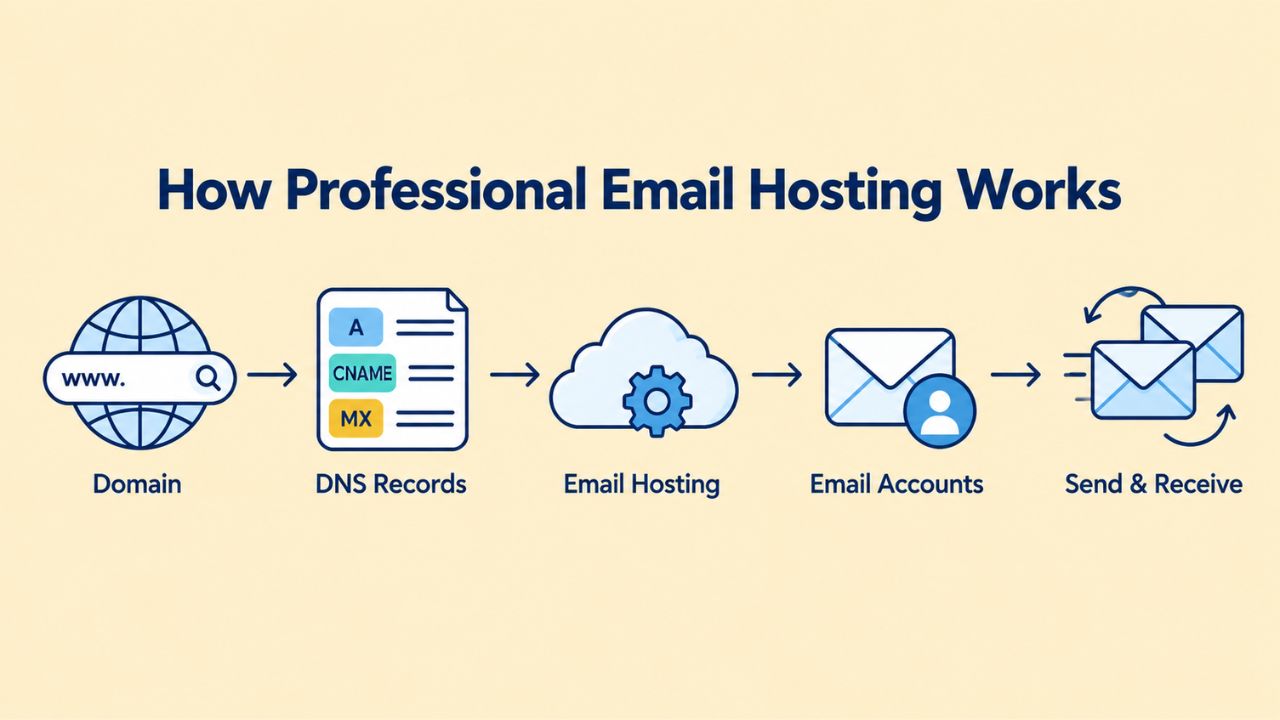
Professional email hosting is a service that stores, sends, and receives your business emails on servers managed by an email provider. Instead of a generic address ending in @gmail.com or @yahoo.com, you create professional addresses using your own domain, like [email protected]. The email provider handles server maintenance, security updates, spam filtering, and email delivery infrastructure, freeing your team to focus on running your business instead of managing email systems.
The DNS and MX Record Foundation
At the heart of email routing is the DNS (Domain Name System), specifically the MX record (Mail Exchange record). When someone sends an email to your domain, their mail server queries DNS to find your MX record, which acts as a signpost directing the message to the correct mail server. The MX record contains the hostname of your email provider’s mail server and a priority value that determines the order in which servers should receive mail if multiple MX records exist for the domain.
This elegant system allows billions of emails to find their destination across the internet without hardcoded server lists or manual routing configurations. If the first mail server is unavailable, a secondary MX record can route the message to a backup server, ensuring email deliverability remains reliable even during outages or maintenance windows. Your email provider supplies the exact MX record values you need to add to your domain’s DNS settings through your domain registrar’s control panel. Once those records propagate, typically within 24 to 48 hours, though often much faster, incoming mail automatically routes to your provider’s servers without any further action needed.
SMTP, IMAP, and Email Access Protocols
Professional email hosting supports three main protocols that handle different aspects of email communication. SMTP (Simple Mail Transfer Protocol) handles outgoing email; your email client uses it to send messages from your account to recipients across the internet. For retrieving and accessing email, IMAP (Internet Message Access Protocol) is the modern standard that most professional businesses use today; it keeps all your messages and folders on the provider’s server, syncing them seamlessly across your webmail interface, smartphone, and desktop clients like Outlook or Apple Mail.
With IMAP, you can read an email on your phone during the morning commute, mark it as read, and see that status reflected instantly when you open your webmail later at the office or check your desktop client. This two-way synchronization keeps your inbox consistent across all devices. POP3 (Post Office Protocol 3) is an older alternative that downloads messages to a single device and removes them from the server, making it less ideal for modern teams or anyone using multiple devices throughout the day. For professional use, IMAP is the clear choice because it ensures your inbox and all its contents stay synchronized no matter where or how you access your email.
Custom-Domain Email and Brand Credibility
A professional email address using your own domain name is one of the simplest yet most powerful ways to establish business legitimacy and credibility. Customers and partners see domain-based email addresses as trustworthy and professional. In contrast, free email addresses from consumer providers raise immediate questions about whether the sender runs a real, established business or operates informally.
Why Your Domain Matters to Customer Perception
The domain in your email address is one of the most visible elements of your professional identity. Every email you send carries your domain name to recipients, creating repeated brand exposure and building domain recognition over time. When customers see consistent use of the same professional domain across email, website, and business materials, it reinforces the impression that you are an established, legitimate business worth doing business with. Free email addresses, by contrast, suggest to many customers that the business hasn’t invested in professional infrastructure or is not serious enough to secure its own domain.
Professional email hosting ensures your domain email address stays active and functioning even if you change web hosts, move your website, or restructure your hosting infrastructure. Email infrastructure and web hosting are separate systems maintained by different providers. This separation means that switching web hosting providers doesn’t mean losing email continuity or having to communicate address changes to all your customers and business contacts. Your business email remains yours to control, migrate, and manage independently of your web presence.
Multi-Mailbox and Alias Management
Professional email hosting allows you to create multiple distinct email addresses on the same domain, like [email protected], [email protected], and [email protected], and manage them all from a single centralized dashboard. Each address can have its own password, storage quota, and access permissions, allowing different team members or business functions to have dedicated email addresses that reflect their role. You can also create aliases, which are forwarding addresses that route mail to a primary inbox without creating a separate account.
This flexibility in mailbox and alias management makes professional email hosting an efficient and scalable solution for growing teams. New team members can be set up with dedicated email addresses in minutes without any infrastructure changes or technical complications. Aliases let you maintain specialized contact addresses for specific purposes, like [email protected] for inquiries, [email protected] for sales, or [email protected] for support, while automatically routing all messages to team members’ primary inboxes. This structure keeps your business organized, professional, and responsive while avoiding the complexity of managing dozens of separate email accounts and passwords.
Email Hosting Features Comparison
| Feature | Free Email | Professional Hosting |
|---|---|---|
| Custom Domain Email | No (@gmail.com, @yahoo.com) | Yes (@yourbusiness.com) |
| Advanced Spam Filtering | Basic | Advanced with admin control |
| Two-Factor Authentication | Limited options | Full support |
| Data Encryption | Basic | SSL/TLS encryption (transit & rest) |
| Shared Mailboxes | No | Yes, for team communication |
| Admin Controls | None | Full account & policy management |
| Sender Reputation | Shared with millions | Isolated to your domain |
| 24/7 Support | Community forums | Dedicated support |
| Email Recovery | Limited | Backup & recovery available |
| Audit Logs | No | Yes, compliance-ready |
Professional Email Hosting vs. Free Email Services
The differences between free email services and professional email hosting go far beyond simple branding and aesthetics. Free email was fundamentally designed for personal use by individual consumers, while professional email hosting is purpose-built for business communication, security requirements, and organizational compliance needs. Understanding these differences helps you decide whether professional email is the right choice for your business.
Feature and Security Differences Between Free and Professional Email
Professional hosting isolates your sender reputation on your own domain, meaning your email delivery depends entirely on your own sending practices and engagement metrics, not on the actions of millions of other users sharing the same infrastructure. Free email also lacks essential business features like shared mailboxes for team inboxes, detailed audit logs for compliance purposes, and granular controls to manage data retention policies. If an employee leaves your organization, you may struggle to recover their email, access shared conversations, or properly transition their communications to other team members.
Professional hosting gives you complete admin control over account creation, password policies, security requirements, and offboarding procedures. You can mandate two-factor authentication for all users, set minimum password complexity requirements, and generate detailed audit logs showing who accessed which emails and when. These capabilities are essential for businesses that need to maintain data security, comply with regulatory requirements like HIPAA or GDPR, or maintain control over sensitive business communications. Free email services cannot provide this level of administrative control and visibility.
Business Communication and Team Collaboration
When your entire team uses professional email addresses with your business domain, it reinforces organizational identity and professionalism. All outgoing communications carry your business domain, creating consistent brand exposure and building customer confidence. Professional hosting also enables team collaboration features like shared mailboxes, where multiple people can access the same email account; shared calendars, where team members can coordinate schedules; and contact sharing, where the right team members can access important business relationships.
Free email services are fundamentally designed for individual use, not team collaboration. You cannot efficiently manage shared inboxes, coordinate schedules across team members, or maintain organized contact lists that multiple people can access and update. Professional email hosting solves these collaboration challenges by providing the infrastructure and features your team needs to work together effectively. As your business grows, the value of these collaboration features becomes increasingly apparent and important to your operational efficiency.
Email Authentication: SPF, DKIM, and DMARC
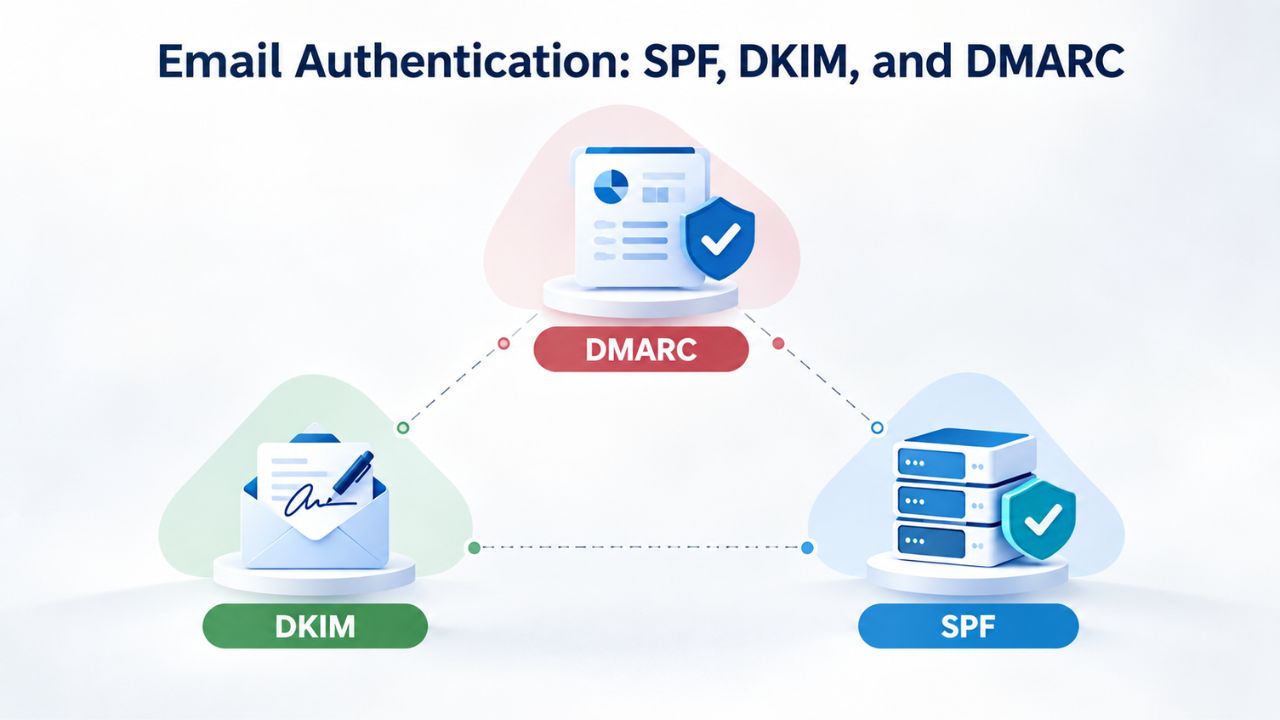
Email authentication protocols are technical safeguards that protect your domain’s reputation and help ensure your messages reach the inbox instead of being filtered to spam folders. Google, Yahoo, Microsoft, and other major mailbox providers increasingly require these authentication methods, making them essential modern standards for any business sending email. Understanding these three protocols, SPF, DKIM, and DMARC, helps you appreciate why professional email hosting takes email security seriously.
SPF (Sender Policy Framework)
SPF, formally defined in IETF RFC 7208, is a DNS TXT record that lists which mail servers and IP addresses are authorized to send email on behalf of your domain. When a receiving server gets an email claiming to be from your domain, it checks your SPF record to see if the sending server’s IP address appears on your authorized list. If the sending server’s IP address matches an authorized IP in your SPF record, the message passes SPF authentication. If the IP address is not on the list, the message may be rejected outright or flagged for additional scrutiny by spam filters.
SPF acts as a foundational security layer; think of it as a bouncer at the door of an exclusive club. It answers the fundamental question: “Is this server authorized to send email as this domain?” SPF is relatively simple to implement but has limitations; it verifies only the technical “envelope sender,” or “MAIL FROM” address, not the visible “From” header that recipients see in their email client. This gap is one reason why additional authentication protocols like DKIM and DMARC were developed to provide more comprehensive protection against spoofing and phishing attacks.
DKIM (DomainKeys Identified Mail) and Alignment
DKIM, formally defined in IETF RFC 6376, adds a cryptographic digital signature to every outgoing email sent from your domain. Your mail server signs each message with a private key unique to your domain; receiving servers look up the corresponding public key in your DNS and verify the signature cryptographically. If an email was altered in transit, the digital signature will fail validation, alerting the receiving server that the message has been tampered with and cannot be trusted.
DKIM protects message integrity and proves the message genuinely came from your domain, even if it is forwarded through multiple servers or passed between different email systems. The original DKIM signature remains valid as long as the message content stays unchanged. This is particularly valuable in business environments where emails are frequently forwarded, replied to, and shared across departments and with external partners. Unlike SPF, which verifies only the technical sender, DKIM signs the message itself, making it much harder for attackers to forge or modify emails while maintaining a valid signature.
DMARC (Domain-Based Message Authentication, Reporting and Conformance)
DMARC, formally defined in IETF RFC 7489, orchestrates SPF and DKIM and adds a critical alignment-checking layer. DMARC verifies that the domain authenticated by either SPF or DKIM matches the domain visible in the message’s “From” header, the address that actual email recipients see when they open your email. This prevents a common attack where someone uses SPF to pass authentication with a domain they control but spoofs a completely different sender in the visible “From” header.
DMARC also tells receiving mail servers exactly how to handle messages that fail authentication checks. You can specify that messages should be delivered normally, moved to quarantine for manual review, or rejected outright. DMARC also generates detailed reports showing you when authentication passes and fails, allowing you to monitor potential spoofing attempts and identify configuration problems. For businesses concerned about brand protection and email security, DMARC provides visibility and control that SPF or DKIM alone cannot.
Email Deliverability and Avoiding Spam Folders
Email deliverability differs from email delivery, and understanding this distinction is crucial for business success. Email delivery means the receiving mail server accepted your message into its system; email deliverability means the message actually landed in the recipient’s inbox instead of their spam folder, and that they can find and read it. The distinction matters enormously; you can have technically perfect email delivery but terrible deliverability if most of your messages end up filtered to spam folders where recipients never see them.
What Affects Inbox Placement
Your sender reputation is the single biggest factor determining whether your emails reach the inbox. Mailbox providers track whether recipients open, click, and engage with your messages, and whether they mark mail as spam, delete it unread, or report it as phishing. Low engagement signals to Gmail, Yahoo, Outlook, and other providers that your messages lack value, and they progressively filter more of your future messages into spam folders. High bounce rates, emails sent to invalid or non-existent addresses, also damage your sender reputation significantly. Every bounce signals that your email list isn’t well maintained or that you’re not validating addresses before sending.
Misconfigured or missing SPF, DKIM, and DMARC records add another major layer of deliverability risk. Messages without proper authentication are more likely to be filtered to spam or rejected entirely, especially by corporate email systems and security-conscious mailbox providers. Content quality matters too; excessive links, spammy subject lines, poor HTML formatting, and misleading headers can trigger spam filters. Hitting spam traps, particularly by sending to addresses harvested from the internet or included in purchased email lists, damages your reputation severely and may result in your domain being blacklisted entirely.
How Professional Email Hosting Helps Deliverability
Professional email hosting providers maintain carefully managed IP addresses with strong reputations built over years of responsible email sending. They implement industry-standard spam filtering, phishing detection, and authentication support. They make it simple to configure SPF, DKIM, and DMARC directly in your control panel, removing technical complexity and guesswork from the authentication setup process. When you use a dedicated email hosting provider instead of free email, your messages don’t compete with millions of other senders on shared infrastructure; instead, they sit behind a well-maintained reputation infrastructure.
Niya Digital’s team has found that businesses migrating from free email to professional hosting often see measurable improvements in email deliverability within the first few weeks. This improvement happens simply because the business is now sending from clean, authenticated, reputation-managed infrastructure. The provider monitors IP reputation in real time, ensures authentication records are properly configured, and provides tools to help you maintain good sender practices. Many providers also include detailed reporting on email performance, deliverability metrics, and authentication status, giving you visibility into how your email is received.
Get Started With Professional Email Hosting
Niya Digital’s Professional Email Hosting, powered by Titan Email, makes it simple to get started with business email that reinforces your professional brand and protects your business communications. Explore the features available, review what email capabilities matter most to your business, and start a trial to see how professional email can strengthen your business presence and customer relationships.
Setting Up Business Email Across Your Devices
One of the biggest advantages of professional email hosting is flexible access. You can check your email in a web browser on any computer, in native apps on your smartphone or tablet, or in desktop programs like Outlook and Apple Mail, while keeping your email, folders, and settings perfectly synchronized across every device.
Webmail Access and Native Apps
Most professional email hosting providers offer webmail, a browser-based interface that works on any device with internet access. You log in with your email address and password through your web browser, and you have full inbox access without installing any software. This approach works on computers at internet cafes, on borrowed devices, on tablets, and anywhere else you have a web browser. Many providers also offer native apps for iOS and Android that provide a more polished mobile experience, with push notifications for new mail, offline message reading, and integration with your device’s contacts and calendar.
Webmail interfaces have become quite sophisticated, offering drag-and-drop folder organization, advanced search capabilities, and productivity features like snooze, flags, and rules. Native mobile apps often include additional features like biometric authentication, offline access to your most important messages, and deep integration with your device’s native features. Combining webmail and native apps lets you access your email how and where you want, without compromising functionality or security.
Desktop Configuration and Synchronization
Setting up IMAP in desktop email clients like Microsoft Outlook, Apple Mail, or Mozilla Thunderbird typically involves entering your email address, password, IMAP server address (provided by your email host), and port number (usually 993 with SSL encryption). Most modern email clients can auto-detect these settings if you enter your domain-based email address, making setup a simple one-time process rather than a technical challenge. Once configured, your inbox, folders, and sent mail sync automatically across all your devices, so actions you take on one device instantly appear on all others.
IMAP keeps all your messages and folder structure on your provider’s server and syncs them in real time. When you read an email on your phone, delete it on your tablet, or move it to a folder on your desktop, those changes instantly propagate to all your devices. This two-way synchronization ensures perfect consistency, so you never have to manage multiple copies of the same message or manually keep your systems in sync. For busy professionals managing email across multiple devices, IMAP is the clear choice, eliminating friction and ensuring seamless access to your complete email history everywhere you go.
Email Migration: Moving to Professional Hosting
Switching email providers can feel daunting; you have years of messages, important conversations, and business contacts that need to transfer safely. The good news is that modern email migration tools make the process straightforward, reliable, and usually painless. Most migrations complete without any downtime, and you can keep your old account open for weeks as a safety net to ensure nothing important falls through the cracks.
The IMAP Migration Process
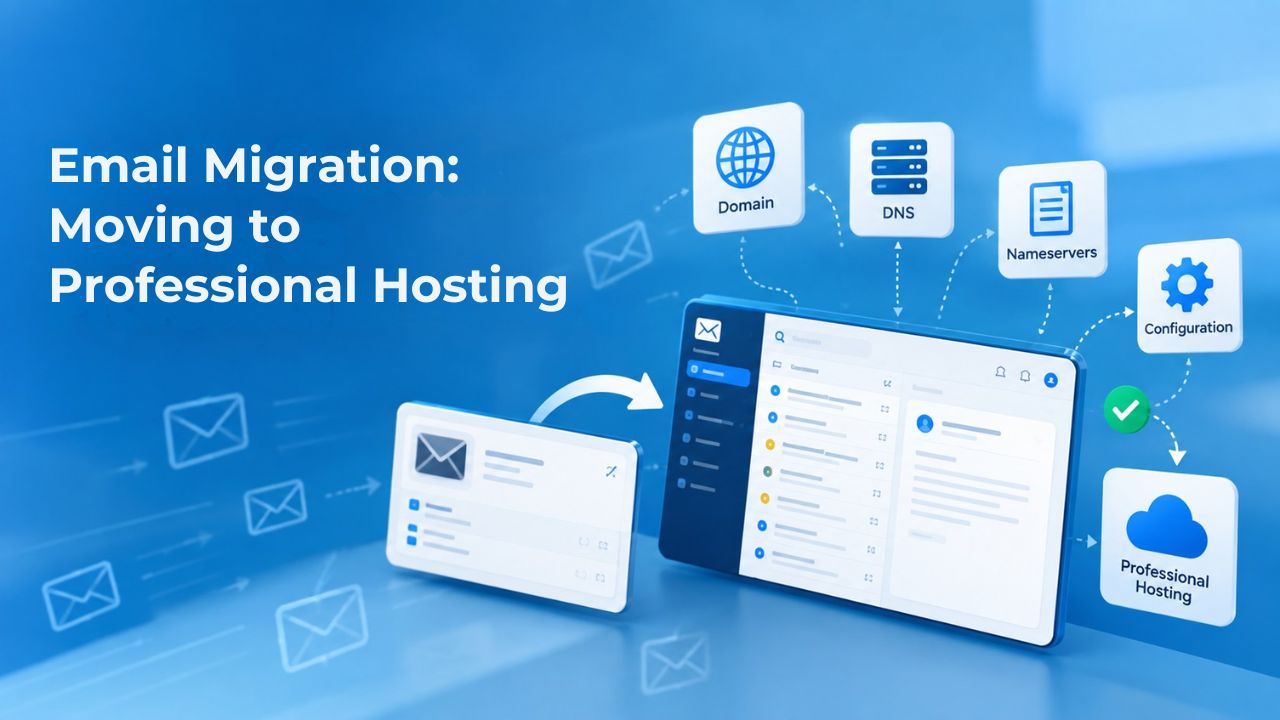
Email migration typically uses IMAP, a protocol that both your old provider and your new provider support. You create a new mailbox on your new provider, then provide your old provider’s login credentials to the new provider’s migration tool. The tool connects to your old mailbox, copies all your email messages and folder structure to the new provider, and then lets you verify that everything transferred correctly. The entire process is automated and requires no technical knowledge on your part.
Contacts, calendars, tasks, and custom forwarding rules don’t transfer via IMAP because they’re stored separately from messages. You’ll set these up on your new provider as a separate step, or you can export them from your old provider and import them to the new one. Most professional email providers provide step-by-step guides and support for these additional transfers. Once the initial email sync completes and you’ve verified that all your messages transferred successfully, you update your domain’s MX records to point to the new provider.
DNS Transition and Continuity Planning
When you update your MX records to point to your new email provider, DNS changes propagate globally within 24 to 48 hours. During this transition period, some mail may still arrive at the old provider while DNS caches update worldwide. That is why professional email providers recommend keeping your old account open for weeks after migration; it ensures you don’t miss messages that arrive at the old system during or immediately after the transition. Many providers set up mail forwarding to automatically send any messages arriving at the old provider to your new mailbox.
Before migrating, export your existing email as a backup so you have a copy if something unexpected happens. Document which email addresses and aliases exist on your current account, noting which team members use which addresses. Update your business website, social media profiles, email signature, and any automated systems to reflect your new email address. Keep detailed records of the migration timeline and where emails arrived, so you can troubleshoot any issues that arise. Most businesses find the migration process straightforward and uneventful, especially when they follow these best practices.
Security Features in Professional Email Hosting
Business email must protect sensitive conversations, customer data, proprietary information, and compliance records. Professional hosting includes multiple layers of security features that free email does not provide. These security capabilities protect both your business information and your customers’ data, helping you maintain trust and meet regulatory obligations.
Encryption and Authentication Security
Professional email providers use SSL/TLS encryption for data in transit; all communication between your device and the email server is encrypted so that network eavesdroppers cannot see your messages. Many providers also encrypt data at rest, meaning messages stored on their servers are encrypted using strong encryption algorithms. Two-factor authentication (2FA) adds a second security layer; even if someone somehow guesses or compromises your password, they cannot access your account without a unique verification code from your phone.
These security features help organizations meet regulatory requirements like GDPR, HIPAA, PCI DSS, and other data-protection standards that mandate encryption and access controls. Free email services don’t provide the encryption, authentication, and administrative controls regulated industries require. If your business handles patient records, financial information, payment card data, or other sensitive information, professional email hosting isn’t optional; it’s required by regulation.
Spam and Malware Filtering
All incoming emails pass through advanced spam filters before reaching your inbox. These filters use machine learning algorithms, domain reputation databases, and behavioral analysis to identify phishing attempts, malware, suspicious attachments, and other threats before they reach your team. Professional email providers maintain sophisticated filtering systems that are constantly updated as new threats emerge. They can also be customized to your organization’s needs; you can whitelist trusted senders, create rules for specific types of mail, and manually block addresses or entire domains.
Professional hosting also includes malware scanning that inspects email attachments for known malware and suspicious code. It can quarantine messages with dangerous attachments, send them to an administrator for review, or block them entirely. Phishing detection systems look for emails that attempt to impersonate your organization or common targets like financial institutions, and flag them for special handling. Combined with user training and awareness, these technical security layers significantly reduce your organization’s susceptibility to email-based attacks.
Choosing an Email Hosting Provider for Your Business
Selecting the right email provider is an important decision that will affect your business for years. Your email infrastructure supports your most important business communications, so choosing wisely ensures you have reliable, secure, feature-rich email that grows with your business. Several key factors should guide your evaluation and selection process.
Essential Decision Factors
Check whether your provider supports the email clients your team uses. If your team uses Microsoft Outlook, Apple Mail, mobile apps, or Thunderbird, confirm the provider supports IMAP and SMTP access to those clients. Support quality is often overlooked but critically important; email downtime disrupts everything in your business, so you need 24/7 support availability in your preferred communication channels. Evaluate the provider’s track record with email deliverability and uptime through their published status pages and customer reviews. Look for providers that offer SPF, DKIM, and DMARC configuration directly in their control panel, as this reduces technical friction and simplifies authentication.
Consider whether the provider offers email migration assistance or tools, and whether they’ll help transfer your messages from your old provider. Understand their data backup and recovery policies, what happens if you accidentally delete important emails, and whether they can recover deleted messages. Check their security certifications and compliance claims; if your business is regulated, confirm the provider meets your industry’s requirements. Read customer reviews on third-party review sites to understand real-world experiences, not just marketing claims.
Questions to Ask Before Committing
Will the provider handle email migration for you, or do you need to migrate manually? Do they offer a free trial period so you can test the platform and make sure it fits your team’s workflow? What is their uptime guarantee, and what happens if email becomes unavailable? Are there any hidden or additional fees beyond the stated plan cost? What support channels are available (email, chat, phone), and what are the typical response times? Can you reach support during your business hours?
What is their data retention and deletion policy? If you need to keep emails for compliance or legal reasons, can the provider accommodate long-term retention? If you later decide to switch providers or want to export all your data, how difficult is that process? Can you export all your mail, contacts, and calendar data in standard formats? Understanding these practical details helps you avoid vendor lock-in and ensures you can move your email if you ever need to.
Why Business Email Hosting Is Worth the Investment
Free email is convenient, but professional hosting is an investment in credibility, security, and business continuity that pays dividends over time. The modest investment in professional email is far outweighed by the value of customer trust, data protection, and email reliability that professional hosting delivers.

Long-Term Benefits and Business Growth
For growing teams, professional email hosting scales elegantly and efficiently. You can add users, create group email addresses, manage permissions, and enforce security policies from a central admin panel. Free email offers none of this flexibility or administrative control. Whether your team has three people or thirty, professional hosting grows with you without infrastructure changes or migrations. By the time most businesses realize they need professional email hosting, they’ve often lost years of email history or struggled through complicated and error-prone migrations from free services.
The competitive advantage of professional email becomes increasingly clear over time. Every email your business sends carries your professional domain, creating repeated brand exposure and reinforcing your organization’s identity. Every customer interaction via email reflects your professionalism and commitment to quality. Together, these factors create a cumulative advantage that helps you win more business, maintain customer loyalty, and project the image of a serious, professional organization. Investing in professional email hosting supports your business’s long-term success and growth.
Email Hosting Decision Matrix
| Decision Factor | Why It Matters | What to Look For |
|---|---|---|
| Mailbox Capacity | Determines how many users your system can support | Ability to add mailboxes easily as you grow |
| Storage Per User | Affects long-term email retention and archive needs | 25–75 GB standard; upgrade options available |
| Device Support | Ensures you can access email anywhere you work | IMAP/SMTP, native apps, webmail all supported |
| Security Features | Protects sensitive business communications | 2FA, encryption, audit logs, admin controls |
| Email Authentication | Improves deliverability and prevents spoofing | SPF, DKIM, DMARC setup in control panel |
| Migration Support | Reduces risk and complexity when switching | Guided migration, tools, or full provider assistance |
| Customer Support | Critical when email issues occur | 24/7 availability, multiple contact channels |
| Compliance Features | Meets regulatory and legal requirements | Audit logs, data retention, backup policies |
Make the Move to Professional Email
Stop by Niya Digital today to explore email hosting plans, learn about available features, and start your free trial. Experience how professional email can transform how your business communicates and how customers perceive your organization.
Frequently Asked Questions
What’s the difference between email hosting and web hosting?
Web hosting stores your website files on a server so visitors can access your site online. Email hosting stores and manages your business emails on separate servers. You can have web hosting without email hosting (or vice versa), but many providers bundle both services together. Email hosting focuses solely on sending, receiving, and storing email, while web hosting makes your website accessible. The two services are technically independent, which means you can change one without affecting the other.
Can I use professional email without a website?
Yes, absolutely. Professional email hosting only requires that you own a domain name. You don’t need a website on that domain to use professional email. Many small business owners and freelancers run email-only domains with no website whatsoever, using professional email purely for business communication and to establish credibility. The domain identifies you in the email system, but it doesn’t require any website content.
How long does email migration take?
Migration timeline depends primarily on the size of your mailbox. Small mailboxes containing fewer than three gigabytes typically migrate within a few hours. Larger mailboxes may take a day or two depending on how many messages and attachments they contain. During migration, your old account remains fully active, so you don’t lose access to any of your email history. After migration completes and your DNS records update, all new incoming mail automatically routes to your new provider.
Do I need to update DNS records?
Yes, updating DNS records is a necessary step when switching email providers. To route incoming email to your new provider’s servers, you update your domain’s MX records in your DNS settings. Your email provider supplies the exact MX record values you need to add. You also publish SPF and DMARC records if your provider supports them, which helps with deliverability and security. Most providers give you step-by-step instructions; you paste the values into your domain registrar’s DNS control panel.
What happens to my email if I change web hosts?
Professional email and web hosting are completely separate services managed by different providers. If you change web hosts, your email is completely unaffected because it runs on your email provider’s servers, not your web host’s infrastructure. This separation is a major advantage of professional email hosting: your email continuity doesn’t depend on your website hosting decisions, and you can modify either service independently.
Can I create multiple email addresses on one domain?
Yes, professional email hosting lets you create as many email addresses as you need on your domain. You can set up [email protected], [email protected], [email protected], each with its own password and storage. Many providers also allow you to create aliases (forwarding addresses) that route multiple addresses to one inbox, so your team can manage group emails like [email protected] without creating a separate account.
Is professional email hosting secure?
Professional email hosting is far more secure than free email services. Providers offer two-factor authentication, data encryption, advanced spam filtering, malware detection, and admin controls to enforce security policies. Free email services don’t provide these security tools. Professional hosting also isolates your sender reputation to your own domain, reducing the risk that spam from other users affects your email deliverability.
What email clients work with professional hosting?
Most professional hosting providers support IMAP and SMTP protocols, which means they work with virtually any modern email client: Microsoft Outlook, Apple Mail, Mozilla Thunderbird, Gmail (when configured as a POP/IMAP account), and mobile clients like Outlook for iOS or the Gmail app. Webmail access works in any web browser on any device. Check with your specific provider to confirm compatibility with your preferred email program.
How much storage do I get?
Most professional email providers offer 25–75 GB of storage per mailbox, depending on the plan you choose. For comparison, free Gmail offers 15 GB shared across email, photos, and Google Drive storage. Professional hosting storage is dedicated exclusively to email, so photos or other files don’t compete for space. If you need more storage, most providers let you upgrade for additional capacity.
Can I access my email on my phone?
Yes, absolutely. Professional hosting typically includes native apps for iOS and Android, or you can add your email to any standard email app like Gmail, Outlook, or Apple Mail. Webmail also works perfectly on mobile browsers. All access methods stay synchronized, so changes you make on your phone instantly appear in webmail and desktop clients.
What if my email provider goes down?
Professional email providers maintain redundancy and backup systems specifically to prevent outages. Many offer 99.9% uptime guarantees, meaning email is available to you 99.9% of the time, roughly equivalent to 45 minutes of downtime per year. If a provider experiences an outage, multiple backup MX records can route mail to secondary servers, and most providers don’t refund for the rare outages that do occur. Choose a provider with a solid track record and transparent status pages.
How do SPF, DKIM, and DMARC help my email?
SPF, DKIM, and DMARC are authentication protocols that verify your email comes from an authorized server, hasn’t been tampered with, and aligns with your domain. Together, they reduce the likelihood of your email landing in spam folders and protect your domain from spoofing and phishing attacks. Most professional email providers set these up automatically or provide clear configuration guides.
Is professional email worth it for solo business owners?
Yes, absolutely. Even solo business owners benefit significantly from professional email. A branded email address builds customer trust, improves email deliverability, and gives your business a polished, professional appearance. The credibility and customer confidence benefits easily justify the investment for any business serious about professional operations.
What happens to my email if I don’t renew my domain?
If your domain expires and you don’t renew it, your email stops working because there’s no active domain to route mail to. Most domain registrars offer a 30–45 day grace period during which you can still renew your domain at normal rates. Renew your domain promptly to keep email flowing. Consider setting up auto-renewal so you never accidentally let a domain expire.
Can I have email on multiple domains?
Yes, if your provider supports multiple domains. Most professional email providers let you manage email for multiple domains in a single account. Each domain can have its own set of email addresses, and you can manage everything from one admin dashboard. This is convenient for businesses with multiple brand domains or those that handle email for client domains.
Glossary
- MX Record (Mail Exchange Record): A DNS entry that tells other mail servers where to deliver email for your domain. It points to your email provider’s mail server using a hostname and priority value, directing email routing across the internet.
- SPF (Sender Policy Framework): A DNS record listing which mail servers and IP addresses are authorized to send email on behalf of your domain. Receiving servers check the SPF record to verify that the sending server is allowed to send as your domain.
- DKIM (DomainKeys Identified Mail): An email authentication method that adds a cryptographic digital signature to outgoing messages, proving they came from your domain and were not altered during transit through the internet.
- DMARC (Domain-Based Message Authentication, Reporting and Conformance): An authentication protocol that ties SPF and DKIM together, checks alignment between authenticated domains and visible sender addresses, and instructs receiving servers how to handle unauthenticated mail.
- IMAP (Internet Message Access Protocol): An email protocol that keeps your messages and folders on the provider’s server, syncing them across all your devices (phone, tablet, desktop, webmail) for consistent access everywhere.
- Webmail: A browser-based email interface that lets you access your inbox and send messages from any device without installing software, typically by logging in at your provider’s website.