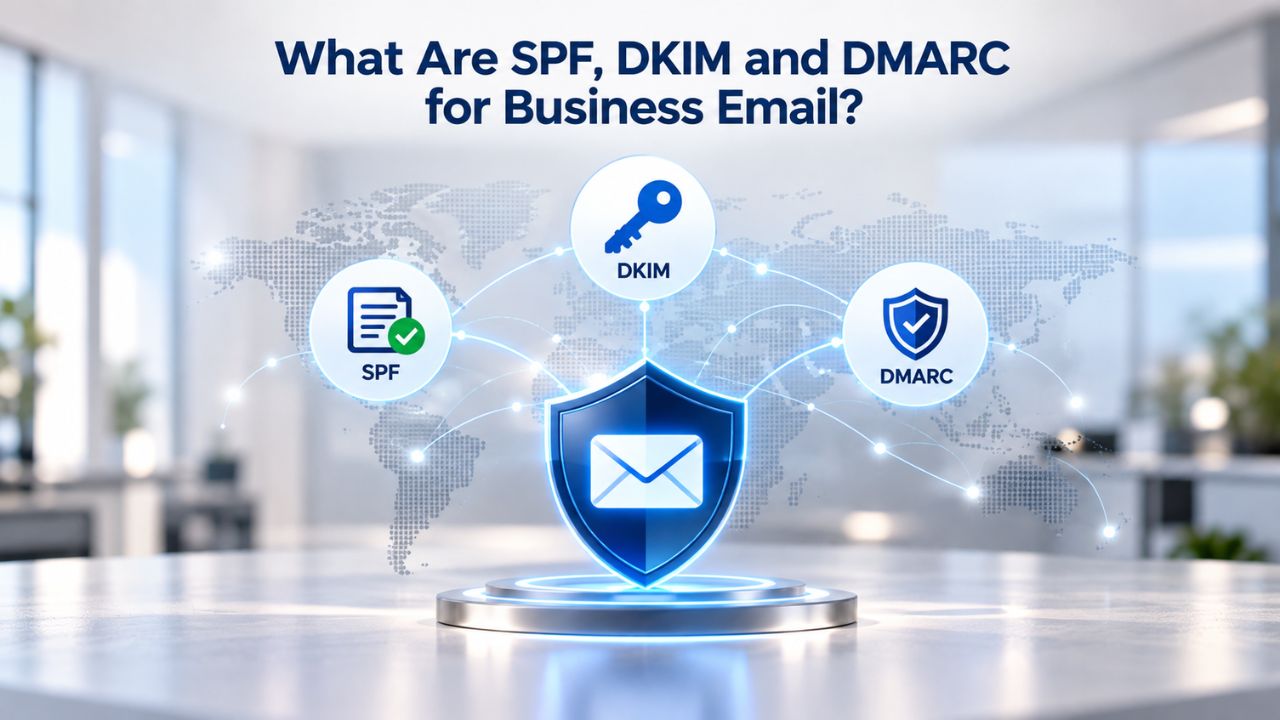
Why Email Authentication Matters for Your Business
Email authentication protocols form the foundation of modern email security and deliverability. Without them, criminals can easily forge emails that appear to come from your domain, a tactic known as spoofing, putting your brand at risk and eroding customer trust. Mailbox providers like Google, Microsoft, and Yahoo use authentication signals as a core part of their inbox-filtering logic. Email that passes authentication checks is far more likely to reach the inbox; email that fails authentication or lacks proper authentication records faces a higher risk of landing in the spam folder. Beyond inbox placement, authentication also protects your domain’s reputation and gives your customers confidence that messages claiming to be from you are genuinely from your business.
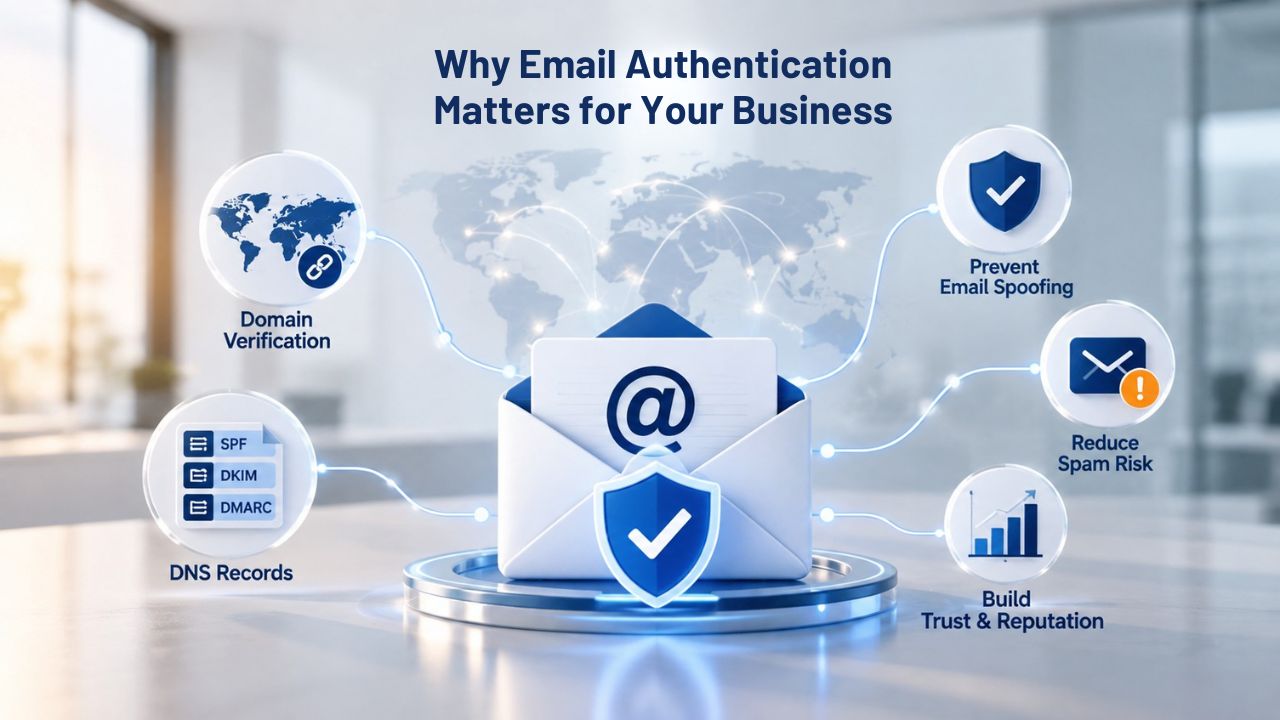
Why Spoofing Without Authentication Is Costly
Every day, millions of phishing emails impersonate legitimate brands by spoofing domain names. Without SPF, DKIM, and DMARC, your domain is vulnerable to the same tactics, and your customers may not be able to tell a fraudulent email from a real one. Niya Digital’s team has found that businesses migrating to dedicated email hosting often discover authentication was missing or incomplete on their old setup, leaving them exposed during the transition.
Without authentication protocols, two outcomes typically follow: legitimate emails face higher spam filtering, and attackers can freely abuse your domain. Both outcomes damage customer relationships and brand credibility. Once authentication is in place, the risk of domain spoofing drops sharply, and your legitimate messages are more likely to reach recipients’ inboxes on the first try. This is why implementing SPF, DKIM, and DMARC is no longer optional for businesses that depend on email for customer communication.
Authentication as a Baseline, Not a Magic Fix
It’s critical to understand that authentication protocols verify the sender and message but don’t directly control spam filtering or reputation scoring. Sender reputation, email content quality, engagement history, and list-management practices matter just as much. A sender with poor engagement or low-quality content can still land in spam despite passing SPF, DKIM, and DMARC checks. Conversely, a sender with high engagement may receive some forgiveness for incomplete authentication, though best practice is to complete it regardless.
Think of authentication as the foundation of a strong email infrastructure. Without it, you’re building on sand. With it in place, you have a solid base from which to manage sender reputation, monitor deliverability, and protect your brand. Proper authentication, quality content, engaged recipients, and good list management practices create the best conditions for inbox placement and customer trust.
How SPF (Sender Policy Framework) Works
SPF lets domain owners publish a list of authorized mail servers in their domain’s DNS records. When a recipient’s mail server receives an email claiming to be from your domain, it queries your SPF record to verify that the sending server’s IP address is on the authorized list. Think of SPF as a whitelist for mail servers. You tell the world, “Here are the IP addresses allowed to send email on behalf of mydomain.com.” A receiving mail server checks that list and decides whether to trust the message based on whether the sending IP matches. If the IP is not authorized, the email fails SPF and is flagged as potentially spoofed.
Setting Up SPF
Setting up SPF is straightforward in most hosted email platforms. You log into your domain’s DNS control panel, add a TXT record, and paste an SPF policy provided by your email-hosting provider. The policy typically looks like a string of authorized mail server identifiers combined with modifiers that tell receiving servers what to do if an email fails SPF checks. For businesses using Titan Email through Niya Digital, the platform generates the correct SPF record during setup, eliminating the guesswork.
Most SPF records are live within minutes of deployment, though DNS propagation can occasionally take up to 24 hours globally. Once live, SPF immediately protects your domain from spoofing attempts and supports better inbox placement. The beauty of this approach is that you don’t need to understand the technical syntax; the hosting platform handles it. You copy and paste the provided record, and authentication begins working automatically.
SPF Limitations to Know
SPF has one significant limitation: it authenticates only by IP address, not message content. An attacker who has compromised an authorized mail server could still send spoofed emails that pass SPF checks. This is why DKIM and DMARC exist: to add verification on top of SPF’s basic IP-level authentication.
Additionally, SPF can become complex if your business uses multiple email services or third-party senders such as email-marketing platforms, payment processors, or CRM systems sending transactional emails. Each service may require a separate entry in your SPF record, expressed as an “include” statement. You handle this as a string of includes, and the complexity is usually manageable, but misconfigured SPF records often cause deliverability problems. The key is ensuring every authorized sender is accounted for and properly included.
How DKIM (DomainKeys Identified Mail) Works
DKIM uses public-key cryptography to digitally sign outgoing email messages, allowing recipients to cryptographically verify that the domain owner genuinely sent a message and that its contents have not been altered in transit. When you enable DKIM, your mail server automatically signs every outgoing email with a private cryptographic key. The recipient’s mail server retrieves your domain’s public key from DNS and verifies the signature. If the signature is valid, the email passes DKIM. If the email was modified after sending or the signature is invalid, DKIM fails. This protects both message integrity and sender authenticity in a way that SPF alone cannot.
Implementing DKIM
Like SPF, DKIM setup involves DNS records, but DKIM is slightly more complex because it requires a public/private key pair. Hosted email platforms like Titan Email generate this key pair automatically and provide the public key as a DNS TXT record. You add this record to your domain’s DNS, and DKIM is active. Hosting providers typically manage key rotation and lifecycle, so businesses don’t need to handle cryptography themselves or worry about key expiration.
Once the public key is in DNS, receiving mail servers can verify every message your mail server signs. DKIM deployment typically takes 10–15 minutes of setup time and is fully automated on most hosted platforms. After deployment, DKIM works silently in the background, cryptographically protecting every message your team sends. No ongoing maintenance is required; the platform handles key management, rotation, and distribution.
DKIM’s Strength Over SPF
DKIM has a major advantage over SPF: it verifies the message itself, not just the sending server’s IP. Even if someone compromises one of your authorized mail servers, they cannot forge DKIM signatures unless they also steal the private key, which the hosting provider stores securely. DKIM also survives email forwarding; if a message is forwarded to another mailbox, the original DKIM signature remains valid. In contrast, SPF can fail on forwarded mail since the forwarding server’s IP may not be authorized.
For this reason, mailbox providers weight DKIM more heavily than SPF in their reputation algorithms. According to M3AAWG Email Authentication Guidance, DKIM is increasingly recognized as a core requirement for professional email authentication. Email-marketing best practices and compliance standards now frequently require DKIM as a prerequisite for reliable delivery and authentication assurance.
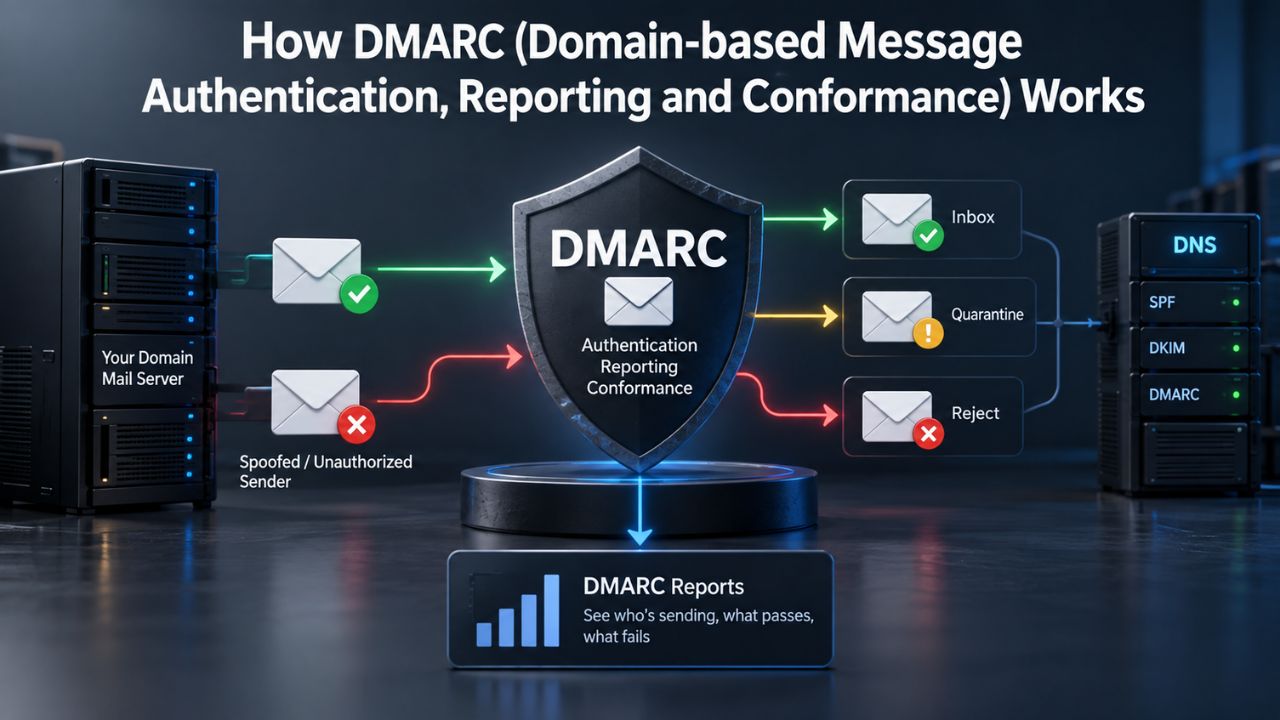
How DMARC (Domain-based Message Authentication, Reporting and Conformance) Works
DMARC sits atop SPF and DKIM, providing two critical functions: a policy mechanism and a reporting framework. With DMARC, you publish a policy that tells receiving mail servers what to do if an email fails SPF or DKIM checks, and you receive reports about authentication failures so you can monitor and improve your email infrastructure. DMARC records are published in DNS as TXT records and include three key elements: an alignment requirement specifying whether the domain in the email’s “From” address must match the authenticated domain, a policy indicating what to do with failing emails, and reporting email addresses where aggregated and forensic reports are sent.
| Feature/Factor | SPF | DKIM | DMARC |
|---|---|---|---|
| What It Authenticates | Sending server IP address | Message integrity and sender identity | Authentication policy and reporting |
| Setup Complexity | Simple (1 DNS record) | Moderate (key pair + DNS record) | Moderate (policy + reporting) |
| DNS Records Required | 1 TXT record | 1–2 records (DKIM + public key) | 1 TXT record |
| Key Security Strength | IP-level validation | Cryptographic signature verification | Policy enforcement + visibility |
| Best For | Preventing domain spoofing at the IP level | Ensuring message integrity and surviving forwarding | Full authentication framework with reporting |
| Limitations | Only checks IP; vulnerable if server is compromised | More complex than SPF; requires key management | Depends on SPF or DKIM; not a standalone solution |
| Alignment Requirement | IP must match sender authorization | Message signature must validate with DNS key | “From” domain must match SPF/DKIM authenticated domain |
DMARC Policy Options and Enforcement
None Policy means no enforcement. Failing emails are delivered normally, but you receive reports monitoring authentication issues. This is the starting point for most businesses and allows you to observe authentication performance without affecting email delivery.
Quarantine Policy sends failing emails to the spam or junk folder, enforcing authentication while still allowing legitimate messages through if there’s a misconfiguration.
Reject Policy bounces failing emails outright, which is the most secure option but should only be used after you’ve verified SPF and DKIM are working correctly; a reject policy with misconfigured authentication can cause email loss.
Most businesses begin with “none,” move to “quarantine” once they’ve verified SPF and DKIM alignment, and eventually adopt “reject” for maximum security. Titan Email’s setup guidance supports this graduated approach, helping you move through these policy levels safely. This staged deployment reduces the risk of accidentally blocking legitimate email while still progressively strengthening your authentication posture. The platform also helps you understand when you’re ready for each escalation based on your authentication performance reports.
DMARC Reporting and Forensic Insights
DMARC’s reporting layer is one of its most valuable features for small-business owners. You receive aggregate reports, usually daily, summarizing authentication results across all email sent from your domain. These reports show which senders pass or fail authentication, whether third-party services are misconfigured, and where spoofing attempts come from. For example, if your email-marketing platform isn’t configured with proper SPF or DKIM, aggregate reports will show you that and the volume of affected emails so you can prioritize fixes.
Forensic reports provide more detail on individual failing messages and are especially useful for investigating phishing attempts or unauthorized senders. Some organizations receive forensic reports highlighting hundreds of spoofing attempts per day against their domain, data that would be invisible without DMARC. This visibility is transformative: it turns vague concerns about “email security” into concrete, actionable intelligence you can use to protect your brand and your customers.
How Email Hosting Platforms Simplify Setup
Self-managed mail servers require technical expertise to configure SPF, DKIM, and DMARC correctly. Mail administrators must generate key pairs, publish DNS records, monitor logs, and troubleshoot misconfigurations. For small businesses, this overhead is often prohibitive, requiring hiring specialized IT staff or expensive consultants. Hosted email platforms like Titan Email abstract this complexity. During onboarding, the platform generates all necessary DNS records (SPF, DKIM, DMARC) and displays them in a guided setup wizard. You copy each record into your domain’s DNS control panel, typically a simple copy-and-paste operation that takes minutes, not hours or days.
One Platform, Unified Configuration
Because Titan Email manages the mail servers, it also manages the authentication infrastructure. The platform knows its own mail-server IPs and generates SPF records that are always correct. The platform generates and rotates DKIM keys and automatically publishes the public key to DNS. You can set DMARC policies in the platform’s webmail console without manual DNS editing. This centralized management means you don’t have to juggle multiple systems or worry about coordination failures between different components.
Niya Digital’s support team assists with DNS configuration and troubleshooting, especially during migrations from older systems or multiple email providers. For businesses switching from free email or self-managed systems, this hands-on support significantly reduces the risk of authentication gaps and deployment mistakes. The combination of platform automation plus human expertise creates a safety net that prevents common errors and accelerates your path to full authentication coverage.
Multi-Service Email Complexity Simplified
If your business uses multiple email services, for example, Titan Email for main team inboxes, a CRM system that sends transactional emails, and a third-party email-marketing platform, authentication becomes more complex. Each service may require its own SPF include statement. A platform like Titan Email handles this by providing clear include statements that you add to a single SPF record, keeping the configuration manageable even with multiple senders. The platform also documents which services to include and in what order, eliminating guesswork.
This centralized approach to multi-service authentication is one of the biggest advantages of using a dedicated business email platform. Instead of managing authentication across a fragmented ecosystem of tools, you manage it from one dashboard, with one SPF record, one DKIM setup, and one DMARC policy. This reduces operational complexity, minimizes misconfiguration risk, and makes it easier to audit which services can send on your domain’s behalf.
Ready to Secure Your Email Authentication?
Niya Digital’s Professional Email Hosting, powered by Titan Email, includes guided SPF, DKIM, and DMARC setup so you can implement authentication without technical headaches. Our support team is available 24/7 to help you configure, test, and monitor your authentication as you grow. Whether you’re starting from scratch or migrating from another provider, we’ll guide you through every step and ensure your email is properly authenticated from day one.
Common SPF, DKIM, and DMARC Mistakes (and How to Avoid Them)
Authentication is straightforward in concept, but deployment mistakes are common and can have real consequences for email deliverability and security. Understanding the most frequent pitfalls helps you avoid them or spot them quickly if they occur. The good news is that most mistakes are easy to fix once you identify them, and DMARC reporting makes identification straightforward. By learning from the experiences of thousands of businesses that have deployed these protocols, you can sidestep the usual traps.
Common SPF, DKIM, and DMARC Mistakes
Many businesses add their primary mail server to SPF but forget about secondary services, email-marketing platforms, payment processors, CRM systems, or scheduled-report services. Each unauthorized sender causes SPF to fail, and receiving mail servers may treat these failures as a signal of low sender reputation. The solution is to audit all services that send email on your domain’s behalf. For each, get the SPF include string from the vendor and add it to your SPF record. Test using SPF checkers (freely available online) to confirm the record is valid and covers all authorized senders.
Another common mistake is deploying a DMARC “reject” policy immediately, assuming all authentication is correct. If SPF or DKIM is misconfigured, legitimate email bounces without warning, and customers may not receive critical messages- a business-critical failure. Start with a DMARC “none” policy for 1–2 weeks while you monitor aggregate reports. Verify that SPF and DKIM are passing for all legitimate senders. Move to “quarantine” or “reject” only once reports show consistent passing rates, ideally 100% for known senders. This staged approach prevents outages while you strengthen authentication.
Common Authentication Mistakes and Solutions
| Mistake | Root Cause | Solution | Deliverability Impact |
|---|---|---|---|
| Incomplete SPF Records | Forgetting to authorize all mail services | Audit all services sending email; add their SPF includes | Authorized senders fail SPF; spam folder risk increases |
| Strict DMARC Policy Too Soon | Deploying “reject” before testing | Start with “none,” move to “quarantine,” then “reject” | Can cause legitimate email to bounce if misconfigured |
| Third-Party Service Misconfiguration | Services not signed with DKIM or included in SPF | Reconfigure services to relay or add their SPF includes | Transactional emails fail DKIM or SPF; deliverability drops |
| Subdomain Alignment Failure | DMARC policy only on primary domain | Configure DMARC on all subdomains used for sending | Subdomain email fails DMARC even if SPF/DKIM pass |
| DNS Propagation Not Verified | Records added to DNS but not yet live globally | Wait 5–15 minutes; use DNS checkers to confirm propagation | Authentication fails until records fully propagate |
| Forgetting to Monitor Reports | One-time setup without ongoing review | Schedule weekly DMARC report reviews | Miss misconfigurations; sender reputation degrades silently |
| Over-Complex SPF Records | Too many includes or modifiers | Keep SPF records as simple as possible; consolidate includes | Overly complex records become unmanageable and error-prone |
Other Configuration Gaps to Watch
Email forwarding, auto-responders, and third-party services sending on your behalf can fail DKIM checks if they alter the message or use different authentication. This is especially common with email-marketing campaigns or transactional messages from integrations. The solution is to ensure third-party services send through your mail server via SMTP relay through Titan Email rather than resending from their own servers. If relaying isn’t possible, align their SPF includes and confirm DKIM is passing in DMARC reports.
DMARC alignment requires the domain in the email’s visible “From” address to match the authenticated domain per SPF or DKIM. If your marketing platform sends from a subdomain like newsletter@newsletter.yourdomain.com but your DMARC policy is only on yourdomain.com, alignment fails, and the email fails DMARC even if SPF and DKIM pass. The solution is to configure DMARC policies on all subdomains used for sending, or ensure third-party senders use the primary domain in the From address. Titan Email’s setup can clarify subdomain DMARC policies during onboarding, and your Niya Digital support contact can help verify the right configuration for your business model.
Monitoring and Acting on DMARC Reports
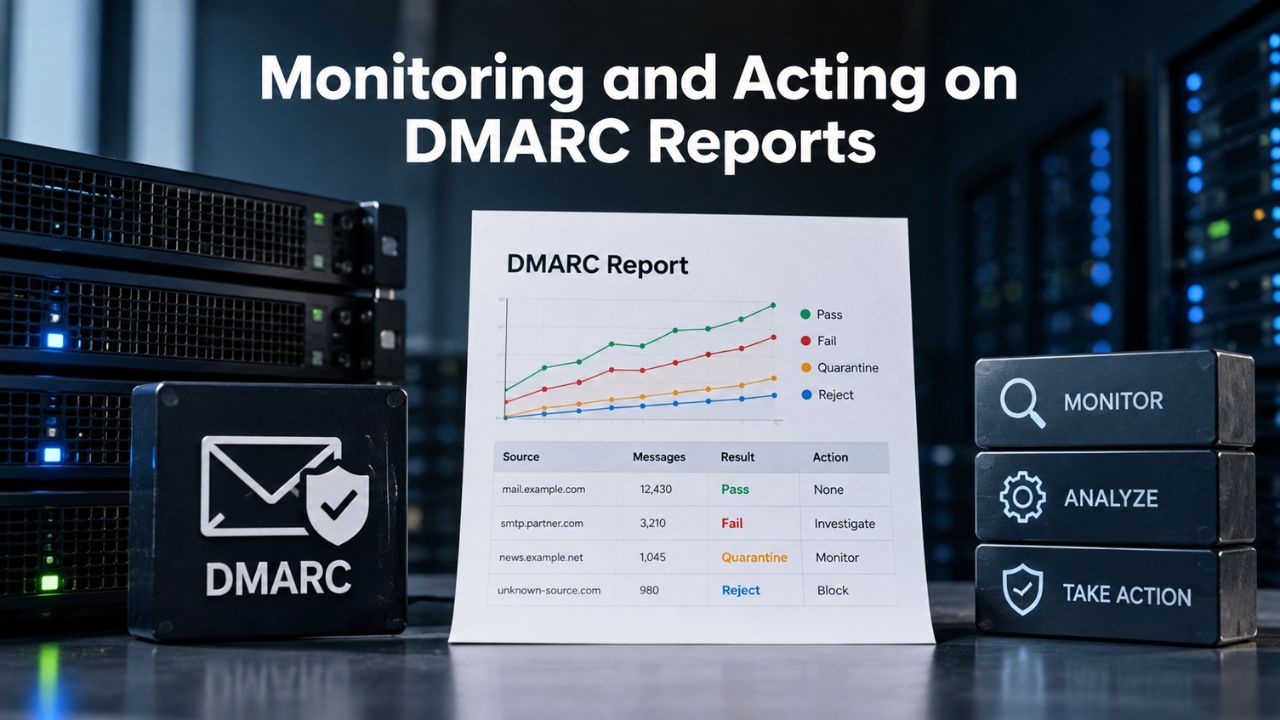
Once you deploy DMARC, you receive daily or weekly aggregate reports summarizing authentication results. These reports are dense XML files, but they answer critical questions: What percentage of your email passed SPF or DKIM? What unauthorized senders are trying to use your domain? Are there gaps in your third-party sender configuration? Regularly reviewing these reports turns DMARC from a passive policy into an active tool for improving your email infrastructure.
Reading Aggregate Reports
Aggregate reports show, for each email source (sender IP), how many messages passed or failed SPF, DKIM, and DMARC checks. If you see a known service like your CRM showing 100% DKIM pass but SPF fail, that signals you should check the service’s SPF include in your record. You might need to add the service’s mail server to your SPF policy, or reconfigure the service to relay through your primary mail server. More importantly, if you see unknown IPs with low pass rates, that could indicate a phishing attempt or compromised credentials. You can then block that IP or source in your email provider’s firewall or contact Niya Digital’s support team for assistance.
Most organizations find that the first week of DMARC reports reveals multiple surprises, services they forgot about, misconfigurations they didn’t know existed, or spoofing attempts they never suspected. This information is gold for security and deliverability. By acting on these early reports, you catch problems before they harm your sender reputation or customer trust. Your hosting platform often provides aggregate reports in a human-readable summary; if you get XML files, services like Google Postmaster Tools and Microsoft SNDS can help parse and visualize the data.
Acting on Insights and Building a Monitoring Habit
DMARC reports are most valuable when you check them regularly and act on what they reveal. Services like Niya Digital or Titan Email can help interpret reports and recommend changes. For example, if a report shows that a third-party email-marketing service is failing DKIM, you might contact the vendor to verify the service is configured to sign mail with DKIM, update your SPF record if the vendor recently changed mail servers, or reconfigure the service to relay through your mail server instead of resending.
Over time, reviewing reports also builds your intuition for what “normal” looks like for your business, making it easier to spot anomalies that could indicate compromise or misconfiguration. Many organizations set a recurring weekly reminder to check DMARC reports, treating it as part of routine email infrastructure maintenance. This habit, developed over a few weeks, pays dividends in email security and deliverability. Niya Digital’s support team can also review reports with you during onboarding and at regular intervals, helping you interpret findings and act on recommendations.
Authentication Alone Won’t Fix All Deliverability Issues
It’s tempting to believe that SPF, DKIM, and DMARC solve all inbox-placement problems. In reality, these protocols are one piece of a larger deliverability puzzle. Mailbox providers also evaluate sender reputation (based on engagement, complaints, and prior deliverability history), email content quality (subject lines, links, images, spam-trigger words), and recipient list quality (list churn, bounce rates, unsubscribe handling). Email that passes authentication but has poor engagement history can still land in spam.
Authentication’s Place in Sender Reputation
Authentication doesn’t directly improve your reputation; it establishes that you are who you claim to be. From there, your reputation depends on what you actually do: sending relevant content to engaged recipients, respecting unsubscribe requests, handling bounces promptly, and monitoring complaint rates. A small business sending well-written newsletters to subscribers who actually want them will have strong deliverability even without perfect authentication, though authentication is still essential. Conversely, a business sending to inactive addresses, ignoring bounces, or ignoring complaints will struggle with spam folders even with perfect SPF, DKIM, and DMARC.
Authentication is the foundation, not the entire house. Once that foundation is solid, the rest of your email practices- content quality, list management, and engagement monitoring- determine whether your email thrives or languishes in spam folders. Many businesses that implement authentication see immediate deliverability improvements, but those gains come from a clean sender reputation combined with proper authentication, not authentication alone.
Beyond Authentication: Sender Best Practices
To maximize deliverability alongside authentication, follow these fundamentals. First, engage your audience by sending relevant content to people who want it. Monitor open and click rates and remove unengaged subscribers periodically to keep your list healthy. Second, respect feedback by honoring unsubscribe requests immediately and monitoring complaint rates, investigating spikes to understand what went wrong. Third, maintain list hygiene by removing hard bounces and watching for patterns; never re-add bounced addresses without re-engagement.
Fourth, monitor your reputation using tools like Google Postmaster Tools and Microsoft SNDS, which provide reputation data and insights. These tools will show you your sender reputation score, any issues mailbox providers have flagged, and trends in your authentication and deliverability metrics. Finally, use professional email hosting like Titan Email, offered through Niya Digital, which monitors sender reputation on your behalf and provides tools to manage bounces, complaints, and authentication. Proper authentication, quality content, engaged lists, and platform-based reputation monitoring create the conditions for reliable, high-volume email delivery.
Email Authentication and Changing Providers
One of the trickiest parts of email authentication is migrating between email providers. During a migration, you add a new mail server to your authorized senders list via SPF and update DKIM public keys in DNS. If done incorrectly, email delivery can drop or spoofing protection can be lost. Careful planning minimizes risk and helps ensure customers keep receiving email during the switch.
Planning for a Clean Migration
The safest migration approach is to update your SPF record to include both your old and new mail servers for 1–2 weeks before cutting over completely. This “coexistence” window lets in-flight email from the old system continue to authenticate while you test the new system. DKIM is trickier because you can only have one active DKIM key per selector; most providers use a new selector during migration (for example, titanmail vs. oldprovider), so both keys can exist in DNS simultaneously. This approach ensures email signed by either system authenticates correctly during the transition.
Niya Digital’s migration support team guides you through this process, helping you plan the DNS changes, test authentication before the cutover, and monitor reports immediately after. This reduces the risk of post-migration deliverability problems that could harm customer relationships. The team will typically provide a step-by-step migration checklist, specific SPF and DKIM records to deploy at each stage, and timing guidance to minimize disruption. Expert support during migration turns what could be a risky, error-prone process into a smooth, predictable transition.
DMARC During Migration
If you’re migrating between providers, your DMARC policy is especially important during the transition. Keep your policy at “none” (monitoring only) so that any authentication misconfigurations don’t bounce email. Once both old and new systems are fully aligned with SPF and DKIM, you can move to “quarantine” or “reject” with confidence. This means your DMARC policy will likely sit at “none” for a few weeks during and after the migration, a small trade-off for ensuring email delivery continuity.
The monitoring data you receive during a “none” policy is invaluable for verifying that your new system is properly authenticated before you enforce policy. Once the reports show that all email from your new mail servers passes SPF and DKIM checks, you can confidently move to “quarantine” or “reject.” Your Niya Digital support team will help you interpret these reports and determine when you’re ready for the next policy level, reducing the risk of mistakes and ensuring your authentication is fully operational after the migration.
Best Practices for Ongoing Authentication Management
Implementing SPF, DKIM, and DMARC isn’t a one-time setup task; it’s the start of long-term email infrastructure management. Your authentication records will need updates as your business grows, as you add new services, and as vendors update their mail server infrastructure. Staying on top of authentication maintenance helps keep your email secure and deliverable for years to come.
Regular Audits and Updates
As your business grows, you’ll likely add new services that send email on your domain’s behalf: a CRM for customer communications, an email-marketing platform for campaigns, a help-desk system for support tickets, or an ecommerce platform for order confirmations. Each new service requires an SPF include and, ideally, DKIM configuration. Make it a quarterly habit to audit all services sending email on your behalf and verify they’re included in your SPF record. If you find a service that’s not included, add it immediately; it’s currently failing SPF checks and harming your reputation.
Review your DMARC reports monthly even after deployment is complete. Trends in your reports, rising failure rates, and new unauthorized senders indicate infrastructure changes that need attention. When vendors change their mail server infrastructure (which happens periodically), your SPF and DKIM records may need updates to stay current. Niya Digital’s support team can help you stay on top of these updates by checking your authentication health during regular reviews and alerting you to needed changes before they impact deliverability.
Building a Culture of Email Security
Within your organization, foster awareness that email authentication is a shared responsibility. Make sure team members who configure email clients, set up forwarding, or integrate third-party services understand that these actions might affect authentication. For example, setting up email forwarding to a personal account can break DKIM signatures; integrating a new tool without proper configuration can cause SPF failures. A quick email to your team explaining the basics of SPF, DKIM, and DMARC builds understanding and prevents well-intentioned actions from accidentally breaking your authentication.
Document your authentication setup, including which services are included in your SPF record, where your DKIM keys are stored, and who to contact if authentication issues arise. This documentation becomes invaluable if staff turnover occurs or you need to troubleshoot a problem months after initial setup. Niya Digital can provide documentation templates and best-practice guides to help you maintain this institutional knowledge over time, ensuring that authentication management doesn’t depend on any single person.
Ready to Optimize Your Email Authentication and Deliverability?
Niya Digital’s Professional Email Hosting, powered by Titan Email, goes beyond authentication to provide comprehensive email infrastructure support. From setup and migration to ongoing monitoring and optimization, our team ensures your email is secure, authenticated, and deliverable. Start implementing proper email authentication today and give your customers confidence that your messages are genuine and your brand is protected.
Frequently Asked Questions
What happens if I don’t set up SPF, DKIM, and DMARC?
Without authentication protocols, mailbox providers can’t verify you’re the legitimate sender. Your emails are more likely to land in spam folders, and attackers can freely spoof your domain to send phishing emails impersonating your business. Email authentication is now a baseline expectation for professional email; major mailbox providers penalize unauthenticated mail and are increasingly requiring authentication for reliable delivery.
Can I use DMARC without SPF and DKIM?
DMARC requires at least SPF or DKIM to work effectively. DMARC is a policy and reporting layer that sits on top of these protocols; without them, DMARC cannot authenticate anything. Best practice is to deploy SPF first (simplest), then DKIM (cryptographic verification), then DMARC policy on top of both (enforcement plus reporting). Deploying all three together provides the strongest authentication framework.
How long does it take to set up SPF, DKIM, and DMARC?
On a hosted platform like Titan Email, setup typically takes 15–30 minutes. This includes generating the DNS records, copying them into your domain’s DNS control panel, and waiting for DNS propagation, which can take a few minutes to 24 hours depending on your domain registrar. Most records are live within an hour.
Will SPF/DKIM/DMARC guarantee my emails reach the inbox?
No. Authentication helps improve inbox placement by verifying you’re the legitimate sender and reducing spam-folder risk, but sender reputation, engagement history, content quality, and list management also matter significantly. Think of authentication as a necessary foundation, not a delivery guarantee.
What if I use multiple email services, do I need separate authentication for each?
If multiple services send on behalf of your domain, each needs to be authorized in your SPF record via an “include” statement. DKIM can support multiple services by using different selectors (keys), though configuration complexity increases. Hosting all email through one platform like Titan Email simplifies this by centralizing all senders under one set of authentication records.
Can I monitor which senders pass or fail authentication?
Yes, through DMARC aggregate and forensic reports. These reports show, for each source, what percentage of email passed SPF, DKIM, and DMARC, which senders are unauthorized, and which messages failed. Reviewing these reports regularly helps you spot misconfigurations, unauthorized senders, and phishing attempts.
What’s the difference between DMARC “none,” “quarantine,” and “reject”?
“None” means no enforcement; failing emails are delivered, but you receive reports. “Quarantine” sends failing emails to the spam folder. “Reject” bounces failing emails. Most businesses start with “none,” move to “quarantine” after verifying SPF and DKIM, and eventually use “reject” for maximum security.
Do I need to change my SPF/DKIM/DMARC if I switch domain registrars?
No. These records live in your domain’s DNS, which your registrar controls. If you switch registrars, you update your DNS records at the new registrar, but the SPF/DKIM/DMARC policies themselves don’t change. Before switching, make sure your new registrar lets you edit DNS.
What happens to my email authentication during a host or email provider migration?
During migration, temporarily update your SPF to include both old and new mail servers, ensuring email continues to authenticate from both systems. DKIM requires updating the public key in DNS; most providers handle this with a new selector so both keys can coexist. Keep the DMARC policy set to “none” during migration to avoid bouncing email. Niya Digital’s support team handles this process.
How often should I review my DMARC reports?
Check reports at least weekly, especially during the first month after deployment. Regular review helps you spot misconfigurations early and act on them before they harm deliverability. Once your system is stable, monthly review is usually sufficient unless you’re adding new senders or making significant changes.
Is authentication the same for free email addresses (@gmail.com, @yahoo.com) and custom domains?
No. Google or Yahoo already authenticates free email services, and their reputation is pre-established. Custom-domain email requires you to set up authentication yourself because you own the domain and are responsible for its reputation. This is one key reason businesses invest in custom-domain email; it gives them full control and authentication capability.
What’s the easiest way to set up SPF/DKIM/DMARC if I’m not technical?
Use a hosted email platform like Titan Email, offered through Niya Digital. These platforms provide guided setup wizards and pre-generated DNS records. Niya Digital’s support team can walk you through each step over email, chat, or phone, turning a potentially complex process into a straightforward one.
Can I test my SPF/DKIM/DMARC records before going live?
Yes. Use free online SPF and DKIM checkers to validate your records before adding them to DNS, and after adding them, wait a few minutes for propagation and test again. Most tools will confirm the record is valid and correctly formatted. DMARC reports also serve as a testing tool once deployed; start with a “none” policy and monitor reports for 1–2 weeks before enforcing.
Why would an email pass SPF but fail DKIM, or vice versa?
SPF checks the sending server’s IP address; DKIM checks the message signature. An email can pass SPF if it comes from an authorized server but fail DKIM if the message was modified in transit or signed with a key your DNS doesn’t have. Conversely, it can pass DKIM but fail SPF if the sending server’s IP isn’t authorized. That is why layering both matters; each catches different risks.
Do I need to worry about SPF/DKIM/DMARC if I’m using Microsoft 365 or Google Workspace?
Yes. Even major providers like Microsoft 365 require you to set up SPF, DKIM, and DMARC for your custom domain to achieve optimal deliverability and security. Both providers provide setup guides and support. However, if you’re using a third-party platform like Titan Email, which is designed for custom-domain hosting, the platform handles much of the configuration, simplifying the process.
Glossary
- DKIM (DomainKeys Identified Mail): A protocol that digitally signs outgoing email using cryptographic keys, allowing recipients to verify the message came from the domain owner and hasn’t been altered in transit.
- DMARC (Domain-based Message Authentication, Reporting and Conformance): A policy framework that sits on top of SPF and DKIM, allowing domain owners to specify how failing email should be handled and to receive reports on authentication results.
- DNS (Domain Name System): The global system that translates domain names into IP addresses and stores configuration records, including SPF, DKIM, and DMARC records, that control how a domain behaves online.
- Mail Server: A computer system that accepts, processes, and delivers email. For hosted email like Titan Email, the hosting provider operates the mail server rather than the business running it on-premises.
- SPF (Sender Policy Framework): An email authentication protocol that allows domain owners to publish a list of authorized mail-server IP addresses in DNS, preventing attackers from spoofing the domain.
- TXT Record: A type of DNS record used to store text-based configuration data. SPF, DKIM, and DMARC records are all stored as DNS TXT records, with DKIM also using a specialized DKIM record type.
- Webmail: Email access through a web browser, rather than a desktop application like Outlook or a mobile app, allowing users to send, receive, and manage email from any internet-connected device.