

Most website owners hear the term bandwidth regularly but struggle to understand what it truly means. Many confuse it with internet speed, assume “unlimited bandwidth” means infinite data transfer, or underestimate what their site actually needs. In reality, bandwidth is simply the total amount of data your website transfers to visitors each month. Niya Digital is an authorized reseller of GoDaddy-powered web hosting infrastructure, not an operator of its own independent data centers or hardware. Overall website performance, uptime, and security depend on many factors outside any single provider’s control, including site configuration, application code, traffic patterns, and the site owner’s security practices.
What Bandwidth Really Means
Bandwidth in web hosting is fundamentally about data volume. When you sign up for a web hosting plan, you’re not just renting server space; you’re also purchasing the ability to transfer data between your server and your visitors. Data transfer is measured in gigabytes or terabytes per month, and understanding this concept is the foundation for making informed hosting choices.

Data Transfer Between Server and Visitors
Every time someone visits your website, their browser downloads files from your hosting server to display the page. These files include HTML documents that provide page structure, CSS stylesheets that define visual appearance, JavaScript code that enables interactivity, images that add visual content, fonts that render text, videos that stream media, downloadable documents that visitors can access, and any other assets needed to create a complete web experience. All of these files, regardless of size, count toward your monthly bandwidth consumption.
The mathematics of bandwidth usage is straightforward but often misunderstood. If your average web page is 2 megabytes in size and you receive 10,000 visitors per month who each view 3 pages on average, your monthly bandwidth consumption would be 60 gigabytes (2 MB × 3 × 10,000 = 60,000 MB, or 60 GB). Each visit, download, form submission, and email sent and received through your hosting account consumes bandwidth. That is why understanding your site’s content size and visitor patterns is crucial to choosing a hosting plan that won’t limit your growth.
Monthly Allocation vs. Real-Time Speed
One of the most common sources of confusion in web hosting is conflating two different bandwidth measurements: monthly allocation and connection speed. Your hosting plan might advertise “unlimited bandwidth,” which refers to your monthly data transfer allowance, while simultaneously imposing a 1 Gbps speed limit, which describes how fast data can move at any given moment. These are entirely different metrics, and both matter.
Your connection speed, often measured in megabits per second (Mbps) or gigabits per second (Gbps), determines how quickly data can flow from your server to visitors at any single instant. Your monthly bandwidth is the total volume of data permitted to transfer during the entire billing period. A site with “unlimited bandwidth” can transfer enormous volumes over a month without extra charges, but if the connection speed is capped at 100 Mbps, individual page loads are limited by that speed. This distinction explains why some sites with massive monthly allocations still experience slowdowns during peak traffic hours; the speed constraint, not the volume constraint, becomes the bottleneck.
Business Web Hosting Plans & Pricing
Choose the hosting plan that fits your website, WordPress site, or growing business. Compare features, storage, performance, security, and website capacity to find the right hosting environment for your needs.
cPanel Starter
cPanel Hosting that's easy, reliable and lightning-fast.
- 1 website
- 30 GB storage
- Unmetered bandwidth*

cPanel Economy
cPanel Hosting that's easy, reliable and lightning-fast.
- 1 website
- 100 GB space
- Unlimited bandwidth*
- 100 email accounts**
- 10 MySQL databases (1 GB ea.)
cPanel Deluxe
cPanel Hosting that's easy, reliable and lightning-fast.
- Unlimited websites
- Unlimited space
- Unlimited bandwidth*
- 500 email accounts
- 25 MySQL databases (1 GB ea.)
cPanel Ultimate
cPanel Hosting that's easy, reliable and lightning-fast.
- Unlimited websites
- Unlimited space
- Unlimited bandwidth*
- 1000 email accounts
- Unlimited MySQL databases (1 GB ea.)
- 2X Processing power & memory (available for Linux/cPanel only)
- Premium DNS
- 1-year SSL certificate to secure customer data and increase search rankings
*We don't limit the amount of storage and bandwidth your site can use as long as it complies with our Hosting Agreement. Should your website bandwidth or storage usage present a risk to the stability, performance or uptime of our servers, we will notify you via email and may be required to upgrade, or we may restrict the resources your website is using.
**Email account storage is limited to 100 email accounts with 100 MB of total storage.
WordPress Basic
A great way to get started.
- 1 website
- 10 GB NVMe storage
- Unmetered bandwidth
- Free SSL Certificate *
- WordPress pre-installed
- Weekly backups
- Web Application Firewall
- Daily malware scans
- One-time malware removal

WordPress Deluxe
Improve your site performance with Cloudflare CDN.
- 1 website
- 20 GB NVMe storage
- Unmetered bandwidth
- Free SSL Certificate *
- WordPress pre-installed
- Daily backups
- Web Application Firewall
- Daily malware scans
- One-time malware removal
- Up to 2x faster performance with global Cloudflare CDN **
- Enhanced security with DDoS protection
- Staging site
WordPress Ultimate
Add online marketing with more sites, storage and security.
- 1 website
- 30 GB NVMe storage
- Unmetered bandwidth
- Free SSL Certificate *
- WordPress pre-installed
- Daily + on-demand backups
- Web Application Firewall
- Daily malware scans
- Unlimited malware removal
- Up to 2x faster performance with global Cloudflare CDN **
- Enhanced security with DDoS protection
- Staging site
- WordPress code optimizer
- Smart WordPress plugin manager
- Sell online with WooCommerce
*An SSL certificate is included with every site and free for the life of the hosting plan. Certificates are automatically installed, validated and renewed.
Web Hosting Plus Launch
For multiple basic sites.
- 100 GB storage*
- 4 GB RAM
- 2 CPUs
- Unmetered traffic
- 50 websites & databases
- Free, unlimited SSL for all your websites**

Web Hosting Plus Enhance
For high-traffic WordPress, Joomla, and other sites.
- 200 GB storage*
- 8 GB RAM
- 4 CPUs
- Unmetered traffic
- 100 websites & databases
- Free, unlimited SSL for all your websites**
Web Hosting Plus Grow
For advanced eCommerce sites like Magento.
- 300 GB storage*
- 16 GB RAM
- 8 CPUs
- Unmetered traffic
- 150 websites & databases
- Free, unlimited SSL for all your websites**
Web Hosting Plus Expand
For multiple basic sites.
- 400 GB storage*
- 32 GB RAM
- 16 CPUs
- Unmetered traffic
- 200 websites & databases
- Free, unlimited SSL for all your websites**
*The total amount of usable storage capacity for your particular Hosting Service(s) may differ from the represented capacity as there is required space for the operating system(s), system file(s) and other supporting file(s).
**If you cancel the Web Hosting Plus product, you will lose the associated SSL certificate as well.
Bandwidth vs. Speed: Stop Confusing These Terms
The terms bandwidth, speed, and Throughput are used interchangeably in casual conversation, but in web hosting they describe three distinct concepts. Conflating them can lead to buying the wrong hosting tier, misdiagnosing performance problems, or blaming your hosting provider for issues that originate elsewhere. Clarity on these three terms is essential for informed decision-making.
Why the Difference Matters for Your Website
Consider two highways with opposite characteristics. The first is a single narrow lane where vehicles travel at 100 miles per hour, low capacity but high speed. The second is ten lanes wide, but vehicles only move at 5 miles per hour, high capacity but low speed. Neither is ideal; a functional transportation system needs both adequate capacity and reasonable speed. Your website faces the same reality: you need enough bandwidth (capacity) to handle many concurrent visitors and adequate speed (fast data transmission) so each visitor’s pages load quickly.
A practical example illustrates why this distinction matters. Suppose you’re comparing two hosting plans: Plan A advertises “500 Mbps connection speed” but limits you to 50 GB monthly bandwidth. At the same time, Plan B offers “unlimited bandwidth” but caps your connection speed at 100 Mbps. Plan A gives you speed but constrains volume; if your site receives modest traffic, you might hit the monthly cap and face overage charges. Plan B allows unlimited volume but slower instantaneous transfer; pages might load slowly during peak hours even though your monthly allowance is plentiful. The right plan depends on your specific traffic pattern, not just impressive-sounding advertising claims.
The Three Concepts You Need to Know: Bandwidth, Speed, Throughput
Bandwidth is the maximum capacity of your connection; imagine it as the width of a pipe carrying water. Speed describes how fast individual units of data travel through that pipe, similar to the speed limit on a highway. Throughput is the amount of data that successfully arrives at its destination under real-world conditions, accounting for network congestion, latency (transmission delay), and packet loss (data that doesn’t arrive).
Here’s how these three concepts interact in practice: your hosting provider gives you a 1 Gbps connection (bandwidth/capacity). Data travels through your connection at a certain speed influenced by network conditions and latency (speed/fast or slow transmission). During normal business hours, network congestion means only 50% of your capacity is actually usable for visitors (throughput/real-world availability). During peak evening hours, congestion increases and your effective Throughput drops to perhaps 10% of the theoretical maximum. The bandwidth itself didn’t change; the pipeline remains the same width, but congestion reduced what actually flows through it. This is why a site can feel slow even with high theoretical bandwidth if server load is high or network conditions are poor.
Unmetered vs. Unlimited: What the Fine Print Says
The hosting industry uses the marketing terms “unmetered bandwidth” and “unlimited bandwidth” widely, but they represent different business models and carry different implications. Neither term means truly infinite data transfer; understanding the distinction helps prevent surprise restrictions or unexpected billing.
What “Unmetered Bandwidth” Really Means
Unmetered bandwidth means your hosting provider doesn’t charge you based on the total gigabytes or terabytes you transfer each month. Instead, you pay a flat monthly fee regardless of how much data your site transfers, as long as usage stays within acceptable limits. The trade-off is that your port speed limits your actual data transfer speed: the physical connection speed linking your server to the internet backbone, typically 1 Gbps on shared hosting and higher on dedicated or VPS configurations.
The practical implication is that you could theoretically saturate a 1 Gbps connection 24 hours per day for an entire month and transfer approximately 324 terabytes of data without incurring overage charges. In practice, very few websites ever approach that volume because that level of consumption reflects streaming video service scale, not typical business websites. The advantage of unmetered plans is predictable billing: you pay one fixed price every month and never receive surprise overage charges no matter how much legitimate traffic your site receives. The limitation is that you cannot exceed your port speed at any given moment, so if your site experiences a massive traffic spike, simultaneous user experience may degrade due to bandwidth saturation.
What “Unlimited Bandwidth” Really Means
The term “unlimited” is a marketing label that typically means one of three things:
(1) unmetered allocation at a specific port speed,
(2) a metered allowance set so high that most users never reach it, or
(3) no published limit but with hidden restrictions tied to fair-use policies that protect other accounts on your shared server.
No hosting company can genuinely offer unlimited bandwidth in the technical sense of infinite data transfer at infinite speed; every network connection has a physical maximum speed, and every provider has an acceptable-use policy to prevent one abusive account from degrading performance for others.
When evaluating an “unlimited bandwidth” hosting plan, the critical question to ask is: “Unlimited at what port speed, and what fair-use policy applies?” Most providers state in their terms that if your account’s usage becomes abnormal or degrades server performance, they reserve the right to throttle your connection, require an upgrade, or even suspend your account. This is not a scam or hidden penalty for success; it’s standard industry practice. One website consuming 50 terabytes monthly would degrade performance for hundreds of other sites on a shared server, making resource protection essential. Understanding this policy upfront prevents frustration later.
How Much Bandwidth Does Your Website Actually Need?
Calculating your bandwidth needs requires three key pieces of information: the average size of your web pages, your expected daily visitor count, and how many pages each visitor typically views. Once you have these figures, a straightforward formula provides your estimated monthly bandwidth requirement. Adding a safety buffer on top ensures you won’t outgrow your plan unexpectedly.

The Simple Calculation Formula
To estimate bandwidth accurately, multiply your average page size by the number of pages each visitor views, by your daily visitor count, by 30 days, then multiply by a safety factor between 1.3 and 1.8. The formula is: Average Page Size (MB) × Pages per Visitor × Daily Visitors × 30 Days × Safety Factor (1.3–1.8) = Estimated Monthly Bandwidth. For example, if your average page is 2 MB, you expect 100 daily visitors viewing 3 pages each, with a 1.5 safety factor, the calculation yields: 2 × 3 × 100 × 30 × 1.5 = 27,000 MB, or 27 GB per month.
To determine your average page size, test with real content. Load at least 10 different pages from your website using your browser’s developer tools (press F12 in Chrome or Firefox), note the total page size for each, and calculate the average. If you already have published content and analytics data, you can check your actual bandwidth usage in your hosting control panel to validate your estimates. The safety factor of 1.3 to 1.8 accounts for traffic spikes, automated bot visits, email traffic through your hosting account, and unexpected promotional surges, crucial protection against running out of bandwidth mid-month during a viral moment or successful marketing campaign.
Adding a Buffer for Traffic Spikes and Growth
Website growth is rarely linear, and traffic patterns can surprise you. A small business blog receiving 100 daily visitors might see 500 visitors the day after a post goes viral on social media, or after being featured in an industry publication or news site. A recommended practice is to add 30 to 50% above your calculated baseline bandwidth needs to prevent resource constraints and unexpected overage charges. This buffer absorbs seasonal fluctuations, sudden marketing campaign success, and unexpected visibility spikes without forcing an emergency upgrade mid-month.
Plan explicitly for growth over the next 12 months. If you’re launching a new site or operating a growing business, traffic will almost certainly increase. Using the low end of your estimated range now might work comfortably for three months but require an upgrade by month six. Starting with a plan that includes a healthy 30–50% buffer means you can focus on growing your business instead of managing hosting constraints. Most providers make upgrading simple and risk-free; you only pay the difference in monthly fees. But planning removes the disruption and stress of scrambling to upgrade during peak traffic periods.
Real-World Bandwidth by Site Type
Bandwidth requirements vary dramatically based on website type, content mix, and visitor patterns. A text-heavy blog uses a fraction of the bandwidth an image-heavy e-commerce store requires, and streaming services need orders of magnitude more. Understanding where your website fits within these categories helps you choose an appropriately sized plan without unnecessary overspending.
Blogs, Content Sites, and Small Businesses
A typical blogging or content website uses 5-50 GB of bandwidth per month, depending on visitor volume. Whether posts include embedded videos or downloadable resources. A small business website with a few dozen pages of text and some images, updated monthly, and receiving a few hundred daily visitors typically needs 10–25 GB monthly. These sites generally consist of text-based content, some images, and light multimedia, so the data transferred per visitor remains relatively modest even with steady traffic.
Niya Digital’s cPanel Starter and Economy plans suit this category well because they offer unmetered bandwidth. A blog averaging 2 MB per page, receiving 500 daily visitors each viewing 2 pages, would consume approximately 20 GB per month, well within the comfortable range for entry-level shared hosting. As your blog grows and attracts more traffic or you begin publishing longer posts with embedded media, upgrading to the Deluxe or Ultimate tier provides more breathing room, additional email accounts for team members, and extra database capacity for plugins or custom features.
E-Commerce, Media Sites, and High-Traffic Platforms
E-commerce websites typically require 50 to 200 GB of bandwidth per month because product pages feature multiple high-resolution images, customers download invoices and shipping labels, and shopping carts manage image-heavy product catalogs. A news or media website publishing dozens of articles daily, each with multiple high-resolution images, embedded videos, or interactive content, often needs 200 GB to over 1,000 GB monthly. Streaming services and platforms hosting user-generated content face even higher demands, often requiring 500 GB to thousands of terabytes monthly due to video streaming, downloads, and constant data movement.
For e-commerce and media-heavy sites, Niya Digital’s VPS hosting or Business Web Hosting provides more control and performance than shared hosting environments. These platforms give you dedicated resources separate from other accounts and higher bandwidth allocations matched to growing demand. A mid-sized online store receiving 5,000 daily visitors, each viewing an average of 5 product pages at 4 MB each, would consume approximately 300 GB per month, beyond the comfortable limits of shared hosting but well within a properly configured VPS or business plan. The higher resource allocation justifies the increased cost through better performance, fewer resource constraints, and the ability to handle traffic spikes without slowdowns.
| Site Type | Typical Monthly Bandwidth | Key Variables | Example Scenario |
|---|---|---|---|
| Small Blog / Personal Site | 5–25 GB | 500–2,000 daily visitors; 2–3 pages per visit; minimal images | Hobby blog, 1,000 daily visitors, 2 MB average page size = ~12 GB/month |
| Small Business Website | 25–50 GB | 2,000–5,000 daily visitors; 3–5 pages per visit; moderate images/PDFs | 5-page site, 3,000 daily visitors, 3 pages each, 2 MB average = ~45 GB/month |
| Growing Content Site / Multi-Author Blog | 50–100 GB | 5,000–10,000 daily visitors; 3–6 pages per visit; image gallery | 50 blog posts, 8,000 daily visitors, 4 pages each, 2.5 MB average = ~80 GB/month |
| E-Commerce Store (Small to Mid) | 100–300 GB | 5,000–20,000 daily visitors; product images; shopping cart data | 500 products with images, 10,000 daily visitors, 5 pages each, 4 MB average = ~200 GB/month |
| Media / News Site | 200–1,000 GB | 10,000–100,000+ daily visitors; embedded video; high-resolution images | 50 articles daily, 50,000 daily visitors, 3 pages each, 3 MB average = ~450 GB/month |
| High-Traffic Platform / Streaming | 500+ GB | 100,000+ daily visitors; video hosting; file downloads | Streaming platform, 100,000 daily viewers, 5 hours average viewing = 2,000+ GB/month |
Explore Your Bandwidth Options with Niya Digital
Every website’s bandwidth needs are unique, and choosing the right allocation is critical to performance and growth. Niya Digital’s unmetered plans remove complexity and billing surprises, giving you predictable costs and room to scale. Explore cPanel Web Hosting plans sized for your current traffic, with built-in capacity for growth.
Why Inadequate Bandwidth Hurts Conversions and SEO
Bandwidth shortages don’t just slow websites; they directly harm revenue and search engine visibility. Research on page load time and user behavior shows a clear financial impact of slow performance. For any business with an online presence, bandwidth adequacy is a business issue, not just a technical detail.
The Direct Link Between Slow Load Times and Abandoned Visitors
A 1-second delay in page load time reduces conversions by 7%. Bounce rates increase by 32% when load time extends from 1 to 3 seconds. In dollar terms, a website generating $100,000 daily could lose $2.5 million annually from just one additional second of delay. 53% of mobile users abandon a site if it takes longer than 3 seconds to load, making mobile performance particularly critical for conversion optimization.
Real companies have measured these effects through rigorous testing. Vodafone saw 8% more sales after optimizing site speed, and Rakuten 24 achieved a 33% higher conversion rate through performance improvements. These aren’t theoretical gains predicted by consultants; they’re concrete revenue increases tracked through customer behavior analysis.
When a visitor lands on your site and finds it takes 5+ seconds to load, many click back to a competitor’s faster site instead of waiting. Inadequate bandwidth in shared hosting creates this scenario: when your plan’s bandwidth can’t handle peak traffic, pages queue up for delivery, load times spike, and visitors abandon your site before completing purchases or reading content. Lost revenue from poor performance often exceeds the hosting cost savings of choosing a cheaper, undersized plan.
How Page Speed Affects Search Engine Rankings
Google uses Core Web Vitals- Largest Contentful Paint, Interaction to Next Paint, and Cumulative Layout Shift- as ranking factors, making page speed essential for SEO visibility. A fast site loads its main content in under 2.5 seconds on desktop and under 3 seconds on mobile, metrics Google directly monitors and factors into ranking algorithms. Slow sites rank lower than faster competitors for identical content and keywords, because Google prioritizes user experience as a core ranking signal.
This creates a compounding negative effect: inadequate bandwidth leads to slow pages, slow pages rank lower in search results, lower rankings deliver fewer organic visitors, and fewer visitors mean less revenue. The solution is to choose a hosting plan with enough bandwidth and server resources to handle peak traffic without slowdowns. Niya Digital’s web hosting plans run on GoDaddy’s infrastructure, engineered for consistent performance and including 24/7 monitoring to prevent bottlenecks. Pairing that infrastructure with a plan tier properly sized for your traffic volume creates the foundation for both user satisfaction and search engine visibility, protecting your competitive ranking and revenue.
The Fair-Use Reality Behind “Unlimited” Plans
When your hosting provider offers unlimited bandwidth, they expect your usage to stay within acceptable operational bounds. Understanding what constitutes abuse and maintaining good standing with your provider prevents account restrictions or forced upgrades. Fair-use policies protect the broader hosting community from resource exhaustion caused by individual accounts.

When Hosting Providers Restrict Overuse
Most hosting providers enforce acceptable-use policies stating that if your capacity or storage usage becomes abnormal or degrades server performance, they will notify you and may require an upgrade or restrict your resources. This is not a penalty for legitimate success; a popular website is a positive outcome. It protects the hundreds of other customers on your shared server. One account consuming 10 terabytes of bandwidth monthly can degrade performance for hundreds of other websites on the same physical server, affecting innocent parties.
What constitutes abnormal usage that triggers restrictions? Using your hosting account as a personal file backup service, running a dedicated streaming or peer-to-peer server, or hosting torrents will certainly trigger action. Legitimate business growth, even rapid growth, typically doesn’t trigger restrictions because it spreads across multiple pages and over time, rather than concentrating in massive single transfers. If your site legitimately outgrows shared hosting, the solution is upgrading to VPS or dedicated hosting, which providers actively support and expect. This is a normal progression of the hosting industry.
How to Stay Within Acceptable Use Boundaries
Stay within acceptable use by dedicating your hosting account to its intended purpose: hosting websites, email communication, and related web applications. Monitor your bandwidth usage monthly through your cPanel control panel or account dashboard; most providers display real-time usage statistics you can review anytime. If you notice usage growing rapidly, contact your hosting provider’s support team proactively before you reach any threshold. They can advise you on optimization techniques (image compression, browser caching, CDN integration) or recommend an upgrade to a plan better suited to your growing traffic volume.
Niya Digital’s team has found that most site owners underestimate the bandwidth their business will need in the first year; a 30–50% growth buffer at signup prevents surprises. If you’re uncertain which plan fits your needs, Niya Digital’s support team can review your traffic patterns and content type to recommend the appropriate tier. Proactive bandwidth planning keeps your site running smoothly and saves you from scrambling during traffic spikes or unexpected growth.
Niya Digital’s Bandwidth Allocation Across Plan Tiers
Niya Digital offers web hosting plans running on GoDaddy’s infrastructure, with four main tiers designed to serve different types of sites and businesses. Each tier includes unmetered bandwidth with no per-gigabyte charges, so your growth won’t trigger billing surprises or overage fees. Understanding each tier’s features and capabilities helps you choose the one that matches your current and anticipated needs.
Starter and Economy Plans for Solo Sites and Small Blogs
The cPanel Starter plan includes 30 GB of storage and unmetered bandwidth, making it suitable for a single small website, online portfolio, or personal blog with modest traffic. The cPanel Economy plan expands to 100 GB of storage, 100 email accounts for team communication, and 10 MySQL databases for dynamic content, a good fit for a small business site, professional blog, or online resume with steady but not high traffic volume.
Both plans include the same unmetered bandwidth structure, so the key difference is storage capacity and email/database availability, not download limits or overage risk. A blog averaging 2 MB per page with 1,000 daily visitors viewing 3 pages each would consume about 180 GB monthly, well within the comfortable range for these entry-level tiers. If your site is primarily text and images, growing gradually, and your visitor count is in the hundreds to low thousands daily, Starter or Economy provides a solid, affordable foundation with no bandwidth overage risk and room for modest growth without immediate upgrades.
Deluxe and Ultimate Plans for Growing Businesses
The cPanel Deluxe plan provides unlimited websites, unlimited storage, and unlimited bandwidth, with 500 email accounts and 25 MySQL databases, ideal for agencies managing multiple client sites or small businesses expecting rapid growth. The cPanel Ultimate plan includes all of the above plus 1,000 email accounts, unlimited MySQL databases, double CPU power and memory for faster processing, premium DNS for advanced configuration, and a free 1-year SSL certificate on annual billing plans.
For a growing e-commerce store, a multi-author blog, or an agency juggling 10–20 client websites, these plans’ unlimited resources let you scale without worrying about resource exhaustion or sudden constraints. The included SSL certificate on Ultimate plans also eliminates an additional expense for sites handling customer data or processing payments. Both tiers offer excellent value for growing businesses that need significant room to expand without hitting resource limits.
| Plan Name | Storage | Bandwidth | Email Accounts | MySQL Databases | Websites | Best For |
|---|---|---|---|---|---|---|
| cPanel Starter | 30 GB | Unmetered* | Limited | 1 | 1 | Personal blog, portfolio, test site |
| cPanel Economy | 100 GB | Unmetered* | 100 | 10 | 1 | Small business, professional blog, light traffic |
| cPanel Deluxe | Unlimited | Unmetered* | 500 | 25 | Unlimited | Growing business, agency, multiple sites |
| cPanel Ultimate | Unlimited | Unmetered* | 1,000 | Unlimited | Unlimited | Large agency, high-traffic site, expansion |
Signs Your Site May Be Outgrowing Its Bandwidth
Before your site crashes or customers complain about slowdowns, watch for warning signs that your bandwidth or overall resources are becoming constrained. Catching these early signals gives you time to plan an orderly upgrade instead of reacting to an emergency that damages your reputation and business.
Monitoring Your Usage and Recognizing Warning Signs
Check your bandwidth usage monthly through your hosting control panel. Most providers show a usage meter that displays your monthly data transfer as a percentage of your plan’s limit, or, for unmetered plans, your historical usage as a reference point. If usage is climbing steadily, up 10% each month, for instance, you will hit a resource limit predictably and can plan your upgrade accordingly. If usage spikes suddenly, that’s usually temporary (a viral social media post, unexpected press mention, seasonal event) and your unmetered plan absorbs it without additional charges or penalties.
Performance sluggishness is another key warning sign. If pages that normally load in 2 seconds now take 5+ seconds, especially during peak hours or traffic surges, your hosting resources are likely fully consumed. This is particularly true on shared hosting, where your CPU, RAM, and bandwidth are divided among hundreds of websites. Slow pages often correlate with high server load, indicating you’re approaching or exceeding the fair-use threshold. Monitoring tools in cPanel let you check CPU usage, memory consumption, and concurrent process counts to spot resource bottlenecks. Consistently elevated numbers signal it’s time to upgrade before performance degrades further.
Timing Your Upgrade to Prevent Performance Issues
If you notice trends in your data, growing traffic month over month, rising resource usage, or increasing page load times, plan your upgrade during a low-traffic period, typically a weekend or your slowest season. Most hosting providers allow instant upgrades with no website downtime, but planning reduces stress and prevents rushed decisions. Upgrading from Economy to Deluxe, for example, increases your available resources; your website keeps running without interruption.
Don’t wait until customers complain or your site becomes unreliable. The costs of downtime, lost sales, frustrated visitors, and reputational damage far exceed the modest price difference between a cramped plan and one with room to grow. Niya Digital’s support team can review your usage patterns and recommend an upgrade before problems arise. Proactive bandwidth management is one of the simplest, highest-return investments you can make in your online presence and long-term business success.
Choosing the Right Bandwidth for Your Next Hosting Plan
Selecting a web hosting plan means balancing current cost with anticipated needs and growth projections. The wrong choice can cost you either through unnecessary spending on unused capacity or through performance problems that hurt your business and user experience.
Questions to Ask Before Committing to a Plan
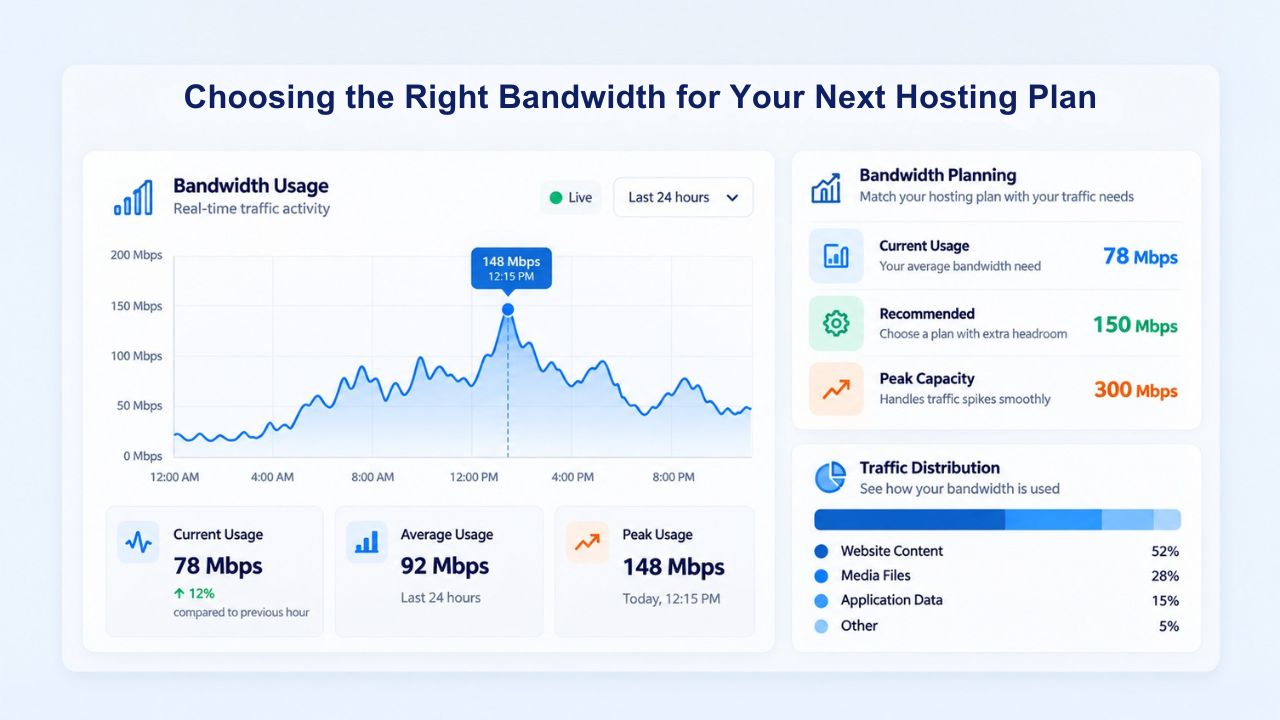
Before selecting a plan, ask yourself: How much traffic do I receive today, and how much do I expect within the next 12 months? What is the average size of my pages, including images and media? How much data do I expect visitors to download (if any)? Do I plan to add video, high-resolution images, or other media-heavy content? Will I be hosting email, databases, or multiple websites? Write down your answers and use the bandwidth calculation formula (average page size × pages per visitor × daily visitors × 30 × 1.5 safety factor) to estimate your real needs.
Next, compare your calculated estimate against available plans. If you calculate 50 GB monthly and the lowest-tier plan offers 100 GB storage with unmetered bandwidth, that plan will serve you well, and the unmetered bandwidth means you have no monthly overage risk if traffic spikes. If you calculate 500 GB monthly and your current plan caps at 200 GB, you need an upgrade. Don’t assume that “unlimited” plans cost the same forever; renewal rates often differ from introductory rates, so confirm long-term pricing before committing.
Avoiding Over-Buying While Ensuring Room for Growth
Buying the highest-tier plan is unnecessary if your needs are modest, but buying the lowest tier to save a few dollars is a false economy if you outgrow it in three months and have to migrate again. The right approach is to calculate your real needs, add a 30–50% buffer for growth and traffic spikes, then select the smallest plan that accommodates that buffer. For most small to mid-sized websites, that means the Economy or Deluxe tier from Niya Digital’s cPanel plans.
Remember, upgrading is simple and risk-free on unmetered plans; your only cost is the difference in monthly fees. This means you can start conservatively and upgrade as your business grows, or start with a larger plan if you expect rapid growth. The key is avoiding a plan so tight that peak traffic causes slowdowns or forces emergency upgrades mid-month. A modest upfront investment in a slightly larger plan than you need today is good insurance against the performance problems an undersized plan causes tomorrow, protecting your user experience and conversion rates.
Scale Your Site with a Hosting Plan That Grows With You
Your bandwidth needs will inevitably change as your business grows. Starting with a plan that provides room to scale and carries no overage penalties lets you focus on building your business instead of worrying about resource constraints. Niya Digital’s unmetered bandwidth Web Hosting plans scale from solo entrepreneurs and bloggers to growing agencies and established businesses, all backed by GoDaddy infrastructure and 24/7 support. Find the plan that matches your growth trajectory.
Frequently Asked Questions
What is the difference between bandwidth and storage in web hosting?
Bandwidth is the amount of data transferred to visitors monthly; storage is the space available on the server to store your website files, databases, and email messages. A 10 GB website file size may consume 100+ GB of bandwidth monthly, depending on visitor activity. Think of storage as a filing cabinet (fixed capacity) and bandwidth as hallway traffic carrying files in and out of that cabinet (volume moved per month, constantly changing).
How do I check my bandwidth usage?
Log into your cPanel control panel and navigate to the Bandwidth or Metrics section (exact location varies by hosting provider). You will see a graph showing your monthly data transfer. Most hosting providers update usage statistics in real time or near real time so that you can monitor it throughout the month. If you use WordPress or other platforms, plugins like Jetpack also track visitor traffic and provide bandwidth consumption estimates for conversion analysis.
Will my site automatically slow down if I exceed my bandwidth limit?
On metered plans with a hard cap, yes, once exceeded, you either face overage charges or automatic throttling. On unmetered plans like Niya Digital’s web hosting, you cannot exceed the allocation, but your connection speed remains capped by your port speed (typically 1 Gbps on shared hosting). High server load from other accounts may still cause slowdowns, but that’s a shared-resource issue, not a bandwidth limit issue.
Is “unlimited bandwidth” really unlimited?
No. Unlimited bandwidth is marketing terminology for either
(1) unmetered allocation at a specific port speed, or
(2) a very high metered cap subject to a fair-use policy.
Every network connection has a physical speed ceiling, and every provider reserves the right to restrict accounts that use excessive resources or cause server performance issues. True, literally infinite bandwidth does not exist in real hosting infrastructure.
How much bandwidth do e-commerce sites typically need?
E-commerce sites usually need 50–200 GB monthly, depending on catalog size, image resolution, and visitor volume. A store with 500 product pages at 5 MB each, receiving 2,000 daily visitors viewing 5 pages each, would need roughly 150 GB monthly. High-resolution images, product videos, and customer downloads increase requirements further. Niya Digital’s Deluxe or Ultimate plans with unlimited bandwidth suit most online stores well.
Can bandwidth usage spike without warning?
Yes. Social media sharing, viral posts, press mentions, or seasonal events can multiply daily visitors overnight. Adding a 30–50% buffer to calculated needs absorbs unexpected spikes without forcing emergency upgrades. On unmetered plans, spikes mean higher traffic but no overage charges, just potential server load if resources are tight.
What causes a hosting provider to restrict my bandwidth?
Common triggers include using your account for file backups, running streaming or peer-to-peer servers, or moving unusually large amounts of data outside normal web traffic patterns. Legitimate business growth, even rapid growth, typically does not trigger restrictions because it spreads over time. If uncertain, ask your hosting provider’s support team about their specific fair-use policies.
How does page load speed relate to bandwidth?
Page load speed depends on many factors: server response time, network latency, visitor location, ISP speed, browser caching, and image optimization, not just bandwidth. High bandwidth does not guarantee fast pages; you also need fast servers, low latency, and optimized content. Insufficient bandwidth during peak traffic definitely causes slowness.
Should I upgrade to VPS hosting for better bandwidth?
VPS offers more control and dedicated resources than shared hosting, but “better bandwidth” alone isn’t the main reason to upgrade. VPS is ideal if you need root access, custom configurations, or more capacity than shared hosting allows. For bandwidth alone on simple websites, shared hosting with unmetered allocation usually suffices.
How do I optimize my site to use less bandwidth?
Compress images, enable browser caching, minify CSS and JavaScript, use a CDN, and defer non-critical asset loading. These optimizations reduce bytes per visitor, lowering bandwidth needs and improving page speed. Most are free or low-cost and have an outsized impact on user experience and resource consumption.
Do email accounts on my hosting plan consume bandwidth?
Email traffic counts toward bandwidth but is usually small compared to web pages. An email with a 1 MB attachment uses 1 MB. With 100 email accounts averaging 10 daily emails each, that’s roughly 100 MB daily, or 3 GB monthly, small relative to typical visitor traffic unless email volume is very high.
What is a CDN, and does it reduce my bandwidth usage?
A content delivery network caches your static files globally and delivers them from locations near each visitor. This reduces origin server load and can lower bandwidth consumption by 30–50% for image-heavy sites. CDNs are optional add-ons; some are paid, but basic CDN integration may be included in hosting plans.
Can I downgrade my hosting plan if my site uses less bandwidth than expected?
Yes, most hosts allow downgrades, effective at your renewal date. Downgrades don’t refund current billing periods, but you stop paying for unused capacity. If you’ve overestimated needs, downgrades save money. If traffic grows later, upgrading is always an option; flexibility is a benefit of cloud-based hosting.
How do I know if my site is ready to outgrow shared hosting?
Signs include traffic exceeding 50,000+ monthly visitors, monthly bandwidth regularly over 500 GB, page load times above 3 seconds despite optimization, or frequent CPU/memory throttling warnings. If you experience any of these, VPS or business hosting may be warranted. Niya Digital’s support can advise based on specific metrics.
What is a fair-use policy, and why does it matter?
A fair-use policy is the hosting provider’s clause allowing them to restrict resources if your account’s usage becomes abnormal or impacts other accounts. It protects the shared server from a single customer exhausting resources. Understanding your provider’s specific policy helps prevent surprise restrictions and keeps you in good standing.
Glossary
- Bandwidth: The total amount of data transferred between a website’s hosting server and its visitors over a defined period, typically measured monthly in gigabytes (GB) or terabytes (TB).
- Unmetered Bandwidth: A billing model where the provider does not charge based on total data transferred. You pay a flat monthly fee and use as much bandwidth as the connection port speed allows, with no per-gigabyte overage charges.
- Unlimited Bandwidth: A marketing term implying no transfer cap. Usually means either unmetered allocation at a specific port speed or a very high monthly cap subject to a fair-use policy. Every connection has a physical speed ceiling.
- Data Transfer: The actual amount of data your website consumes within allocated bandwidth. Each page view, image load, file download, and email message counts as data transfer toward your monthly total.
- Fair-Use Policy: A clause in hosting provider terms stating that if your account’s usage becomes abnormal or degrades server performance, the provider can throttle resources, require an upgrade, or suspend the account.
- Port Speed (Line Rate): The maximum speed at which data moves through the network connection linking your hosting server to the internet, typically measured in megabits per second (Mbps) or gigabits per second (Gbps).
- Throughput: The actual rate at which data successfully transfers in real-world conditions, accounting for network congestion, latency, and packet loss. Often lower than theoretical bandwidth due to real-world constraints.


