
What Is Web Hosting, Really?
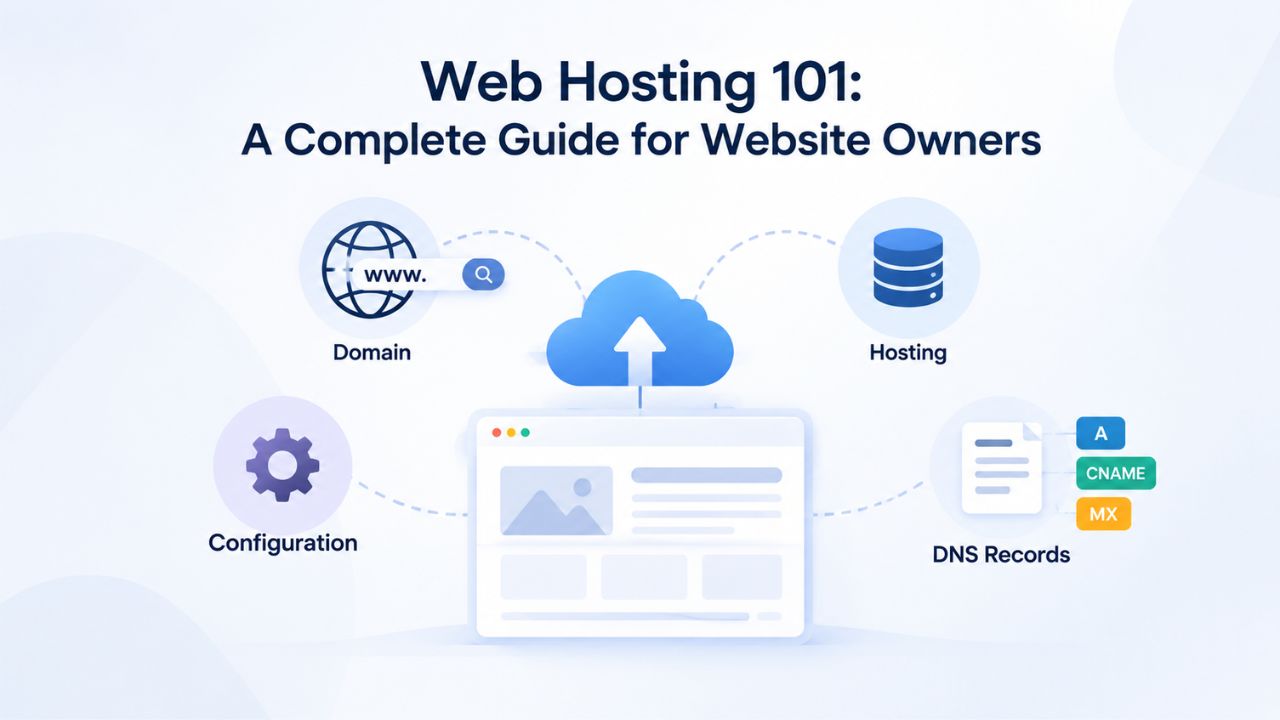
Web hosting is the service that makes your website accessible on the internet. A hosting provider maintains physical servers and network infrastructure; you use a control panel to manage your website’s content, databases, and email accounts. Without hosting, your website exists only on your computer; hosting puts it online where visitors can reach it from anywhere.
The Infrastructure Behind the Scenes
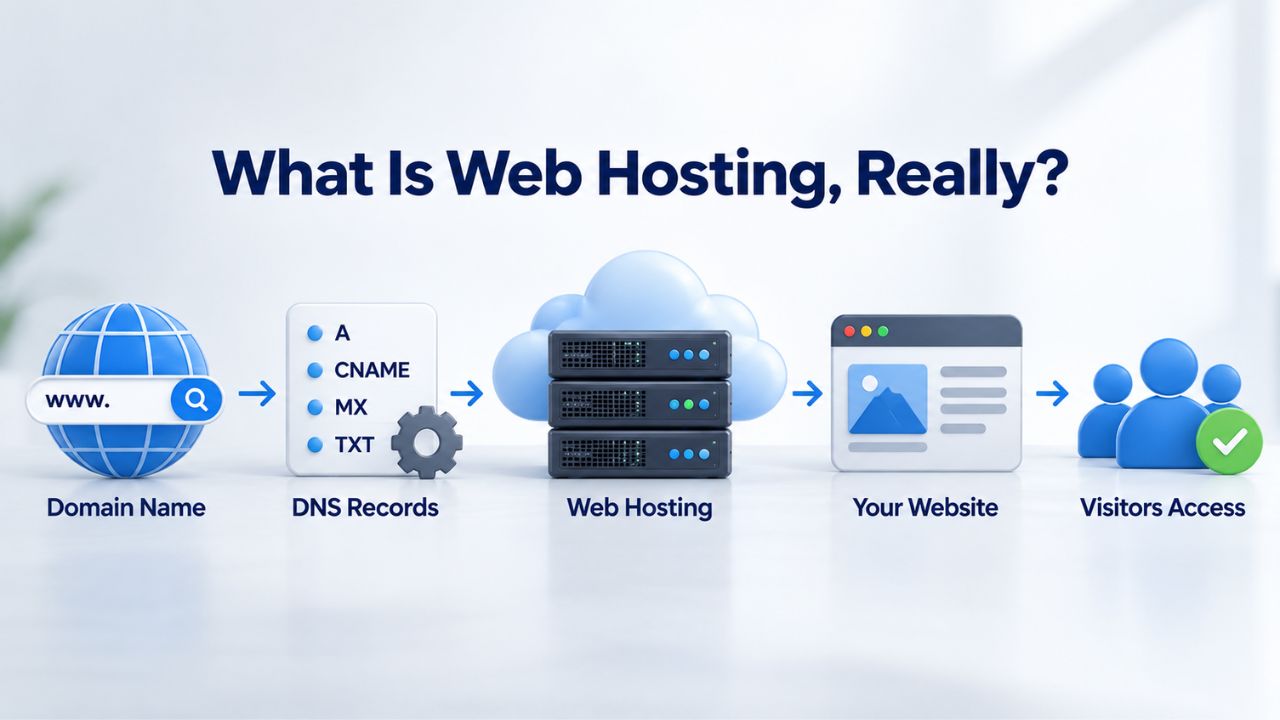
When you visit a website, your browser connects to a server somewhere in the world. That server stores the site’s files, runs its applications, and sends content to your browser. A web hosting provider owns and maintains these servers, keeps them running 24/7, connects them to the internet backbone, and backs up your data. In return, you pay a monthly or annual fee for a portion of the server’s resources, CPU time, memory, disk space, and network bandwidth, shared with other customers on the same physical hardware.
GoDaddy operates the server and network infrastructure that powers Niya Digital’s Web Hosting service. The provider handles the physical and network complexity: you don’t buy or configure hardware, worry about power outages, manage server operating system security patches, or deal with network redundancy. That’s a major reason small businesses and individual creators choose hosting over buying their own server. You focus on building and managing your site; the hosting provider ensures the infrastructure stays up and secure.
Site Type Resource Sizing Guide
| Site Type | Typical Monthly Visitors | Recommended Storage | Recommended Bandwidth | Recommended Plan |
|---|---|---|---|---|
| Blog (text, occasional images) | 100–1,000 | 20–50 GB | 100–300 GB | Starter |
| Small Business Website | 500–5,000 | 50–100 GB | 200–500 GB | Starter/Mid-Tier |
| Online Store (50–200 products) | 1,000–10,000 | 100–250 GB | 500–1,500 GB | Mid-Tier |
| Content-Heavy Site (news, membership) | 5,000–50,000 | 250–500 GB | 1,000–3,000 GB | Mid-Tier/Premium |
| Nonprofit Website | 500–5,000 | 50–100 GB | 200–500 GB | Starter/Mid-Tier |
| Agency Multi-Site Management | 5,000–25,000 | 200–400 GB | 800–2,000 GB | Mid-Tier/Premium |
Business Web Hosting Plans & Pricing
Choose the hosting plan that fits your website, WordPress site, or growing business. Compare features, storage, performance, security, and website capacity to find the right hosting environment for your needs.
cPanel Starter
cPanel Hosting that's easy, reliable and lightning-fast.
- 1 website
- 30 GB storage
- Unmetered bandwidth*

cPanel Economy
cPanel Hosting that's easy, reliable and lightning-fast.
- 1 website
- 100 GB space
- Unlimited bandwidth*
- 100 email accounts**
- 10 MySQL databases (1 GB ea.)
cPanel Deluxe
cPanel Hosting that's easy, reliable and lightning-fast.
- Unlimited websites
- Unlimited space
- Unlimited bandwidth*
- 500 email accounts
- 25 MySQL databases (1 GB ea.)
cPanel Ultimate
cPanel Hosting that's easy, reliable and lightning-fast.
- Unlimited websites
- Unlimited space
- Unlimited bandwidth*
- 1000 email accounts
- Unlimited MySQL databases (1 GB ea.)
- 2X Processing power & memory (available for Linux/cPanel only)
- Premium DNS
- 1-year SSL certificate to secure customer data and increase search rankings
*We don't limit the amount of storage and bandwidth your site can use as long as it complies with our Hosting Agreement. Should your website bandwidth or storage usage present a risk to the stability, performance or uptime of our servers, we will notify you via email and may be required to upgrade, or we may restrict the resources your website is using.
**Email account storage is limited to 100 email accounts with 100 MB of total storage.
WordPress Basic
A great way to get started.
- 1 website
- 10 GB NVMe storage
- Unmetered bandwidth
- Free SSL Certificate *
- WordPress pre-installed
- Weekly backups
- Web Application Firewall
- Daily malware scans
- One-time malware removal

WordPress Deluxe
Improve your site performance with Cloudflare CDN.
- 1 website
- 20 GB NVMe storage
- Unmetered bandwidth
- Free SSL Certificate *
- WordPress pre-installed
- Daily backups
- Web Application Firewall
- Daily malware scans
- One-time malware removal
- Up to 2x faster performance with global Cloudflare CDN **
- Enhanced security with DDoS protection
- Staging site
WordPress Ultimate
Add online marketing with more sites, storage and security.
- 1 website
- 30 GB NVMe storage
- Unmetered bandwidth
- Free SSL Certificate *
- WordPress pre-installed
- Daily + on-demand backups
- Web Application Firewall
- Daily malware scans
- Unlimited malware removal
- Up to 2x faster performance with global Cloudflare CDN **
- Enhanced security with DDoS protection
- Staging site
- WordPress code optimizer
- Smart WordPress plugin manager
- Sell online with WooCommerce
*An SSL certificate is included with every site and free for the life of the hosting plan. Certificates are automatically installed, validated and renewed.
Web Hosting Plus Launch
For multiple basic sites.
- 100 GB storage*
- 4 GB RAM
- 2 CPUs
- Unmetered traffic
- 50 websites & databases
- Free, unlimited SSL for all your websites**

Web Hosting Plus Enhance
For high-traffic WordPress, Joomla, and other sites.
- 200 GB storage*
- 8 GB RAM
- 4 CPUs
- Unmetered traffic
- 100 websites & databases
- Free, unlimited SSL for all your websites**
Web Hosting Plus Grow
For advanced eCommerce sites like Magento.
- 300 GB storage*
- 16 GB RAM
- 8 CPUs
- Unmetered traffic
- 150 websites & databases
- Free, unlimited SSL for all your websites**
Web Hosting Plus Expand
For multiple basic sites.
- 400 GB storage*
- 32 GB RAM
- 16 CPUs
- Unmetered traffic
- 200 websites & databases
- Free, unlimited SSL for all your websites**
*The total amount of usable storage capacity for your particular Hosting Service(s) may differ from the represented capacity as there is required space for the operating system(s), system file(s) and other supporting file(s).
**If you cancel the Web Hosting Plus product, you will lose the associated SSL certificate as well.
How Shared Web Hosting Plans Work
Most website owners start with shared hosting, the most affordable and widely used web hosting option. Shared hosting divides one physical server among multiple customer accounts, each with its own isolated directory, database, and email system. Your site sits alongside dozens or hundreds of other sites on the same hardware. Managed Web Hosting is the standard model for shared plans, meaning the provider handles OS updates, security patching, and server maintenance while you focus on content and applications.
Resource Allocation: What You Actually Get
Each shared Web Hosting plan specifies a storage allocation (how much disk space you can use) and a bandwidth allocation (how much data can transfer to visitors per month). A plan might offer 100 GB of storage and 500 GB of monthly bandwidth, enough for a small blog with modest traffic. If your site grows and approaches these limits, you either optimize (reduce file sizes, compress images, implement caching) or upgrade to a higher-tier plan with more resources.
Storage and bandwidth are separate concepts: storage is the space your files occupy on disk (your HTML, images, plugin files, databases); bandwidth is the data downloaded when visitors load pages, stream media, or download files. A blog with heavy image posts might need less bandwidth than a video streaming site but similar storage, or vice versa. Understanding both helps you avoid overpaying for unused resources or unexpectedly running out of capacity.
Shared hosting works because most small sites don’t use their full resource allocation at the same time. Your site is quiet some hours; another site is quiet others. The provider deliberately over-sells resources, betting that not everyone will max out at the same time. When sites do compete for resources during traffic spikes or poorly optimized code, the provider throttles heavy users to protect others, a shared-hosting tradeoff that keeps costs low for everyone.
Why Shared Hosting Remains Popular
Shared Web Hosting remains the most popular entry-level option for individuals and small businesses because it bundles everything needed to launch a site. Setup is quick (usually minutes), management is straightforward (control panel handles most tasks), and the provider handles infrastructure maintenance, security updates, and hardware concerns. It includes control-panel access, one-click app installers, SSL certificates, and often email accounts- everything a small site needs to succeed.
Niya Digital’s team has found that website owners launching their first site often appreciate how straightforward shared hosting setup is: no server configuration needed, pick a plan, connect your domain, and start building. For blogs, portfolios, small e-commerce stores, and local-business sites, shared hosting is the right choice initially. Many successful websites thrive on shared hosting for years before needing to scale up.
Control Panels: Your Hosting Management Hub
A control panel is the graphical interface you use to manage your hosting account. Most providers offer either cPanel or Plesk, industry-standard tools that let you create email accounts, set up databases, manage files, configure DNS records, install WordPress, and perform backups, all without touching a command line. The control panel is your daily interface to hosting; choosing a provider with good control-panel support and intuitive design makes site management easier.
cPanel: The Market Standard
cPanel is the most widely-used control panel for shared Web Hosting. Its left sidebar groups tasks into sections: Domains, Email, Databases, File Manager, Backups, and Security. To create an email account, go to Email Accounts, enter a mailbox name and password, and confirm; cPanel handles the technical setup behind the scenes. To install WordPress, you click the WordPress icon under the Software section and answer a few questions; cPanel downloads WordPress, creates a database, configures it, and you’re ready to log in and build.
cPanel’s learning curve is gentle: most tasks take one or two clicks, and icons label each section clearly. Novice users rarely need to consult documentation to perform basic tasks like uploading files, creating email accounts, or scheduling backups. The interface hasn’t changed much in years, so your knowledge is portable if you switch hosts in the future. Most hosting providers publish cPanel tutorials and documentation to help new users get comfortable quickly.
Plesk: An Alternative Interface
Plesk is a less common but comparable control panel, offering a dashboard layout instead of cPanel’s sidebar structure. Some providers (and some regions) prefer Plesk; it offers similar functionality and roughly the same ease of use for common tasks. If you’ve never used either, expect to feel comfortable within an hour of clicking around and exploring sections.
Most common tasks- domain connection, email setup, database creation, backup scheduling, and SSL configuration- are available in both control panels with similar names and locations. The control panel you use rarely matters for basic site management. Both cPanel and Plesk support the same technologies (PHP, Python, Node.js, databases, SSL) and integrate with the same app installers. If you’re choosing a Web Hosting provider primarily for one reason- good setup support, email reliability, community resources, or security reputation- the control panel choice is secondary to those larger factors.
Domains, DNS & Getting Your Site Live
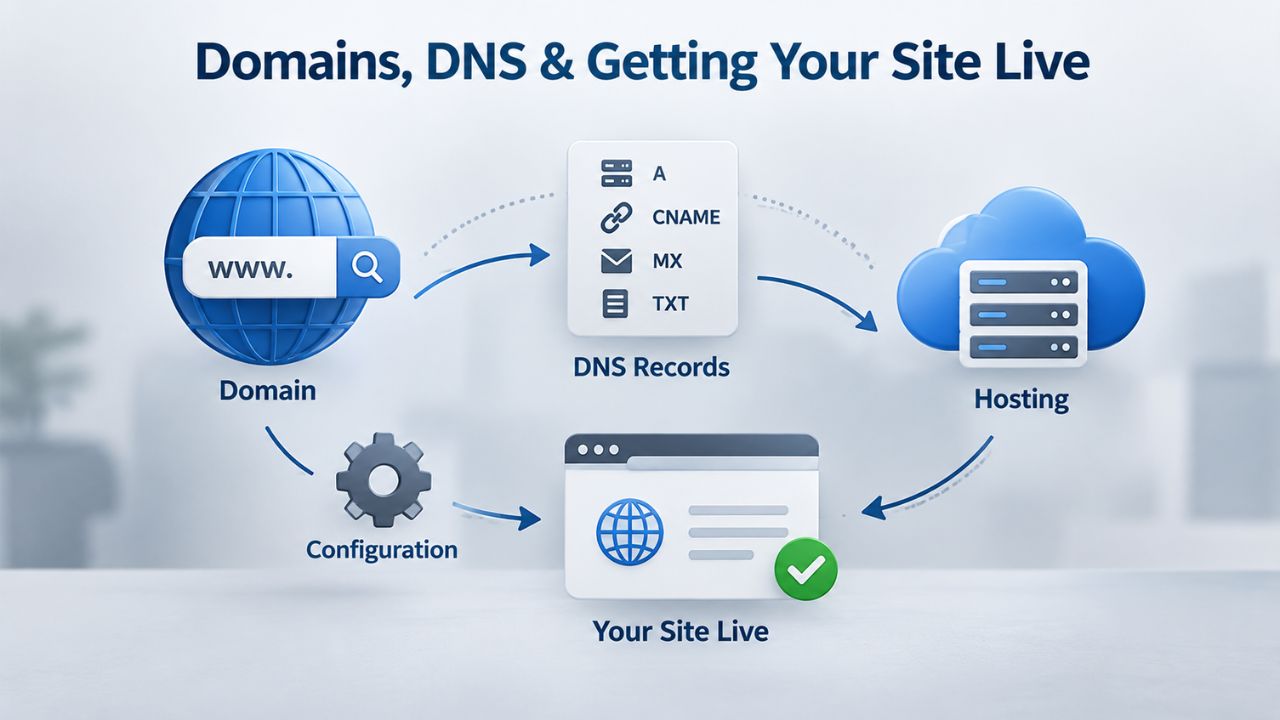
Hosting and domain registration are separate services, though many providers offer both together. You can register a domain with one company and host the website with another; DNS records connect them by telling the internet where your domain should point. Understanding how domains and hosting connect helps you choose where to register and host.
The Relationship Between Domain & Hosting
A domain name is your site’s address (yoursite.com). A hosting account is where your site’s files live. To connect them, your domain’s DNS records must point to your hosting provider’s nameservers. The domain registrar (the company that sold you yoursite.com) manages the DNS records; you update the nameservers there to match your host’s settings. From there, when someone types yoursite.com into a browser, the DNS system directs them to your hosting provider’s server, where your site’s files are stored.
Some people register their domain and hosting at the same company for simplicity (one login, one invoice, easier support coordination). Others prefer separate registrars and hosts for flexibility (easier to switch hosts later without re-registering the domain, choice of multiple providers). Either approach works fine, though registrar-and-host bundles often offer introductory discounts that make combining them financially attractive initially. The key is confirming you can move your domain registration if you ever need to switch hosts.
DNS Propagation: Patience Required
When you change a domain’s nameservers, the change propagates across the global DNS system according to ICANN’s DNS propagation standards. Most caches refresh within hours; full propagation typically takes 24–48 hours. Until then, some visitors (depending on their ISP and location) may see your old site, while others see the new one. This is normal and rarely a problem for most sites; email may briefly route to old servers, but after 24–48 hours, everyone sees your new site.
If you’re migrating from an old host to a new one, plan the DNS switch for a time when a few hours of inconsistency won’t hurt your business. For blogs and portfolios, Sunday night is low-traffic; for online stores, plan to minimize lost transactions during the transition window. Understanding DNS propagation timing prevents surprise and confusion during site migrations.
Choosing the Right Web Hosting Plan Tier for Your Site
Not every site needs the same resources. A personal blog, a 50-product e-commerce store, and a high-traffic SaaS application have very different demands. Understanding how to right-size your plan prevents overpaying for unused resources or running out of space and bandwidth when traffic grows faster than expected.
Matching Your Site Type to Plan Tiers
Shared Web Hosting plans scale by resource allocation: starter plans with 20–50 GB storage suit blogs with light traffic; mid-tier plans with 100–250 GB storage handle growing small businesses and modest-traffic e-commerce stores; higher-tier shared plans offer 500 GB+ storage for busy online stores or content-heavy sites. When even the highest shared plan limits aren’t enough, you upgrade to VPS or dedicated hosting, renting a virtual or physical server with dedicated resources. The decision tree is straightforward: match your current traffic and growth trajectory to the appropriate tier, then upgrade when you outgrow it.
| Site Type | Typical Monthly Visitors | Recommended Storage | Recommended Bandwidth | Recommended Plan |
|---|---|---|---|---|
| Blog (text, occasional images) | 100–1,000 | 20–50 GB | 100–300 GB | Starter |
| Small Business Website | 500–5,000 | 50–100 GB | 200–500 GB | Starter/Mid-Tier |
| Online Store (50–200 products) | 1,000–10,000 | 100–250 GB | 500–1,500 GB | Mid-Tier |
| Content-Heavy Site (news, membership) | 5,000–50,000 | 250–500 GB | 1,000–3,000 GB | Mid-Tier/Premium |
| Nonprofit Website | 500–5,000 | 50–100 GB | 200–500 GB | Starter/Mid-Tier |
| Agency Multi-Site Management | 5,000–25,000 | 200–400 GB | 800–2,000 GB | Mid-Tier/Premium |
A poorly optimized WordPress store might exhaust a mid-tier plan; a well-built blog on a starter plan handles 50,000 visitors per month. Ask your host for sizing help based on your specific site architecture and expected traffic if you’re unsure which tier to choose.
Growth Planning: Avoid Renewal Shock
Most hosting plans are discounted for the first year or three, then renew at a higher rate. Some providers hide renewal pricing until checkout; others display it upfront. Before purchasing, review the renewal price carefully and plan how long you expect to host at that tier. If your site is new, you may scale up within a year anyway, picking a smaller starter plan now and upgrading later as traffic grows often costs less overall than committing to a large plan and renewing at full rates. Confirm renewal terms in writing before purchasing any long-term commitment.
Understanding renewal pricing helps you budget accurately for year two and beyond. Many small-business owners experience “renewal shock” when their hosting bill doubles or triples after an introductory period ends. Reading the fine print about renewal costs prevents this surprise and lets you decide whether to stay or shop around after the initial term expires.
Email Hosting as Part of Your Web Hosting Plan
Most Web Hosting plans include email accounts tied to your custom domain. Instead of name@gmail.com, you have name@yoursite.com, which is more professional and brand-consistent for business communications. Your host manages the email infrastructure; you create and manage mailboxes via the control panel.
Setting Up Custom Domain Email
Creating an email account is simple: open the Email Accounts section of your control panel, enter the mailbox name (info, hello, contact), set a password, and save. The host assigns storage (often 100 GB shared or allocated per account on shared plans). You can access that email via webmail (in your browser) or configure it in Outlook, Apple Mail, or Gmail; most email clients support POP/IMAP protocols that work with hosting-based email. The control panel also includes email forwarding (route messages to multiple addresses) and auto-responders (send replies when you’re away).
Email performance and deliverability depend on the host’s email infrastructure (their spam filters, server reputation, DKIM/SPF authentication setup) and your own practices (not sending from obviously spoofed addresses, confirming authentication records in DNS). Email on shared hosting is typically reliable, though during email infrastructure problems (host server down, DNS misconfiguration), your email temporarily won’t route; one more reason to test email carefully after setup.
Why Custom Domain Email Matters
Branded email (contact@yoursite.com instead of contact@gmail.com) signals professionalism and trust, especially for small businesses, e-commerce, and agency sites. It’s part of your brand identity and establishes consistent professional communication. Free email (Gmail, Yahoo) is fine for personal correspondence. Still, when a customer or client sees a business email from a random free service, they may question the business’s credibility and legitimacy.
Custom domain email also gives you control: you’re not dependent on a third-party email provider’s policies or account access. If your email provider suspends your account, your business email doesn’t disappear. Many small businesses and agencies find that custom domain email is one of the first things customers notice; it immediately conveys professionalism.
Ready to Grow Your Online Presence?
Whether you’re launching your first website or scaling an existing one, Niya Digital’s Web Hosting service provides the foundation you need. Our plans are built on GoDaddy’s infrastructure, managed with your success in mind. Choose a plan that fits your site’s current size, get expert setup help, and upgrade as growth demands. Start your Web Hosting journey today with a provider that understands your needs.
Security, Backups & Protecting Your Site
Web hosting providers handle baseline infrastructure security, firewalls, DDoS mitigation, intrusion detection, and OS patching. But your website’s security is a shared responsibility: the provider secures the server layer, and you secure the application layer (your WordPress plugins, your code, your user credentials). Free SSL Web Hosting is now standard on most plans, encrypting communication between visitors’ browsers and your site.
What the Provider Handles
Most Web Hosting providers, including those powered by GoDaddy infrastructure, include perimeter firewalls that block malicious traffic, DDoS mitigation that absorbs attack traffic, intrusion-detection systems that flag suspicious access, and automatic OS patching that fixes known vulnerabilities. These baseline protections stop many attacks before they reach your site and are included on virtually all shared hosting plans.
Your responsibility includes keeping WordPress and plugins updated (plugin vulnerabilities are the #1 vector for WordPress breaches), using strong admin passwords and two-factor authentication, regularly reviewing user accounts and permissions, and implementing application-level security practices. Follow OWASP’s Web Application Security Top 10 guidance for hardening your site code and configuration. Security is most effective when both the provider and the site owner do their part.
Email Management via Control Panel
| Email Task | What It Does | Where to Find It | Typical Setup Time |
|---|---|---|---|
| Create Mailbox | Set up a new email account with your domain | Email Accounts → Create | 2–5 minutes |
| Set Forwarding | Route incoming email to another address | Email Accounts → Forwarding | 1–3 minutes |
| Configure Auto-Responder | Send automatic replies when away | Email Accounts → Auto-Responder | 2–5 minutes |
| Manage Quotas | Set storage limits per mailbox | Email Accounts → Quota Settings | 1–2 minutes |
| Check Webmail | Access email in a browser without a client | Control Panel → Webmail | Immediate |
| Configure DKIM/SPF | Improve email deliverability and security | Email Authentication → DNS Records | 5–10 minutes |
Backups: Your Insurance Policy
Backups are snapshots of your site’s files and database saved to a separate location. If your site is deleted, hacked, or corrupted, a recent backup lets you restore to a known-good state. Most Managed Web Hosting plans include automated daily or weekly backups; some offer on-demand backups you can trigger yourself. Web Hosting Backups are your insurance policy against data loss.
Before relying on a backup, confirm how long the provider keeps them (30 days, 90 days, a year?), how to restore them (self-service via control panel or support ticket?), and how long restoration takes (minutes, hours, overnight?). Also keep a copy of critical site data (database exports, file archives) in cloud storage (Google Drive, Dropbox) as a secondary layer; no backup strategy is foolproof. Testing a backup restoration before you need it prevents unpleasant surprises.
Performance, Speed & Uptime: What to Expect
Website performance depends on multiple factors: hosting infrastructure, your site’s code quality, content size (large, unoptimized images, video), your visitor’s internet connection, and caching strategies. A hosting provider can deliver a fast server, but a slow site often reflects site optimization and code efficiency, not hosting choice.

Understanding Uptime & SLA
Uptime is the percentage of time your site is running and accessible. Providers publish an SLA (Service Level Agreement); GoDaddy’s standard is 99.9% uptime as a performance target. 99.9% uptime equals roughly 8 hours of downtime per year, or about 43 minutes per month. No hosting provider guarantees 100% uptime; anyone claiming they do is not being honest about the realities of infrastructure management.
Your site’s actual uptime also depends on your own code (bugs that crash your application), your security configuration (if your site is hacked, visitors may see error pages), and network conditions outside the provider’s control. The provider handles the server; you handle the application. Understanding Web Hosting Uptime realities helps you set realistic expectations and avoid unhappy surprises.
Why Your Site Might Feel Slow
Slow page loads frustrate visitors and hurt search rankings. But slowness rarely comes from the host on shared hosting; shared plans use fast SSD storage and adequate CPU/memory for normal site traffic. More often, slowness comes from unoptimized images (downloading 5 MB images instead of 50 KB), WordPress plugin conflicts, inefficient code, or a lack of caching strategies. Web Hosting Bandwidth limits rarely cause slowness; poor site optimization does.
Test your site’s speed with Google PageSpeed Insights; the results usually point to actionable improvements (image optimization, caching setup, plugin reduction) rather than a hosting change. That said, if you consistently hit your plan’s resource limits (the provider throttles your site, or you see “resource limit exceeded” errors), you may genuinely need to upgrade to a higher-tier plan or switch to VPS hosting with dedicated resources.
Migrating to New Hosting Without Downtime
As your site grows or your needs change, you may want to switch Web Hosting providers. Done carefully, a migration takes a few hours and is nearly unnoticed by visitors. Web Hosting Migration is a straightforward process if you follow the right steps and plan.
The Migration Process
Migration involves four steps: (1) Set up a new hosting account with the new provider and verify it’s working in a testing environment. (2) Copy your site’s files and databases from the old host to the new one using FTP/SFTP or migration tools. (3) Test the new site thoroughly, verify links work, databases respond correctly, email routes properly, and the site loads as expected. (4) Update your domain’s DNS nameservers to point to the new provider.
After DNS propagates (24–48 hours), visitors see the new site. Many hosts offer assisted migration: they copy your site, verify everything works, and handle the DNS switch. This removes the technical burden and reduces the risk of a mistake that causes downtime. If you’re comfortable with FTP/SFTP and database tools, you can migrate yourself; if not, ask the new host’s support team for help. Most providers include migration assistance.
Timing the Switch
Plan your migration for low-traffic hours or days. For a blog, Sunday evening is typically quieter; for a small business site with evening traffic, early morning is better. During the 24–48 hour DNS propagation window, some visitors may see the old site if their ISP’s DNS hasn’t refreshed yet.
For most sites, that’s acceptable; a blog or portfolio doesn’t require constant updates. For an active online store, consider migrating during off-hours (late night, early morning, or a slow season) to minimize lost transactions during the transition window.
Scaling Your Site: From Shared to VPS to Dedicated
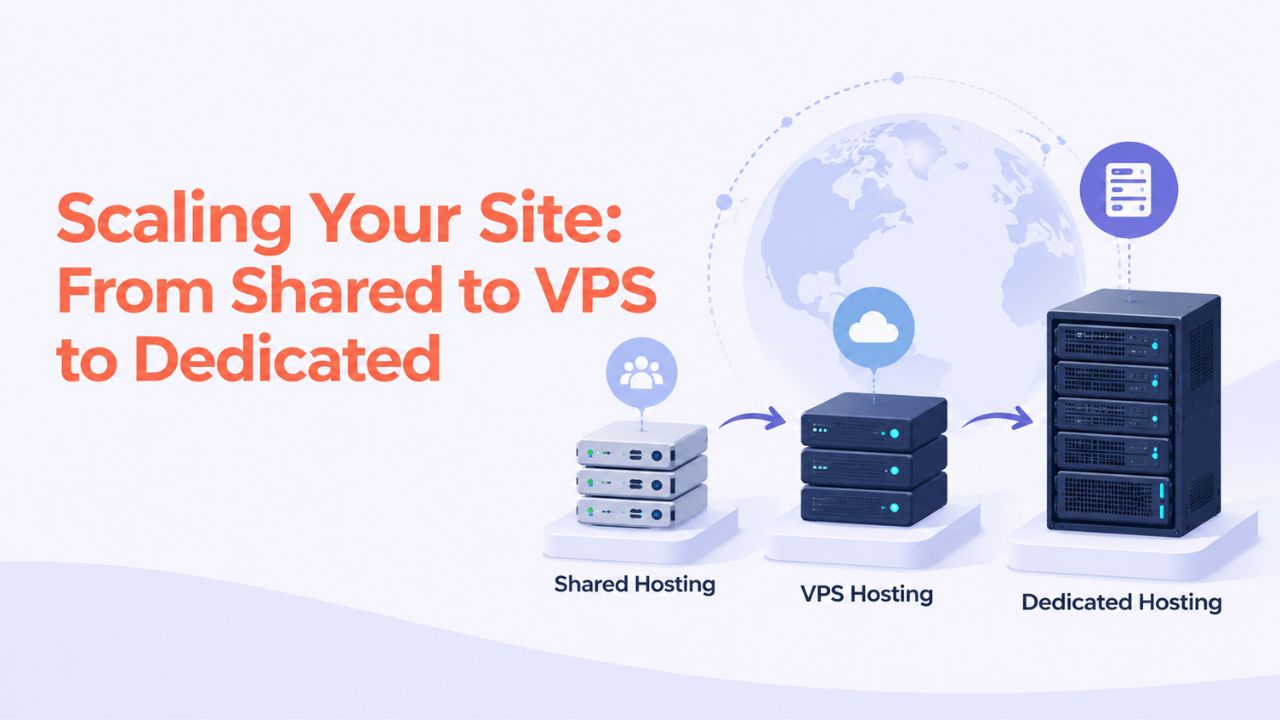
Successful websites grow, and growth requires more hosting resources. Understanding the scaling path helps you plan and avoid bottlenecks that slow your site or frustrate visitors. Scalable Web Hosting options exist at every tier, so you’re never locked into one level.
When Shared Hosting Reaches Its Limit
Shared hosting handles most small and medium sites well. But as your site traffic climbs or your business adds features, you may hit resource limits: the provider throttles CPU, you get “bandwidth exceeded” notices, or your database grows too large for the allocated storage. At that point, shared hosting no longer fits; you need to scale. Niya Digital’s team can help you assess whether upgrading within shared hosting or moving to VPS makes sense for your situation.
Recognizing these limits before your site crashes or becomes slow prevents customer frustration and lost revenue. Common signs include slow page loads, “resource limit exceeded” errors, or your provider notifying you that you regularly exceed resource thresholds. At that point, upgrade instead of waiting for a crisis.
VPS: Dedicated Virtual Resources
A Virtual Private Server (VPS) is the next step up. Instead of sharing a physical server with dozens of others, a VPS allocates a dedicated virtual machine with guaranteed CPU cores, memory, and storage. You share the physical hardware with a handful of other VPS customers, but your resources are isolated and protected; no other customer’s site can slow yours down or consume your allocated resources.
VPS hosting costs more than shared hosting but far less than a dedicated server. You gain more control; some VPS plans let you install custom software, configure the server environment, and even manage the OS, but they also come with more responsibility: you handle security updates, configuration, and monitoring, or you pay extra for a managed VPS where the provider handles those tasks for you.
Dedicated Hosting: Full Server Control
Dedicated hosting means renting an entire physical server exclusively for your site. You have full control over resources, root access to configure everything, and no neighbors competing for resources or slowing your performance. Dedicated hosting is necessary for extremely high-traffic sites, specialized applications, or regulatory compliance requirements (certain industries require dedicated hosting by law).
Dedicated hosting also requires strong technical expertise, or a managed dedicated host that handles OS configuration and updates. Most websites thrive on shared hosting initially, move to VPS as they grow, and consider dedicated hosting only when traffic reaches levels where VPS resource constraints become limiting. Plan this scaling path gradually as your site matures.
Ready to Get Your Website Online?
Niya Digital’s Web Hosting service offers plans for blogs, small businesses, online stores, and agencies, with cPanel control panel access, free SSL, daily backups, setup support, and ongoing account management. Explore our Web Hosting Plans to find the tier that matches your site’s current needs and growth trajectory. We’re here to help you launch and scale your site with confidence.
Frequently Asked Questions
What’s the difference between a domain and Web Hosting?
A domain is your site’s address (yoursite.com); Web Hosting is the server where your site’s files live. You need both to have a working website. They’re sold separately by default, though many providers bundle them. The registrar (who sells the domain) manages DNS records that point your domain to your host’s servers. You can register a domain at one company and host the website at another; they work together through DNS.
How much storage and bandwidth does a small blog need?
A text-heavy blog with occasional images typically needs 20–50 GB storage and 100–300 GB/month bandwidth. Most starter Web Hosting plans include this. If your blog is image-heavy or receives thousands of daily visitors, you might need more. Niya Digital’s plans range from starter to premium tiers to match different site sizes and growth expectations.
Can I change Web Hosting providers without losing my site?
Yes. Your domain remains yours regardless of hosting. Set up your site on new hosting, copy your files and database, test it, then update your domain’s DNS records to point to the new host. After 24–48 hours of DNS propagation, the switch is complete. Many hosts offer assisted migration to simplify the process and verify everything works before going live.
Do I need to worry about security on shared Web Hosting?
Shared hosting includes baseline provider-side security (firewalls, patching, DDoS mitigation). You’re responsible for keeping applications updated, using strong passwords, enabling two-factor authentication, and following security best practices. Security is shared between the provider and the site owner; do your part to keep your site safe.
What does “uptime” mean, and why is 99.9% important?
Uptime is the percentage of time your site is running and accessible. An SLA of 99.9% means your host commits to roughly 8 hours of downtime per year, which is reasonable for most small sites. 100% uptime guarantees are unrealistic; no provider can promise no maintenance, upgrades, or unexpected issues. Understand that downtime happens occasionally; plan accordingly.
How long does it take to set up a Web Hosting account?
Most shared Web Hosting accounts are provisioned within minutes to a few hours. A new domain registration adds 24–48 hours. Once your account is active, you can install WordPress or upload your files immediately. Full setup, including domain propagation and DNS changes, typically takes 1–3 days end-to-end.
Can I host multiple sites on one Web Hosting plan?
Yes, depending on the plan. Most plans support multiple domains and email accounts on the same server. Check your plan details to confirm the limit, but shared hosting is designed to support bloggers and small-business owners managing several sites simultaneously.
What happens if my site grows and needs more resources?
If your site approaches your plan’s storage or bandwidth limits, you can upgrade to a higher-tier plan (often a single click in the control panel, no downtime) or switch to VPS hosting for dedicated resources. Most site growth is gradual; you have time to plan and execute the upgrade smoothly.
Is email included in Web Hosting, or is it an add-on?
Email is included in most Web Hosting plans. You can create custom domain email accounts (info@yoursite.com) via the control panel. Check the plan details for the email account limit and storage allocation, but virtually all plans include at least one account and often more.
How do I back up my site, and should I rely on the provider’s backups?
Most Web Hosting plans include automated backups (often daily or weekly). Test the backup and restoration process before relying on it completely. Also keep an offline copy of critical data (database exports, file archives) in cloud storage as a secondary safeguard. Backups are insurance; multiple layers are safer than one.
What control panel is better: cPanel or Plesk?
Both are excellent and offer nearly identical features for most users. cPanel is more widely used, so if you switch hosts, you’ll likely find it again. Plesk is equally capable and user-friendly. In practice, the difference rarely matters for basic site management; either is simple enough for beginners.
How much does Web Hosting cost?
Web Hosting pricing varies widely by provider, plan tier, features, and region. Entry-level plans are affordable; premium plans cost more as you add resources. Always confirm renewal costs before purchasing, as they often differ from introductory rates. Shop around and compare features, not just price.
Why would I need VPS or dedicated hosting instead of shared Web Hosting?
VPS offers dedicated resources and more control, suited for growing sites that hit shared-plan limits or need custom server configuration. Dedicated hosting offers full server control and capacity for high-traffic or specialized applications. Most websites thrive on shared hosting for years; scaling is a future decision, not an immediate need.
Can I transfer my site to a different Web Hosting provider later without starting over?
Yes. Your domain and site are yours; you can move them to a different host any time. The process is straightforward (copy files/database, test, update DNS), and many hosts offer assisted migration. You’re never locked in; you can always migrate if you’re unhappy.
What’s the difference between managed and unmanaged Web Hosting?
Managed hosting (standard shared and VPS plans) includes provider-side maintenance, security patching, and support. Unmanaged hosting (some VPS and dedicated plans) gives you full control but requires you to handle OS updates, security, and troubleshooting yourself. Most small sites use managed hosting for simplicity.
Is there anything else I should know before signing up for Web Hosting?
Test your control panel, confirm backup and migration support, verify email setup works, read the renewal terms, and check the provider’s uptime SLA and support reputation. Ask questions before purchasing. Most importantly, understand that Web Hosting is just one part of site success; your site’s code, security practices, and content quality matter equally.
Glossary
- Web Hosting: The service and infrastructure that stores your website’s files, databases, and email on a server connected to the internet, making your site accessible to visitors around the clock.
- Control Panel: A graphical interface (cPanel or Plesk) that lets you manage domains, email accounts, databases, files, backups, and security settings without needing command-line access.
- Bandwidth: The total data transfer allowed per month; used when visitors download files, stream media, or load pages from your site.
- Storage (or Disk Space): The total disk space allocated to your account for website files, databases, email, and backups.
- Uptime: The percentage of time a server is running and accessible; typically measured over a month or year as a performance metric.
- DNS (Domain Name System): The system that translates domain names (yoursite.com) into IP addresses that direct browsers to the correct server.
- SSL/TLS Certificate: Encrypts the communication between a visitor’s browser and your website, enabling secure HTTPS connections and protecting data in transit.
- Migration: The process of moving your website, files, databases, and email from one Web Hosting provider to another.


