
Why VRAM Is the Critical Constraint for AI Workloads
VRAM is the dedicated, high-speed memory physically attached to a graphics processing unit. Unlike system RAM on your motherboard, which handles general computing, VRAM is optimized for the parallel calculations that AI models demand. When you run inference on a language model like Mistral 7B or LLaMA, the entire model’s weight matrix must fit into VRAM before the first token is generated. This is not optional, not negotiable, and not something additional CPU cores compensate for.

What Happens When VRAM Runs Out
When VRAM is insufficient, one of two scenarios occurs. The model refuses to load with an out-of-memory error, and your application crashes immediately. Or the model spills layers into system RAM as a fallback, and inference slows by 5 to 10x. The second scenario feels promising: the process starts, the model loads, inference begins. But the latency becomes unusable. A request that should complete in 200 milliseconds takes 1 to 2 seconds. For production APIs, real-time applications, and any workload where speed matters, this degradation is unacceptable.
Getting VRAM right before deployment saves weeks of troubleshooting and prevents mid-project infrastructure migrations. When you run out of VRAM, the only solution is upgrading hardware. This upgrade typically requires downtime, data migration, and redeployment, a costly and disruptive process. Anticipating requirements upfront prevents this scenario entirely.
VRAM Determines What Runs; Compute Determines Speed
VRAM determines what you can run; CUDA cores determine how fast. A powerful GPU with insufficient VRAM cannot run a large model at all. Most developers optimize for compute performance first, then discover VRAM is the actual bottleneck. The correct priority is always VRAM capacity first, memory bandwidth second, and compute throughput third. This hierarchy shapes every infrastructure decision you’ll make.
When you exceed available VRAM, no amount of CUDA cores or clock speed will help. The model either fails to load or spills to system RAM. This constraint is absolute and unforgiving. Understanding it before you provision hardware prevents frustration and wasted spending on GPUs optimized for speed rather than capacity.
VPS Hosting Plans & Pricing
Choose the VPS hosting plan that fits your website, application, or business requirements. Select a self-managed VPS for complete server control or a fully managed VPS with a dedicated team of experts to help manage your server.
Self Managed VPS 1 vCPU
1 GB RAM
Entry-level VPS hosting for lightweight websites and applications.
- 1 CPU Core
- 1 GB RAM
- 20 GB SSD Storage
- Linux only, no control panel

Self Managed VPS 2 vCPU
4 GB RAM
VPS hosting with additional CPU and memory for growing websites and applications.
- 2 CPU Cores
- 4 GB RAM
- 100 GB SSD Storage
Self Managed VPS 2 vCPU
8 GB RAM
Additional memory for more demanding websites and applications.
- 2 CPU Cores
- 8 GB RAM
- 100 GB SSD Storage
Self Managed VPS 4 vCPU
8 GB RAM
Increased processing power for business websites and applications.
- 4 CPU Cores
- 8 GB RAM
- 200 GB SSD Storage
Self Managed VPS 4 vCPU
16 GB RAM
High-memory VPS hosting for resource-intensive workloads.
- 4 CPU Cores
- 16 GB RAM
- 200 GB SSD Storage
Self Managed VPS 8 vCPU
16 GB RAM
Powerful VPS resources for demanding business applications.
- 8 CPU Cores
- 16 GB RAM
- 400 GB SSD Storage
Self Managed VPS 8 vCPU
32 GB RAM
Maximum self-managed resources for demanding workloads.
- 8 CPU Cores
- 32 GB RAM
- 400 GB SSD Storage
Fully Managed VPS 1 vCPU
2 GB RAM
Managed VPS hosting with expert server management.
- 1 CPU Core
- 2 GB RAM
- 40 GB SSD Storage
- Dedicated team of experts to fully manage your server
Fully Managed VPS 1 vCPU
4 GB RAM
Managed VPS resources for websites and business applications.
- 1 CPU Core
- 4 GB RAM
- 40 GB SSD Storage
- Dedicated team of experts to fully manage your server
Fully Managed VPS 2 vCPU
4 GB RAM
Managed VPS hosting with additional CPU resources.
- 2 CPU Cores
- 4 GB RAM
- 100 GB SSD Storage
- Dedicated team of experts to fully manage your server
Fully Managed VPS 2 vCPU
8 GB RAM
Managed VPS hosting with additional memory for growing workloads.
- 2 CPU Cores
- 8 GB RAM
- 100 GB SSD Storage
- Dedicated team of experts to fully manage your server
Fully Managed VPS 4 vCPU
8 GB RAM
Higher-performance managed VPS for demanding applications.
- 4 CPU Cores
- 8 GB RAM
- 200 GB SSD Storage
- Dedicated team of experts to fully manage your server
Fully Managed VPS 4 vCPU
16 GB RAM
High-memory managed VPS for resource-intensive workloads.
- 4 CPU Cores
- 16 GB RAM
- 200 GB SSD Storage
- Dedicated team of experts to fully manage your server
Fully Managed VPS 8 vCPU
16 GB RAM
Powerful managed VPS hosting for demanding business workloads.
- 8 CPU Cores
- 16 GB RAM
- 400 GB SSD Storage
- Dedicated team of experts to fully manage your server
Fully Managed VPS 8 vCPU
32 GB RAM
Maximum managed VPS resources for demanding workloads.
- 8 CPU Cores
- 32 GB RAM
- 400 GB SSD Storage
- Dedicated team of experts to fully manage your server
Understanding Model Parameters and VRAM Calculation
When researchers refer to a “7B” or “70B” model, that number indicates parameters, the trainable weights encoding the model’s learned patterns. A 7-billion-parameter model holds 7 billion numerical values. Each parameter takes up memory, and how much depends on the precision format. A 7B model in FP16 (half precision, 2 bytes per parameter) requires 14 gigabytes of VRAM for inference alone. The same model in 4-bit quantization fits in 3.5 to 5 gigabytes.
The Formula and Basic Requirements
The basic calculation gives you a starting point but not a complete picture. Your model holds weights, which dominate memory consumption. A 7B model in FP16 requires approximately 14 GB just for the weight matrices. A 13B model requires 26 GB. A 70B model requires 140 GB. These numbers scale linearly with parameter count and precision bits. Double the parameters, double the VRAM. Double the precision bits, double the VRAM.
Understanding this linear relationship helps you predict VRAM needs for any model and precision combination. If you know a model’s parameter count and choose a precision format, you only need multiplication. Open-source model cards on Hugging Face typically list parameter counts. Once you know the number, you can calculate VRAM requirements instantly without waiting for documentation.
Calculating Real-World VRAM Needs Beyond Base Weights
Base weights are only part of VRAM consumption. Your model also holds a KV cache, cached attention keys and values that grow larger with longer input contexts and concurrent requests. For a 7B model at FP16, expect roughly 0.25 megabytes of KV cache per token; for a 70B model, roughly 2.5 megabytes per token. When you process multiple requests concurrently (batching), KV cache multiplies by the batch size. Processing 4 concurrent requests with 8,000-token context windows adds several gigabytes of cache overhead to your base model size.
In practice, you cannot allocate exactly the calculated VRAM and expect smooth operation. Framework overhead, runtime libraries, intermediate tensors, and temporary buffers consume additional memory during inference. Allocate 20 to 25 percent headroom above calculated base requirements. A model needing 14 GB for weights and cache should run on hardware with at least 17 to 18 GB available VRAM. This buffer prevents out-of-memory crashes during traffic spikes and allows space for framework overhead. Test your exact setup under production-like conditions and measure actual consumption before committing infrastructure.
How Quantization Reduces VRAM Without Sacrificing Quality
Precision refers to how many bits each parameter uses. Full precision (FP32) uses 32 bits, or 4 bytes, per parameter. Half precision (FP16) uses 16 bits, or 2 bytes. 8-bit quantization uses 1 byte per parameter. 4-bit quantization uses approximately 0.5 bytes per parameter. The VRAM savings are dramatic: dropping from FP32 to FP16 cuts memory in half; dropping from FP16 to 4-bit cuts it by another 75 percent.
Compression Techniques and VRAM Savings
Quantization works because language models are robust to lower precision. The attention weights and semantic relationships preserve meaning even at 4-bit resolution. The model learns to store information efficiently; reducing precision doesn’t destroy that information; it compresses it. Open-source frameworks like llama.cpp and production inference engines ship quantized models as defaults because inference on smaller VRAM footprints is both more cost-effective and often faster than unquantized inference.
Different quantization methods produce different file sizes and inference speeds. 4-bit quantization (Q4) is most aggressive, cutting VRAM by 75 percent. 8-bit quantization cuts by 50 percent but runs faster. INT8, which quantizes during inference rather than storing quantized weights, offers a middle ground. Choosing the right quantization method depends on your trade-off preferences: maximum VRAM savings versus maximum inference speed.
Trade-Offs Between Precision and Model Quality
The trade-off between precision and VRAM is minimal for general-purpose inference. For domain-specific tasks or fine-tuning, precision matters more. A model fine-tuned on 4-bit quantized weights may behave slightly differently than one fine-tuned in full precision. However, parameter-efficient fine-tuning methods, particularly QLoRA (4-bit quantized LoRA), show that 4-bit base models with higher-precision adapter layers can achieve results comparable to full fine-tuning on most domain adaptation tasks.
Always validate output quality under realistic load before deploying a quantized model. Use your actual test set, measure both accuracy and latency, and compare quantized and unquantized outputs. For most inference workloads, you’ll find 4-bit quantization indistinguishable from full precision. This validation step prevents surprises after production deployment and justifies VRAM savings to stakeholders concerned about quality loss.
Inference vs. Training: Dramatically Different Memory Demands
Running a model (inference) and training or fine-tuning a model are fundamentally different workloads with drastically different memory profiles. Inference holds the model weights, KV cache for attention, and small activation buffers for intermediate computations. Training holds all of that plus gradients (additional storage equal to the model size for backpropagation) and optimizer states (typically 2 to 3 times the model size for Adam or AdamW optimizers).
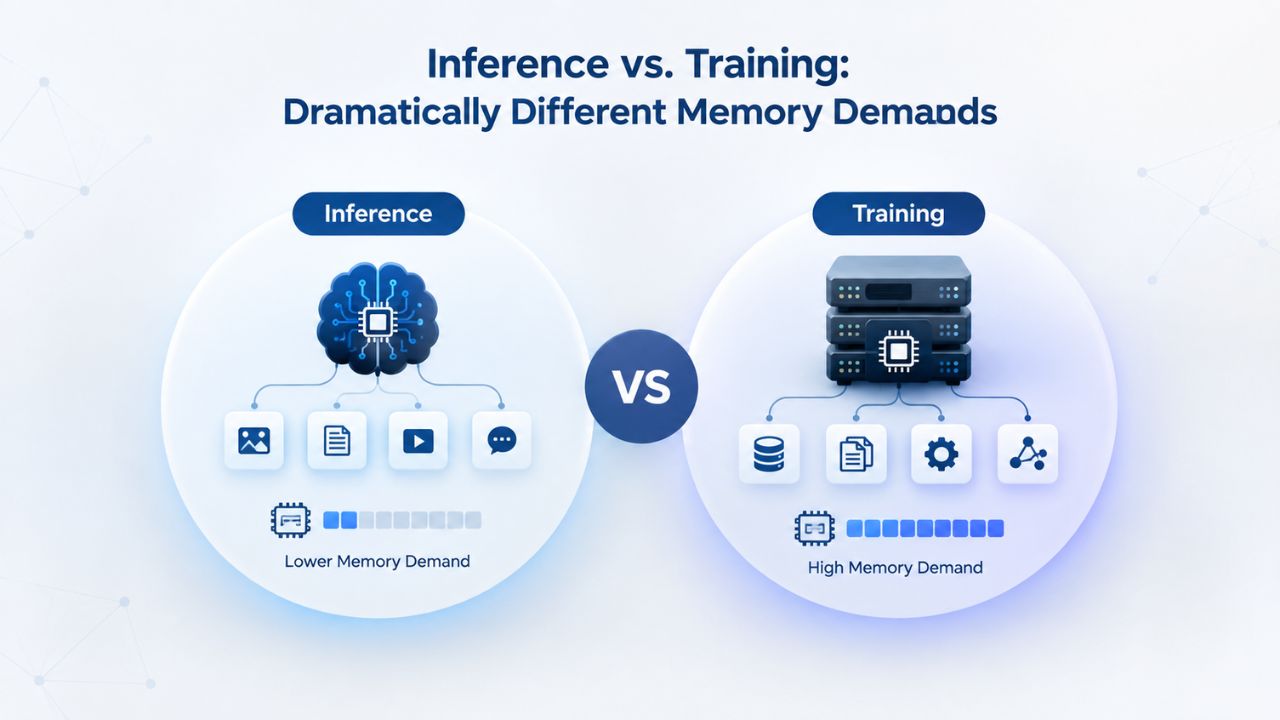
Memory Requirements Comparison
Full fine-tuning multiplies VRAM requirements by 3 to 4 times. LoRA fine-tuning multiplies by 1.5 to 2 times. QLoRA multiplies by 1.2 to 1.5 times. This variation is enormous. A 70B model that consumes 43 GB for inference needs roughly 50 to 65 GB for QLoRA but 400 to 600 GB for full fine-tuning. The difference determines whether a task is feasible on consumer hardware or requires a data-center investment. Understanding these multipliers before you start prevents catastrophic over-provisioning.
This difference is systematic. Fine-tuning requires storing gradients (equal to model size) and optimizer states (2–3x model size). LoRA freezes most of the model and trains only small adapter matrices, dramatically reducing gradient storage. QLoRA goes further by quantizing the base model to 4-bit, storing only the small adapters in full precision. This layered approach lets teams fine-tune 70B models on hardware that would be completely insufficient for full fine-tuning.
Choosing the Right Fine-Tuning Strategy for Your Constraints
Understanding the memory multiplier for your chosen method prevents catastrophic over-provisioning. If you plan only inference, allocate VRAM for the base model plus 20 percent headroom. If you plan QLoRA fine-tuning, multiply by 1.3 to 1.5. If you plan full fine-tuning, multiply by 3 to 4. A clear roadmap- what you’ll do today and what you’ll do next quarter- determines the infrastructure you buy.
For teams new to fine-tuning, QLoRA is almost always the right starting point. It delivers competitive results with minimal infrastructure. Once you validate your approach and confirm that higher precision improves your specific task, consider upgrading to LoRA or full fine-tuning. This iterative, data-driven approach optimizes both budget and time-to-value.
| Inference Scenario | Model Size | Base VRAM | With Batching (4x) | With Large Context (8K tokens) | Recommended Tier |
|---|---|---|---|---|---|
| Single-user chatbot | 7B (Q4) | 5–6 GB | 8–10 GB | 12–15 GB | 16 GB minimum |
| Team API (10–50 users) | 13B (Q4) | 8–10 GB | 15–20 GB | 20–25 GB | 24–32 GB |
| Production service (100+ users) | 70B (Q4) | 40–43 GB | 60–80 GB | 80–100 GB | 96 GB or multi-GPU |
| Fine-tuning (QLoRA) | 7B base | 14–18 GB | 24–30 GB | N/A | 24–32 GB |
| Multi-model serving | 7B + 13B | 18–22 GB | 28–35 GB | 35–45 GB | 48–64 GB |
Real-World VRAM Sizing for Common AI Deployments
Three realistic scenarios illustrate the practical decision process. Small hobby projects, learning environments, and single-user prototypes typically use Mistral 7B or LLaMA 2 7B in 4-bit quantization, requiring 6-8 GB of VRAM. This tier is perfect for experimenting with inference frameworks, building personal chatbots, or running local LLMs for development. Latency is acceptable for a single user or low-traffic prototype. Infrastructure costs are minimal. If your project grows, scaling to the next tier is straightforward.
Small to Medium Deployments
The small-to-medium category encompasses most organizations’ actual needs. A team of 50 people accessing a chatbot powered by a 13B quantized model requires far less VRAM than a startup trying to serve a million concurrent users. Start with Mistral 7B or LLaMA 2 13B, both proven models with excellent community support and extensive quantized versions. Both fit comfortably in 16 to 24 GB of VRAM with room for batching and long contexts. If you later discover you need a larger model, migration is straightforward.
Measuring actual usage during the first weeks of deployment reveals whether your tier is right-sized. Most teams find they’ve chosen correctly and stay on the same tier for months. Some teams discover they can optimize by switching to more aggressive quantization or parameter-efficient fine-tuning, avoiding hardware upgrades. A few teams genuinely need to scale up. This data-driven approach beats guessing and ensures you’re paying for what you actually use.
Enterprise and Production-Scale Deployments
Large production workloads, high-traffic LLM APIs, enterprise fine-tuning, or frontier-model serving require 40 to 96 GB of VRAM or more. A 70B-parameter model like LLaMA 2 70B requires 40 to 43 GB for inference in 4-bit quantization. Mixtral 8x7B, a Mixture-of-Experts model with 47 billion total parameters, requires roughly 28 GB in 4-bit. Mixture-of-Experts models must hold all expert networks in VRAM, even though only a fraction activate per inference token. Sizing based on “active parameters” alone leads to catastrophic out-of-memory failures.
For production inference at scale, dedicated high-end GPUs or multi-GPU configurations are necessary. Teams at this scale invest in custom infrastructure or use specialized inference platforms. The infrastructure complexity increases significantly, but handling hundreds of concurrent users or running models at enterprise scale justifies the investment. Planning for this scale upfront, even if you start smaller, prevents costly mid-deployment migrations and infrastructure overhauls.
| Deployment Tier | Model Example | VRAM Needed (Quantized) | Typical GPU | Concurrent Users | Setup Complexity |
|---|---|---|---|---|---|
| Hobby / Learning | Mistral 7B (Q4) | 6–8 GB | Entry-level | 1–2 | Low |
| Small Team / Internal API | LLaMA 2 13B (Q4) | 16–24 GB | Professional | 10–50 | Medium |
| Production Multi-User | LLaMA 2 70B (Q4) | 40–43 GB | Enterprise | 100–1000 | High |
| Fine-Tuning / Training | 7B model (QLoRA) | 24–30 GB | Professional | Batch job | High |
| Frontier / Multi-GPU | 70B+ (FP16 or sharded) | 80–200+ GB | Multi-GPU Enterprise | 1000+ | Very High |
Deploy GPU-Accelerated AI on Niya Digital VPS Hosting
Niya Digital’s VPS Hosting service provides flexible infrastructure with configurable GPU resources and root access, letting you build custom AI stacks optimized for your workload. Select the VRAM and compute resources your model needs, choose your operating system, and deploy inference servers, fine-tuning environments, or development clusters on managed or unmanaged VPS infrastructure. Niya Digital’s support team is available to guide your deployment from provisioning through optimization.
GPU VPS vs. Standard VPS: Why AI Needs Dedicated Hardware
Standard VPS allocates CPU cores, system RAM, and NVMe SSD storage to applications like web hosting, databases, and traditional software services. GoDaddy’s standard VPS offerings range from 2 vCPU cores with 4 GB RAM to 32 vCPU cores with 128 GB RAM, excellent for web servers, application backends, and general-purpose workloads. These configurations include no dedicated GPU and no VRAM reserved for model inference.
Standard VPS Architecture and Limitations
If you attempt to run LLaMA or any large language model on a CPU-only VPS, the inference process offloads to system RAM, causing the 5 to 10 times slowdown mentioned earlier. Your 70B model in FP16 occupies 140 GB; a standard VPS with 16 GB system RAM cannot hold it at all. Even smaller models run unacceptably slowly on CPU-only infrastructure. CPUs were never designed for tensor operations; they excel at sequential logic and conditional branching, not parallel matrix multiplication.
Standard VPS is generalist infrastructure designed for diverse workloads. GPU VPS is specialist infrastructure designed for compute-intensive workloads: AI model serving, fine-tuning, video rendering, 3D simulations, and scientific computing. The fundamental difference is isolation and purpose. Standard VPS shares resources across many customers with diverse needs. GPU VPS dedicates specific accelerators to specific workloads.
When Standard VPS Fails for AI Workloads
Standard VPS fails silently under AI inference load. The first inference might complete in 10 seconds instead of 500 milliseconds. The second inference takes 15 seconds. After the third, the system either crashes with out-of-memory errors or becomes so slow that API timeouts trigger. Users experience errors and timeouts. Debugging reveals that system RAM is maxed out, the CPU is thrashing on memory swaps, and the model is spilling to disk. At that point, switching to GPU infrastructure is not optional; it’s the only path forward.
For Niya Digital customers building AI applications, the question is not whether to upgrade from standard VPS; it’s when to move to GPU-accelerated infrastructure. If you’re running inference on any model larger than a few hundred million parameters, standard VPS is insufficient. GPU VPS is the only viable deployment option for production workloads. Anticipating this requirement upfront saves significant time and frustration.
Choosing GPU Tiers: How Much VRAM Do You Actually Need?
GPU selection depends on your model’s size, target latency, and budget constraints. 8 GB VRAM covers small quantized models: Mistral 7B at 4-bit, LLaMA 2 7B, and similar-sized variants. This tier suits hobby projects, learning environments, and single-user applications. Latency is acceptable for interactive use. Constraints are significant: limited room for large context windows or high batch processing.
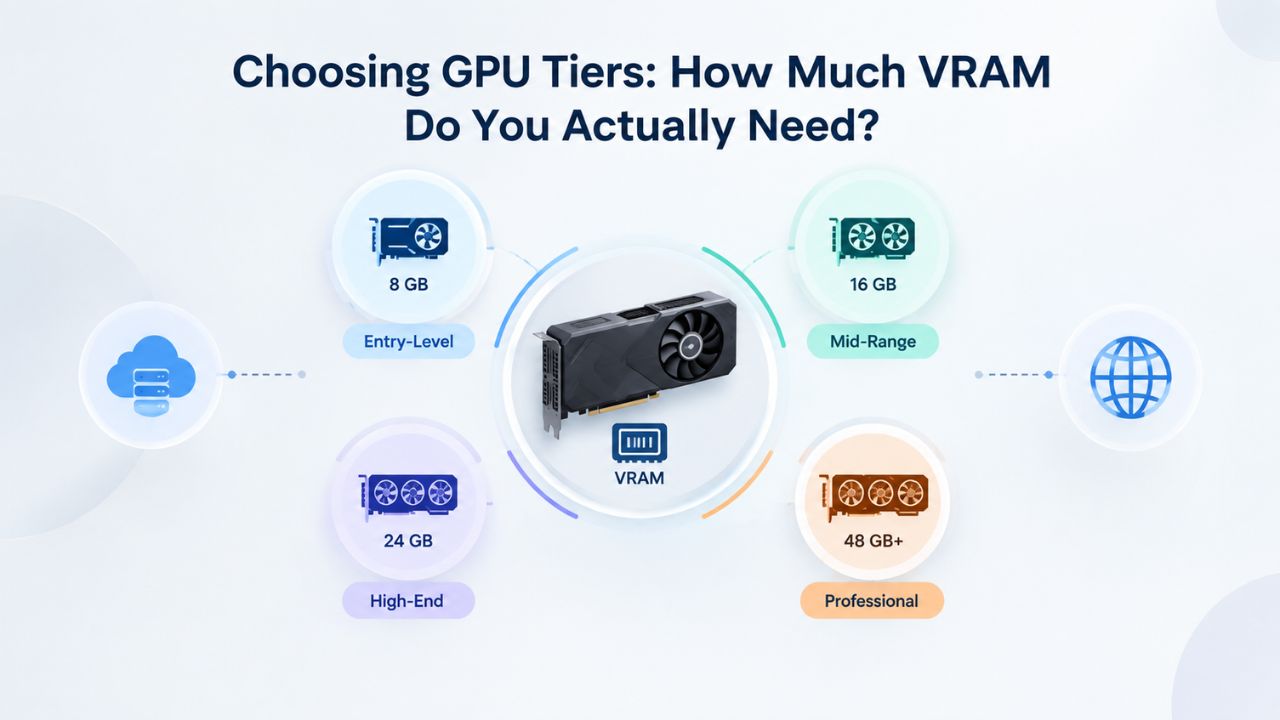
Entry-Level and Mid-Range GPU Configurations
The entry-level 8 GB tier is perfect for getting started with AI inference. Hobby projects, learning environments, and personal chatbots thrive at this tier. The infrastructure is affordable, and scaling to the next tier is straightforward if you outgrow capacity. Many developers start here, validate their approach, then upgrade once they confirm sustained demand. This iterative approach beats over-provisioning based on speculation.
Mid-range 16- to 24-GB configurations are the real production workhorse. A single GPU can serve teams of 50 to 500 people at this tier. The cost scales reasonably with capability. Latency and throughput are both excellent. Most production deployments at mid-market companies sit in this tier indefinitely. If you’re unsure which tier to start with, this is your safe bet.
Professional and Enterprise GPU Configurations
32 GB and larger VRAM enables production scenarios: 70B models in 4-bit quantization, Mixtral 8x7B, or smaller models with very large batch sizes and context windows. Required for APIs serving hundreds of concurrent daily users or enterprises running real-time inference at scale. Latency remains competitive even under heavy load. Infrastructure costs scale significantly; start here only if you have validated demand and confirmed sustained traffic.
80 to 96 GB and above (NVIDIA A100, H100, H200, or RTX Pro 6000 Blackwell) is reserved for production-scale operations, frontier model inference, full fine-tuning of large models, or multi-model serving. These are unnecessary for hobby and small-team inference. Overkill for development and experimentation. Justified only when you’re operating production systems at meaningful scale or running specialized workloads like model training and research.
Common VRAM Mistakes and How to Avoid Them
The most expensive mistake is oversizing VRAM. You buy a 96 GB GPU because a model “might grow,” provision it immediately, and pay for unused capacity for months while actual usage stays at 20 GB. This wastes significant budget with no performance gain. The second mistake is undersizing VRAM. You calculate 14 GB for a 7B model’s base weights, provision exactly 14 GB, deploy to production, and discover that KV cache and batching push actual usage to 18 GB, leading to crashes during traffic spikes. Right-sizing prevents both extremes.
Oversizing, Undersizing, and MoE Model Misunderstandings
Oversizing happens when you pick a tier based on future growth rather than current needs. A team with 50 users buying a 96 GB GPU for “when we grow to 500 users” is paying for unused capacity today. The better approach: start with a 24 GB tier, monitor usage, and upgrade when monitoring shows you’re approaching capacity. This conservative approach lets infrastructure scale with actual demand, not hypothetical growth.
Undersizing happens when you skip the 20 percent headroom buffer. Production systems run 24/7; occasional traffic spikes are guaranteed. If you provision exactly for baseline load, spikes will exceed VRAM and cause crashes. The buffer prevents this. Many outages happen because teams optimized for steady-state load without accounting for variability. Production systems must handle worst-case traffic gracefully.
Quantization Format Confusion and Context Window Overhead
Confusing quantization formats misalign intended and actual memory usage. INT8 and FP8 are not the same as Q4 (4-bit). Different quantization libraries- GPTQ, AWQ, GGUF, EXL2- produce different effective bit depths, different memory footprints, and different inference speeds. Always test with the exact quantization format and library you’ll use in production, not a theoretical number. Hypothetical calculations often diverge from reality.
Ignoring batch size and context length overhead is another classic mistake. A 7B model in FP16 requires 14 GB for base weights. But processing 4 concurrent requests with 8,000-token context windows adds several gigabytes of KV cache and activation buffer. Planning for only model weights leaves no margin. Under realistic load, you’ll hit 100 percent VRAM utilization within minutes. Always allocate 20 to 25 percent headroom above bare calculations before deploying.
Deployment Realities: Provisioning, Warm-Up, and Operations
Deploying a GPU VPS with AI frameworks typically takes 15 to 30 minutes. Most providers (including those reselling GoDaddy infrastructure) offer instant GPU provisioning; your VPS spins up in minutes, and you access it via SSH immediately. Installing the operating system, NVIDIA CUDA drivers, and Python environments adds another 30 to 60 minutes if you configure it manually. One-click deployment templates (pre-configured with CUDA, PyTorch, vLLM, and other common AI stacks) reduce total setup to 5 to 10 minutes.
Setup Timeframes and First-Inference Latency
For production APIs, expect 2 to 5 minutes of warm-up time before achieving steady-state latency. Load your model once, then keep it resident in VRAM for all subsequent inferences. This single decision, loading once versus reloading repeatedly, determines whether an API feels responsive or sluggish. Production systems always pre-load models and keep them in memory. Development environments might reload models for each test, only discovering this performance penalty in production.
The warm-up period is usually acceptable because it’s a one-time cost. After the initial load, throughput and latency stabilize. Design your monitoring and alerting to distinguish warm-up behavior from steady-state behavior. Alert based on sustained high latency, not transient spikes during initial loading.
Backup, Monitoring, and Operational Practices
Backup and snapshot practices matter for production reliability. Regularly snapshot your model weights and configurations. If your GPU needs driver updates, a security patch interrupts service, or you need to roll back a model change, snapshots restore your exact state in minutes. Most GPU VPS providers include automated daily backups; take additional manual snapshots before major changes like model updates or framework upgrades. Testing recovery procedures ensures your backups actually work when you need them.
Monitor your usage every month. Measure VRAM utilization via nvidia-smi, inference latency, and throughput. Plot these metrics over time to identify trends. If VRAM usage grows steadily, a sign that your workload or model is expanding, plan an upgrade before you hit 100 percent utilization and reliability falters. If VRAM usage stays flat, your current tier is right-sized. Proactive planning prevents runtime crashes and infrastructure sprawl.
Planning for Growth: Long-Term Scaling Strategy
AI models evolve rapidly. Mistral 7B represented the performance frontier for general reasoning in 2023. By 2025, teams experimenting with production systems often ran 13B or 70B models. By 2026, frontier deployments push toward multi-hundred-billion-parameter architectures. If you provision VRAM for today’s model, you’ll likely outgrow it within 6 to 18 months. Anticipating future growth prevents expensive mid-deployment migrations.

Anticipating Model Evolution and Infrastructure Evolution
Model evolution is inevitable. Larger models become feasible. Better models get released. Your use cases expand. Building infrastructure that accommodates scaling prevents disruption as you grow. This doesn’t mean over-provisioning today; it means choosing infrastructure platforms that support cheap upgrades rather than expensive migrations. A platform that lets you upgrade from 16 GB to 24 GB to 48 GB is better than one that requires hardware replacement at each step.
Some hosting providers support multi-GPU configurations, letting you shard a large model across multiple GPUs or run multiple smaller models in parallel. Understanding these capabilities upfront shapes your long-term strategy. A provider supporting sharding offers more flexibility as your needs grow. A provider that supports only single-GPU instances will eventually limit your scaling options.
Data-Driven Scaling and Optimization
When model improvements or new use cases require larger models, quantize more aggressively or switch to parameter-efficient fine-tuning (LoRA or QLoRA) to stay within your current tier. Migrate to larger hardware only if optimization proves insufficient. This conservative approach lets infrastructure scale with actual demand, not hypothetical growth. When you do scale, plan upgrades during off-peak hours and test the migration process before production traffic arrives.
Maintain detailed logs of VRAM usage, model performance, and user metrics. This data reveals patterns: when you spike, which models consume the most resources, and whether quantization trade-offs are actually impacting output quality. Armed with this data, you can make infrastructure decisions with confidence rather than speculation. The teams that scale most efficiently measure continuously and decide based on evidence, not guesswork.
Transform Your AI Deployments with Niya Digital
Niya Digital’s VPS Hosting service, powered by GoDaddy infrastructure, scales with your AI ambitions. From hobby GPU experiments to production multi-user inference APIs, configure the compute and VRAM resources your workload demands. Niya Digital supports both managed and unmanaged deployments, giving you flexibility to run pre-built AI stacks or build fully custom environments. Start small, monitor real usage, and scale with confidence as your AI application grows.
Frequently Asked Questions
How much VRAM do I need for GPT-4 or Claude?
These proprietary models are served exclusively via API by their creators, so you don’t run them locally. If you’re deploying open-source alternatives like LLaMA 2 70B or Mistral Large, follow the sizing guidelines in this post. For proprietary model APIs (OpenAI, Anthropic, other cloud providers), VRAM is irrelevant; you send requests over the network and receive responses. Your infrastructure cost depends on API pricing, not GPU ownership.
Can I run multiple models simultaneously on one GPU VPS?
Yes, if your total VRAM budget permits. A 24 GB GPU can hold Mistral 7B (5 GB in Q4) and a smaller model, leaving room for KV cache and batching. In practice, time-sharing (running one model actively, swapping to another on demand) is common. Modern frameworks like vLLM support multi-model serving with careful memory management, though setup complexity increases significantly.
What’s the difference between quantization formats like GPTQ, AWQ, and GGUF?
All reduce VRAM by compressing weights to lower precision, but the methods and trade-offs differ. GGUF (used by llama.cpp) optimizes for CPU inference and portability. GPTQ and AWQ target GPU acceleration and deliver faster inference on NVIDIA hardware. All achieve 4-bit or 8-bit compression; test with your exact target format and library before production deployment.
Should I use Windows or Linux for AI inference?
Linux is standard for AI workloads. It has superior CUDA driver support, lower system overhead, and most AI frameworks optimize for Linux first. Windows works, but driver maturity lags, and library support is fragmented. Recommendation: use Linux unless your specific workflow requires Windows-only tools.
Can I upgrade my GPU mid-deployment without downtime?
Most GPU VPS providers support live migration to larger GPUs, though brief downtime (10 to 30 minutes) is typical during migration. Some advanced providers offer true hot-upgrade capabilities. Plan upgrades during off-peak hours to minimize user impact and service disruption.
Is 4-bit quantization safe for production inference?
Yes. Quantized models are standard in production across industry. Quality loss is negligible for most inference tasks. Fine-tuning is more sensitive to precision loss than inference; if you’re fine-tuning, test 8-bit before committing to 4-bit. Always validate output quality on your actual dataset under realistic load conditions.
How do I measure actual VRAM usage of a running model?
Use NVIDIA’s command-line tools: nvidia-smi for overall GPU/VRAM statistics, or watch nvidia-smi for real-time monitoring. In Python, use torch.cuda.memory_allocated() (PyTorch) or cupy. cuda.Device().mem_info (CuPy) to track precise memory footprint. Monitor under realistic load to measure real-world consumption.
Can I use AMD or Intel GPUs instead of NVIDIA?
NVIDIA dominates AI inference because of its mature CUDA ecosystem and broad software support. AMD GPUs (RX 7900 XTX, MI300X) and Intel Arc GPUs exist but have fragmented software support and fewer pre-built models and libraries. For production inference, NVIDIA is the reliable choice.
What happens if I choose a GPU with too little VRAM?
The model either fails to load with an out-of-memory error or spills into system RAM and runs 5 to 10 times slower; neither scenario is acceptable for production. Always allocate at least 20 percent headroom above calculated VRAM needs to ensure reliability.
Do I need a dedicated IP address on my GPU VPS?
For production inference APIs (especially behind load balancers), a dedicated IP is standard and usually included. For personal experimentation or internal tools, a shared IP is sufficient. If you run a public-facing service, request a dedicated IP to avoid reputation issues.
How does batch size affect VRAM usage?
Batch size is the number of inference requests processed concurrently. Doubling batch size roughly doubles KV cache overhead and activation buffer consumption. A 7B model processing batch size 1 uses significantly less VRAM than batch size 8. Plan your batch size before provisioning.
Is Niya Digital’s VPS Hosting suitable for AI workloads?
Niya Digital’s VPS Hosting, powered by GoDaddy infrastructure, supports custom GPU configurations with root access, letting you install AI frameworks and manage your own models. For specialized AI features (pre-configured inference stacks, managed monitoring), consult Niya Digital’s offerings. Niya Digital’s strength is flexible, scalable infrastructure.
How long does it take to fine-tune a model on GPU VPS?
Fine-tuning durations depend on model size, dataset size, and hardware. A 7B model fine-tuned on 1,000 examples with QLoRA might complete in 30 to 60 minutes. Full fine-tuning takes 3 to 6 hours. Larger models and datasets scale training time substantially. Use hourly rental for experiments.
What’s the difference between streaming responses and batch inference?
Streaming responses send inference results token by token as they are generated, reducing perceived latency. Batch inference processes multiple complete requests and returns full results, maximizing throughput. Most production systems use streaming for user-facing interfaces and batch processing for backend tasks.
How do I handle model updates without interrupting live inference?
Use canary deployments: spin up a second GPU VPS instance with the new model, run it alongside the original, and route a small percentage of traffic to it for validation. Once validated, gradually shift traffic to the new instance, then retire the old one.
Glossary
- GPU (Graphics Processing Unit): A specialized processor originally designed for graphics rendering that has become essential for parallel computing tasks like AI model training and inference because it can perform thousands of calculations simultaneously across many cores.
- VRAM (Video Random Access Memory): High-speed memory physically attached to a GPU and separate from system RAM, used to hold model weights, intermediate computations (activations), KV caches, and temporary buffers during AI inference or training.
- Inference: Running a trained machine learning model on new input data to generate predictions or outputs, as opposed to training, which updates model weights using labeled data and backpropagation.
- Quantization: A compression technique that reduces model size and memory requirements by storing weights at lower precision (8-bit or 4-bit instead of 32-bit), with minimal accuracy loss for most inference tasks and applications.
- KV Cache: Cached attention keys and values computed and stored in transformer models during inference; grows linearly with input context length and batch size, adding significant VRAM overhead to base model weight requirements.
- Fine-Tuning: Adapting a pre-trained model to a specific task by training it further on domain-specific data, requiring substantially more VRAM than inference but significantly less than training from scratch from random initialization.
- Parameter: A learnable weight in a neural network; models are measured in billions (B) of parameters; a 7B model has 7 billion individual trainable values.
- Batch Processing: Running multiple inference requests concurrently on a single GPU; improves throughput and latency efficiency but increases KV cache memory consumption proportionally to batch size.