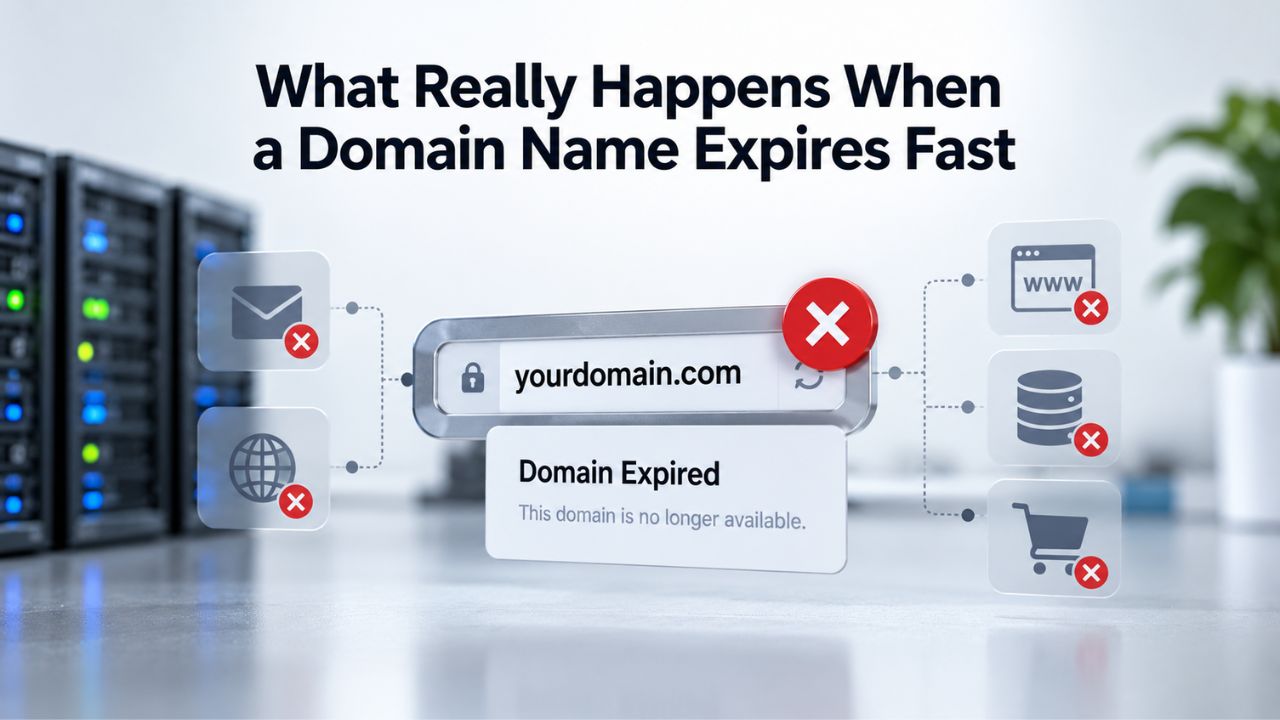
The Moment Your Domain Expires: What Happens in the First Hours
Your domain registration expires at midnight. The moment arrives quietly, no warning alarm, no automatic intervention. At that point, control passes from you to a sequence of ICANN-mandated phases designed to give you multiple chances to act. But the clock is counting down, and each phase narrows your options and raises recovery costs.
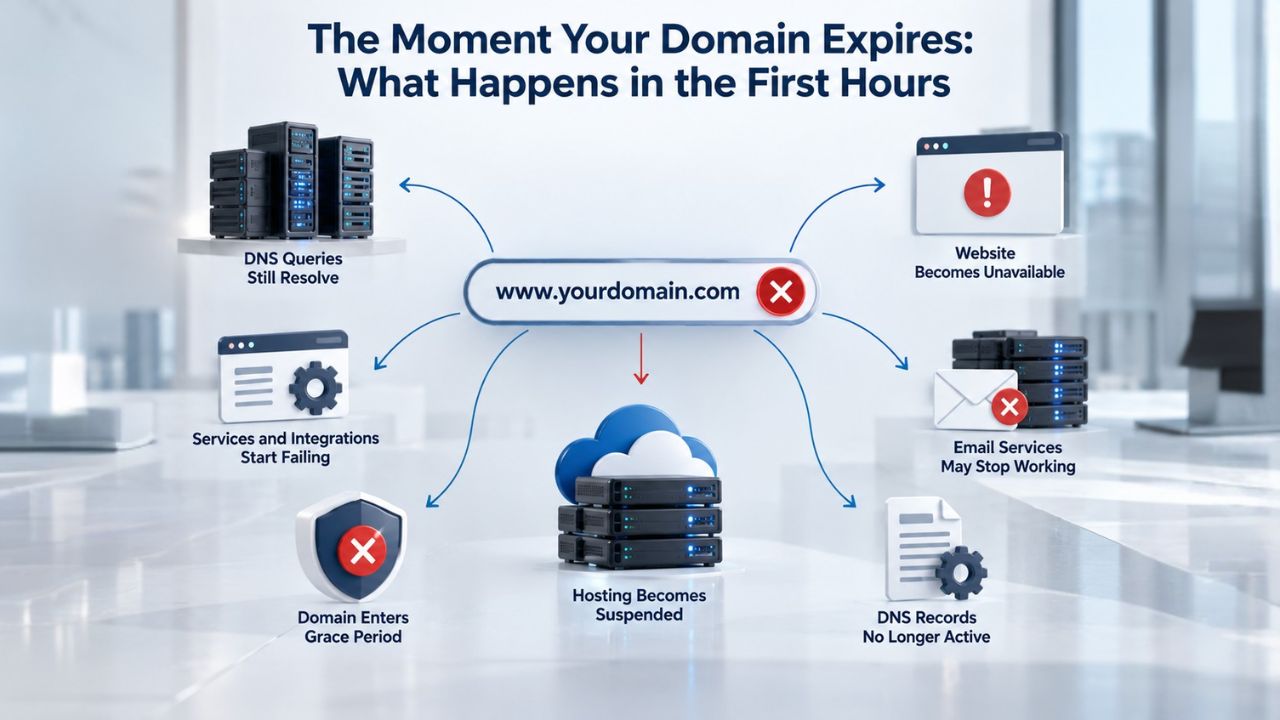
DNS Resolution Stops (Or Becomes Unpredictable)
When your domain expires, ICANN policy requires registrars to interrupt DNS resolution, which is the system that translates your domain name into an IP address and routes traffic to your website. Many registrars disable this on day one, the same day your registration ends. Others wait a few days.
Either way, within the first 24 to 72 hours, your website is no longer reachable by its domain name. Visitors typing your address into their browser see an error. Search engines note the failure. Any service that depends on DNS, email routing, API calls, or SSL certificate validation stops functioning at the same moment. This is not a warning state; it is a complete disruption. Your business loses access immediately, even though your domain hasn’t been deleted yet.
The ICANN Expired Registration Recovery Policy requires registrars to interrupt DNS for a minimum of eight days post-expiration if the domain is deleted within that window. But the practical impact is immediate: by hour one, you are offline. Niya Digital’ team has found that customers discover most domain disruption incidents, rather than registrars proactively flagging them, because notification systems don’t always trigger the moment DNS goes down.
Email Fails Simultaneously With Website
Your domain’s email system depends entirely on DNS records, specifically, MX (Mail eXchange) records that tell mail servers where to deliver incoming mail. When DNS resolution stops, those records become inaccessible. Email stops working immediately when a domain expires, because MX, SPF, DKIM, and DMARC records cease resolving. Incoming emails bounce back to senders with a “host unknown” or delivery-failure message. Outgoing mail may fail authentication checks and be rejected or marked as spam. This failure is total and sudden; there is no gradual degradation. One moment email works; the next it does not.
Emails already stored in your mailbox survive; your mailbox provider (Gmail, Outlook, or another mail host) still holds them. But new incoming mail cannot be delivered. If a third party later re-registers the expired domain, the new owner can change the MX records, redirecting all subsequent mail to themselves and effectively capturing your business communications. Researchers have documented cases where organizations registered a lapsed domain that a large company once used and immediately began receiving login links, internal forwards, and supplier communications, simply because MX records still pointed to infrastructure that had since expired. For small businesses and enterprises alike, this represents a significant security and privacy risk.

Domain Name Registration
Each and every domain name comes with all you need to get online.
- Domain Forwarding and Masking: Direct any domain name you own to your website. Anyone who types that domain name into their browser is taken directly to your website.
- Domain Locking: Domain locking prevents accidental or intentional transfers of domain ownership and stops anyone from redirecting your nameservers.
- Total DNS Control: Manage your domain nameserver (DNS) records and set your email, FTP, sub-domains and website location all from one control panel.
- Change of Registration: Assign your domain name to someone else or change the contacts for your domain online anytime.
- Status Alerts: Monitor the status of your domain and get instant alerts if there's been a change.
- Auto Renew Protection: No need to watch expiration dates to make sure you renew on time! Auto renew keeps your domains, hosting, website builders, and other products in your name and under your control.
Domain Disclaimers:
- Special savings apply only to first year of registration. You must purchase entire section to qualify for special savings.
- The final price may differ because of additional sales, fees, and promotions.
- Products will automatically renew until cancelled. You may turn off the auto-renewal feature by visiting your account.
- Change of registration may require a fee for certain domains.
The Three-Phase Lifecycle: Grace Period, Redemption, and Pending Delete
The moment your domain expires, it enters an ICANN-structured sequence that determines how long you have to act and what it will cost. Each phase has a fixed duration, set rules, and an escalating recovery price. Understanding this sequence matters because each day you miss costs you options. The following table outlines the timeline and your options at each stage:
| Phase | Typical Duration | Who Can Recover | Recovery Cost | DNS Status | Registry Source |
|---|---|---|---|---|---|
| Registrar Grace Period | 1–45 days after expiration | Original registrant only | Standard renewal fee | Typically disabled from day one | ICANN Expired Registration Recovery Policy (ERRP) |
| Redemption Grace Period (RGP) | 30 days after the grace period | Original registrant only | Redemption fee plus renewal fee | Remains disabled throughout | ICANN Expired Registration Recovery Policy (ERRP) |
| Pending Delete | 5 days after redemption | None; recovery is no longer possible | Not applicable | Remains disabled | ICANN Expired Registration Recovery Policy (ERRP) |
| Public Pool Release | Immediately after deletion | First registrant to successfully register the domain | Standard registration fee | Active once re-registered | ICANN Expired Registration Recovery Policy (ERRP) |
| Backorder Window | Varies if the domain expires again | First successful backorder customer | Backorder service fee plus registration fee | Active once re-registered | Industry standard practice |
| Permanent Re-Registration | Ongoing | Anyone able to negotiate with the current owner | Market price (negotiated) | Active once ownership transfers | Private negotiation |
How Recovery Works During Each Phase
After expiration, most registrars offer a grace period during which you can still renew your domain at the standard renewal price. This period typically lasts 1 to 45 days, depending on the registrar; it is not an ICANN-mandated requirement, so the duration varies. If you catch the error within this window and renew, you pay only the standard annual renewal fee, and your domain is restored. Your website comes back online. Email resumes. DNS resolution is re-enabled.
The catch: even during the grace period, DNS resolution is typically disabled, meaning your services are offline the entire time. Many registrants assume they have weeks to renew without consequence, only to discover their site has been dark for days. The grace period is a technical safety net, not a business continuity plan. The financial advantage is clear: you can still renew at the standard price, but the operational damage has already begun.
Redemption and Declining Options
If you don’t renew your domain during the registrar grace period, it exits that phase and enters the ICANN-mandated Redemption Grace Period (RGP). For most generic top-level domains (.com, .net, .org), this window is exactly 30 days. During this phase, only the original registrant can recover the domain; third parties cannot register it. You can’t transfer the domain to another registrar. DNS remains disabled. But recovery is still possible if you act.
Automated scanning services track every domain entering redemption and alert threat actors and domain investors within minutes. After the 30-day redemption period, your domain enters a five-day “Pending Delete” phase. At that point, you can no longer recover the domain through your registrar. After five days, the registry deletes the domain and releases it into the public domain pool, available for anyone to register on a first-come, first-served basis.
Automated registration services scan for valuable dropped domains and snap them up within seconds. Once someone else registers it, recovery is no longer a technical option; you would need to negotiate a purchase at market rates or use a domain backorder service to try to recapture it if the new owner lets it expire.
The Cost Escalation: Why Every Day Matters
The financial journey from expiration to permanent loss follows a predictable curve; each phase increases the barrier to recovery. Understanding the cost structure shows why immediate action matters. The following table shows how costs and service impacts escalate across the domain lifecycle:
| Service/Cost Factor | Grace Period | Redemption Period | After Deletion |
|---|---|---|---|
| Website Accessibility | Offline from day one | Offline throughout the 30-day redemption period | Offline until the domain is re-registered |
| Email Delivery | Blocked because MX records are inaccessible | Blocked throughout the redemption period | May be intercepted by the new domain owner after re-registration |
| Recovery Mechanism | Renew directly through the registrar dashboard | Contact the registrar and pay the redemption fee | Acquire via backorder service or negotiate with the new owner |
| Recovery Cost | Standard renewal fee | Redemption fee plus the standard renewal fee | Market price, which may range from hundreds to thousands |
| Third-Party Risk | Low because the domain is not yet publicly available | Monitored by automated drop-catching and scanning services | High because the domain may be registered by another party |
| Time Remaining to Act | Approximately 1–45 days | Approximately 30 days | About 5 days before permanent public release |
| Recovery Guarantee | Yes, the registrant can renew during the grace period | Yes, the registry must allow redemption during RGP | No guarantee; registration is first-come, first-served |
How Costs Escalate Across the Expiration Timeline
During the registrar grace period (typically days 1–45), renewal costs whatever your registrar charges for an annual renewal. For most top-level domains, this is a modest, standard rate depending on the TLD and registrar. This is your lowest-cost window. Act here, and you escape with minimal expense and avoid all redemption fees. Once you enter the redemption grace period (typically days 46–75), the cost structure changes dramatically. You pay two separate fees: a registry redemption/restoration fee (a substantial additional charge) plus the standard annual renewal fee. This combined cost is substantial and non-negotiable; registrars cannot waive the redemption fee, which the registry collects to cover the administrative restoration process.
If your domain is deleted and released to the public pool, recovery becomes a matter of luck, negotiation, or significant expense. If a third party has registered it, you can attempt a backorder through a domain backorder service, which monitors the domain and attempts to re-register it if the new owner lets it expire.
Alternatively, you can contact the new owner and attempt to purchase the domain at their market asking price, which can be costly for valuable domains that have accumulated brand equity and search engine history. Understanding the cost gap between standard renewal and redemption is a powerful incentive to act within the grace period. The difference in total cost between acting immediately and waiting even a few days can be substantial enough to drive operational prioritization.
Why Domains Expire: The Common Causes
Expiration is rarely a surprise in hindsight. Analysis of hundreds of domain incidents reveals the same handful of causes, all preventable with proper systems.
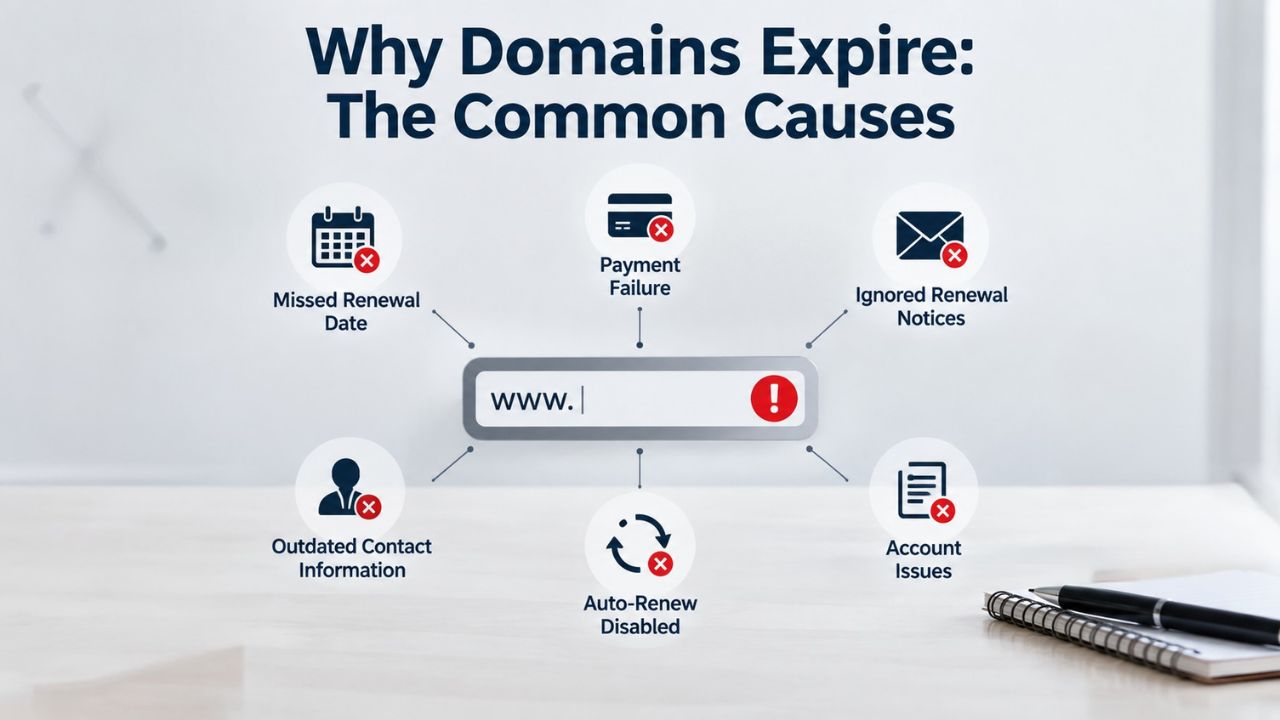
Payment and Notification Failures
The single most common cause of accidental domain expiration is a failed auto-renewal payment combined with missed renewal notices. Auto-renewal depends entirely on the validity of the payment method on file. If your credit card has expired, reached its limit, been canceled, or your bank flags it as fraudulent, the renewal charge will decline. Most registrars attempt the charge 15 to 30 days before expiration and retry two or three times over the following days. If all attempts fail, the domain expires on its scheduled date. The failure is silent.
At the same time, ICANN policy requires registrars to send at least two renewal reminder notices before expiration: one about a month prior and one about a week prior. But all notices are sent to the registrant email address listed in the domain’s official contact information. If that email address is outdated, unmonitored, or redirects to a former employee’s account, renewal notices never reach the person responsible. This problem is amplified in organizations where renewal reminders are routed to a shared inbox that receives hundreds of messages daily. The renewal notice, sent by an unfamiliar registrar and containing unfamiliar terminology, gets filed as spam, deleted, or forgotten.
Team Changes and Lost Visibility
Large organizations often accumulate hundreds or thousands of domains registered over years or decades. With every team turnover, acquisition, or department reorganization, knowledge about domain ownership becomes fragmented. Real-world examples include Microsoft’s Hotmail UK (2003), Foursquare (2010), and HBO Now (2017), all experienced domain expiration because the domain was managed outside the normal deployment pipeline, owned by a small set of people, and ignored until renewal failed. When those people left or changed roles, no one else knew to renew the domain.
For small businesses, the problem is simpler but equally dangerous. A single founder or small team manages domains through a registrar they registered with years ago. If that person becomes unavailable, no one else has access to the registrar account or knows which domains are in use. Critical domains slip into expiration because the organization lacks centralized visibility into its domain portfolio. This is why many organizations now maintain a documented inventory of all their domains, including registrar, expiration date, registrant contact, and backup renewal contacts.
ICANN Notification Requirements: Why Reminders Still Fail
ICANN’s Expired Registration Recovery Policy requires registrars to notify domain owners before and after expiration. In theory, these notifications should prevent accidental loss. In practice, they often don’t.
Pre-Expiration Notices Are Required But Not Foolproof
Registrars must send at least two renewal reminders: one about a month before expiration and one about a week before expiration. The word “approximately” is key; timing can vary, and if the notice arrives when the recipient is overwhelmed or on vacation, it may be overlooked. The notices are sent to the email address listed in the domain’s WHOIS record, not to the billing contact or the current account owner. If that email is a legacy address from a former employee, a shared inbox, or a domain-based email (which becomes unreliable if the domain is about to expire), the notice will not reach the right person.
Post-Expiration Notices Come Too Late
Registrars must send at least one additional notice within five days after expiration, including restoration instructions and information about domain transfer services. By the time this notice arrives, the domain is already offline, the outage has begun, and customers have noticed the problem. For businesses that rely on their website or email, five days of outage is five days of lost revenue, customer communication, and trust. This notice is meant as a last-chance recovery tool, but it arrives after the damage is done.
The requirement that registrars send notices is also only as good as the contact information on file. If that information is outdated or incorrect, ICANN compliance means the registrar sent the notice; it does not mean the owner received it. This distinction is central to why many expiration incidents occur despite ICANN’s notification framework.
Take Control of Your Domain Renewal
Don’t let an expired credit card or missed email push your domain into redemption. Niya Digital, through our ICANN-accredited registrar partner, provides automatic renewal options, expiration alerts, and DNS management tools that keep your domain active without manual intervention. Protecting your domain is simpler than recovering it, and far less expensive. Whether you’re registering a new domain or transferring an existing one, proactive management prevents costly disruption.
The Hijacking Risk: Your Expired Domain as a Target
Once your domain is deleted and released to the public pool, it becomes a target for attackers, investors, and legitimate registrants. The risk isn’t merely that someone will register your domain name; it is that they will do so strategically to exploit your brand, intercept your communications, or disrupt your operations.
How Third-Party Acquisition and Exploitation Works
Within hours of a domain entering the public pool, automated registration services scan for valuable dropped domains and attempt to register them. Threat actors, domain investors, and competitors all have tools configured to catch specific domains the moment they become available. For a valuable domain, the first registrant wins, often an automated system, not a human. Once a third party owns your domain, they control all its resources, including email routing and DNS records.
They can alter MX records to redirect all incoming email to servers they operate, allowing them to intercept business communications, password-reset links, and sensitive data. Researchers have registered expired domains once used by large organizations and immediately began receiving login credentials and internal communications, simply because mail servers were still sending traffic to the old domain address. A frequently cited example is the 2017 PyPI (Python Package Index) incident: the repository domain expired, and an attacker acquired it, allowing potential injection of altered code into packages downloaded by thousands of developers.
Brand Damage, SEO Penalties, and Recovery Cost
Once a third party re-registers your domain, they can populate it with any content. Attackers often restore archived content from your domain’s history and republish it alongside malicious or misleading material, leveraging the domain’s accumulated search engine history and backlinks to drive traffic to pages you do not control. The domain carries institutional memory, years of backlinks, indexed pages, and user trust, which a threat actor can exploit completely.
Search engine penalties also affect your brand’s ability to rank if you attempt to register a new domain afterward. The old domain continues appearing in search results because search engines cached it. If it now hosts malicious content or content misrepresenting your brand, customers and search engine algorithms both associate your brand name with that content. If you want your domain back after it drops to a third party, you can attempt a backorder (which monitors for re-availability). Still, you are competing against automated systems that work faster. Backorder services charge fees and offer no guarantee of success. Direct purchase from the new owner may be your only option, which can be costly for a valuable domain.
Recovery Steps: What You Can Do at Each Phase
Your options narrow with each phase, but recovery is possible at every stage up to pending delete. Knowing what to do the moment you discover your domain has expired is critical.
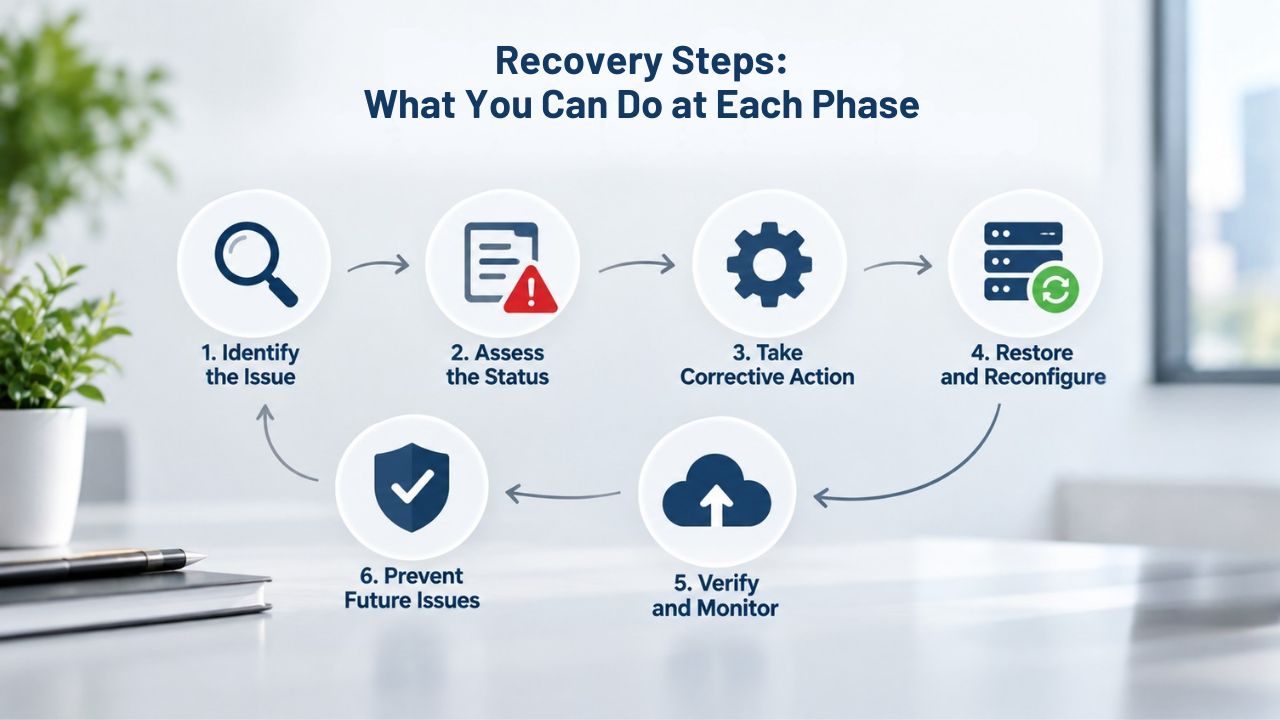
Acting During the Grace and Redemption Periods
If you discover your domain has expired and you are still within the registrar grace period (typically days 1–45), the fix is straightforward: log into your registrar account and renew the domain for another year or more. You pay the standard renewal fee- no premium, no redemption costs. Your domain is restored to active status. DNS resolution resumes. Email begins working again. For most people, the problem ends here. The key is acting quickly; every day in the grace period brings you closer to redemption costs.
If your domain has already entered the redemption grace period (typically days 46–75), you can no longer renew it in your registrar dashboard. Instead, you must initiate a redemption or restoration process, which requires paying the registry restoration fee in addition to the standard renewal fee. Contact your registrar’s support team and ask them to restore your domain. They will provide a quote for the restoration fee plus the renewal fee. Approve the payment, and your domain is restored. DNS is re-enabled email resumes. The process usually takes a few business days because the registrar must coordinate with the registry to restore the domain from its deleted state to active status.
Recovery After Pending Delete and Permanent Loss
If your domain has already been deleted and released to the public pool, or if someone else has already registered it, direct recovery through your registrar is no longer possible. Your options are limited and can be expensive. You can use a domain backorder service (which monitors for the domain to become available again if the new owner lets it expire) and pay a backorder fee. There is no guarantee the backorder will succeed. Alternatively, you can identify the new registrant through a WHOIS lookup and try to purchase the domain directly, which may be costly for a valuable domain.
If your domain was used for email or critical services, check if the third-party owner is actively using the domain or if it is parked (showing ads or a placeholder page). If it is parked, they may be willing to sell. If a competitor or attacker is using it, your only path forward is legal action (if trademark infringement is involved) or accepting the loss and moving forward with a new domain name and aggressive redirects from any domains you still control.
Prevention and Monitoring: The Long-Term Strategy
The best time to deal with domain expiration is before it happens. A small investment in monitoring and automation prevents the cascade of problems that follows a lapsed domain.
Enable Auto-Renewal, Monitoring, and Backup Methods
The first line of defense is enabling auto-renewal for every domain you own or manage through your domain hosting provider. When auto-renewal is turned on, most registrars will automatically charge the domain renewal 30 days before expiration. But auto-renewal is only as reliable as the payment method behind it. Whenever you get a new credit card, update your registrar’s billing information immediately. Add a backup payment method if your registrar supports it. Many registrars let you add multiple payment methods, and if the primary charge fails, they will retry the backup option. For critical domains, do not rely on auto-renewal alone. Set calendar reminders for 90, 60, 30, 14, and 7 days before each domain’s expiration date.
For organizations managing dozens or hundreds of domains, dedicated domain monitoring services track all your domains and alert you to approaching expirations, failed renewals, and changes to registration details. These services can integrate with Slack, email, or other notification systems. Keep a documented list of all your domains, including the registrar, expiration date, registrant email, billing contact, and critical dependencies. Ensure that the registrant email address on file with each registrar is actively monitored, not a shared inbox, not a domain-based email, and not a personal email likely to become inaccessible. Use a dedicated corporate email address that multiple team members can monitor.
Document Your Domain Portfolio and Establish Clear Ownership
For organizations of any size, maintaining a centralized domain inventory is insurance against disruption. When a team member leaves, registrars send notices, or an incident occurs, you have a clear picture of your domain portfolio and who owns each one. This documentation should also include which websites and services depend on each domain, so you understand the business impact if a domain lapses. The cost of maintaining this documentation is trivial compared to the cost of losing a valuable domain or experiencing a surprise outage from a critical domain expiration.
Understanding Your Rights and ICANN Policy
Domain registration is not ownership; it is a leasehold. Every domain registration expires and must be renewed to remain active. ICANN policies govern this process globally, but rules vary by top-level domain and registrar.

gTLDs vs. ccTLDs: Different Rules, Same Urgency
Generic top-level domains (.com, .net, .org, and hundreds of newer gTLDs like .app, .dev) follow ICANN’s Expired Registration Recovery Policy, which provides a consistent framework: grace period, redemption grace period, and pending delete. For most gTLDs, the timeline is approximately 45 days for the grace period, 30 days for redemption, and 5 days for pending delete. Country-code top-level domains (.uk, .de, .jp, ccTLDs), by contrast, are managed by individual registry operators.
Each registry sets its own policies for expiration, grace periods, and redemption; some ccTLDs have more lenient recovery periods, while others may delete domains immediately upon expiration. This variation exists because each country’s registry operates under different legal frameworks and business models. If you manage international domains, research the specific rules for each country’s ccTLD. Do not assume that .co.uk or .fr follows the same timeline as .com. Some country registries can delete domains immediately, making quick action even more critical.
Your Registrant Rights and Registrar Obligations
ICANN accredits registrars and requires them to disclose renewal fees, provide notification services, and allow restoration during redemption. If a registrar fails to send required notifications, fails to allow redemption during the mandatory grace period, or uses hidden fees, you have grounds to file a complaint with ICANN’s Contractual Compliance team.
This does not undo an expiration, but it does create accountability. If you believe your registrar acted negligently, document the failure and file a complaint at ICANN’s Contractual Compliance portal. Your registrant rights end once your domain is deleted. After that, recovery depends on market availability and negotiation, not policy.
Prevent Expiration Before It Becomes a Crisis
Domain expiration is one of the most preventable infrastructure failures in modern business. Niya Digital’s comprehensive domain management services, including auto-renewal, multi-year registration options, expiration alerts, and direct registrar partnership, help you avoid the costly cycle of grace periods and redemption fees. Whether you manage one domain or hundreds, losing a domain to an accidental expiration is a systems failure, not a circumstance. Implement renewal monitoring today, and stop worrying about domain downtime.
Frequently Asked Questions
What is the exact timeline for domain expiration?
For most generic top-level domains (.com, .net, .org), the timeline is: grace period (up to 45 days), redemption grace period (30 days), and pending delete (5 days). Country-code domains vary by registry. During the grace period, you can renew at the standard price. During redemption, you must pay a restoration fee ($100–$300) plus renewal. After pending deletion, you can’t recover it directly. The entire window from expiration to permanent deletion is typically 75–80 days for gTLDs, depending on registrar policy.
Will my emails stored in my mailbox disappear if my domain expires?
No. Emails already stored in your mailbox will remain available after domain expiration. Your mailbox provider (Gmail, Outlook, etc.) retains the messages. The problem is that you cannot receive new incoming emails because the MX records (which route mail to your mailbox) stop working when DNS resolution is disabled. If a third party later re-registers your domain and alters the MX records, they can potentially intercept new mail sent to your domain. Still, your existing mailbox contents are not automatically deleted.
Can I recover my domain after it enters pending delete?
Recovery becomes impossible once a domain enters pending delete. However, technically you can still re-register it if you act extremely quickly (within minutes) after it enters the public pool. In practice, automated registration services snap up valuable domains within seconds of release. Your best option is a domain backorder service, which monitors for the domain to become available and attempts to re-register it on your behalf if the current owner lets it expire or releases it for any reason. Backorder services charge a fee and offer no guarantee of success.
How much does it cost to recover a domain in redemption?
Recovery costs during redemption are substantially higher than standard renewal, with both a registry redemption fee and the standard annual renewal fee required. The exact cost varies by TLD and registry. This is a registry-mandated fee; registrars cannot waive it. The cost reflects the administrative and technical work required to restore a deleted domain from the registry’s systems. The total is always significantly more than if you had renewed during the grace period.
What happens if my auto-renewal fails?
If your auto-renewal charge is declined, most registrars will retry the charge two or three times over the following days. If all attempts fail, your domain will expire on its scheduled date.
The failure is silent; registrars do not always send prominent alerts when auto-renewal fails. To prevent this, update your billing information whenever you get a new credit card, enable a backup payment method if possible, and check your registrar dashboard periodically to confirm auto-renewal is still active and your payment method is current.
Can I transfer my domain during the grace period?
ICANN policy permits expired generic TLD domains to be transferred to another registrar, provided the domain is still in its grace period. You must complete the transfer before the domain enters its redemption period. If you want to move your domain to a different registrar immediately after expiration, you can do so during the grace period without triggering redemption fees. Transfers for gTLDs typically require an EPP code and an unlocked status; check with your current registrar for the specific process.
Why does my registrar allow third parties to register my domain during the grace period?
During the grace period, the domain is still registered to you, so third parties cannot register it. However, some registrar policies allow a domain to be available for auction or re-registration by others during the grace period if the original registrant has not renewed. Check your registrar’s terms of service to understand how your grace period works and what happens if you don’t renew within their timeline.
What if my domain was used for a critical API or external service?
If your domain was used in DNS records for third-party services, for example, an API endpoint, a CDN configuration, or an email service, expiration creates a cascading failure. Any dangling DNS records that reference services no longer responding become exploitable; attackers can re-register the domain and hijack the data exchange or manipulate the responses.
Before allowing any domain to expire, audit all external services and APIs that reference it. Update DNS records or notify third-party providers before expiration. This preventive step is critical for domains that support infrastructure beyond website and email.
How can I check if a domain I own is in danger of expiring?
Use WHOIS lookup tools to check a domain’s expiration date. Most registrars also display the expiration date in your account dashboard. If your registrar doesn’t provide clear visibility, consider switching to one that does. Many domain monitoring services can track multiple domains and alert you as they approach expiration. For any mission-critical domain, set reminders 90, 60, 30, 14, and 7 days before expiration.
Can I renew my domain more than a year in advance?
Yes. ICANN allows renewals for up to 10 years at a time, though the maximum registration term can never exceed 10 years from today. Multi-year registrations reduce renewal frequency and the risk of failure. If you register a domain for 5 or 10 years, you only need to worry about renewal once per decade rather than once per year. This strategy eliminates recurring billing failures and contact information drift as a source of expiration.
What if I don’t want to keep my domain anymore?
If you want to let a domain expire deliberately, allow it to lapse without renewal. After it exits the pending delete phase and is released to the public pool, anyone can register it. If you want to prevent others from registering it, you can keep renewing it indefinitely, or you can document that the domain was intentionally released and redirect any residual traffic to your new domain for 12–24 months to train users and search engines.
Glossary
- Auto-Renewal Grace Period: A registrar-controlled period (typically 1–45 days) immediately following domain expiration during which the original registrant can still renew the domain at the standard renewal price without paying a redemption fee.
- Redemption Grace Period (RGP): A 30-day ICANN-mandated period following deletion of a domain during which only the original registrant can restore the domain by paying a substantial registry redemption fee plus standard renewal fees. During RGP, the domain remains locked from transfers and public registration.
- WHOIS: A public database containing registrant information for domain names, including contact details and registration/expiration dates. Accessible through WHOIS lookup tools, it allows anyone to verify who owns a domain and when it will expire.
- Transfer Lock: An ICANN-approved security feature that prevents a domain from being transferred to another registrar without explicit authorization from the registrant. Transfer lock does not prevent domain expiration; a domain can expire and be deleted even if it is locked.