Small businesses face a critical decision when choosing productivity tools: investing in robust cloud collaboration platforms or settling for limited, fragmented solutions. Microsoft 365 for Small Business offers a structured approach with three tiers designed to align with different team needs and operational maturity levels. Understanding the true investment in deploying and maintaining Microsoft 365, encompassing subscription, setup, training, and security configuration, helps you make informed investment decisions that support sustainable growth. Niya Digital is a reseller of Microsoft 365 Business solutions and works with an authorized Microsoft partner network to help small businesses deploy and manage their cloud productivity platform.
Microsoft 365 Business Plans: Understanding the Three Tiers
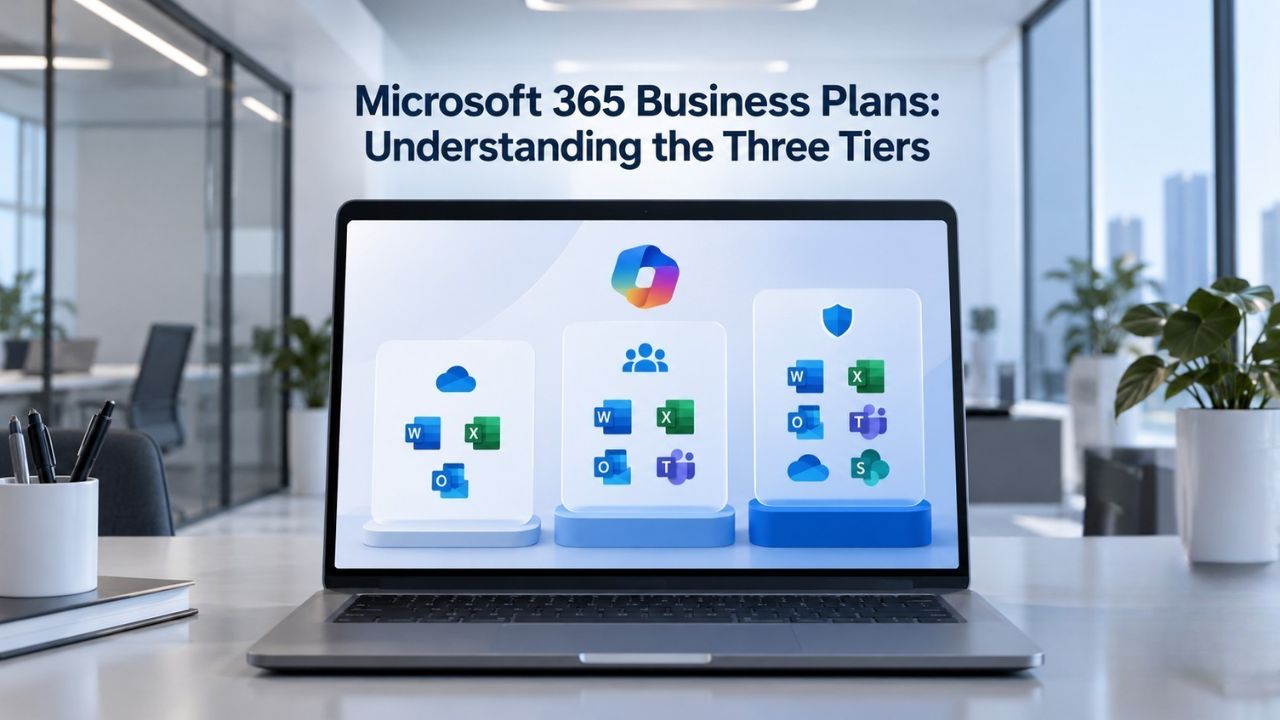
Microsoft 365 Business plans operate on a per-user subscription model, meaning you provision each employee or team member individually. This structure lets organizations scale capabilities with headcount and assign features based on job requirements. The three main tiers, Business Basic, Business Standard, and Business Premium, differ significantly in application access, security capabilities, and device management features included.
Business Basic: Foundation for Cloud-First Teams
Microsoft 365 Business Basic serves organizations where team members work primarily through browser-based and mobile applications. This tier includes web and mobile versions of Office apps, Word, Excel, PowerPoint, and Outlook, along with Microsoft Teams for chat, video meetings, file collaboration, and team workspaces. Users receive substantial cloud storage via OneDrive and access to SharePoint for team sites.
This plan works exceptionally well for remote-first organizations, customer service teams, sales coordination roles, and businesses where offline desktop software isn’t a core requirement. The lightweight footprint means faster onboarding, fewer hardware requirements, and simpler support for distributed teams. Organizations choosing the Basic tier often report that browser-based tools meet their workflow needs while keeping infrastructure costs and administrative overhead minimal.
Business Standard: Comprehensive Productivity and Collaboration
Microsoft 365 Business Standard represents the most commonly adopted tier for small to midsize organizations. Standard includes everything in Basic, plus full desktop installations of Office applications and downloadable versions of Word, Excel, PowerPoint, and Outlook across multiple devices. This tier also adds advanced collaboration features, video editing through Clipchamp, and business apps like Microsoft Bookings for appointment scheduling.
Standard tier aligns with organizations where professionals spend significant time creating complex spreadsheets, building presentations, managing detailed documents, or conducting advanced data analysis. Design agencies, accounting firms, consulting teams, and project-driven businesses typically find Standard’s feature set essential to productivity. The desktop Office applications provide offline capability, advanced formatting options, and performance characteristics that web-based alternatives cannot match for compute-intensive tasks.
Business Premium: Enterprise-Class Security and Device Management
Microsoft 365 Business Premium combines all Standard features with comprehensive security and device management capabilities. This tier includes Microsoft Defender for Business, providing continuous endpoint protection, ransomware detection, and threat monitoring across company devices. Intune device management adds centralized control over device enrollment, security policies, and mobile application management.
Organizations handling sensitive customer data, operating in regulated industries, using company devices for remote work, or managing bring-your-own-device (BYOD) programs require the Premium tier’s advanced security posture. Financial services firms, healthcare practices, legal teams, and businesses processing payment information find Premium’s ransomware protection and device encryption essential risk-mitigation investments. The combination of Defender and Intune transforms device security from hoping breaches don’t occur to actively detecting and responding to threats across your entire fleet.
Microsoft 365 Plans & Pricing
Find the Microsoft 365 plan that fits your needs, whether you're using it at home, with your family, or for your business. With a range of plans designed for different budgets and requirements, you can enjoy the tools you need to stay productive, connected, and protected.
Microsoft 365 Email Essentials
Professional email with 10GB of email storage.
- Professional email using your domain name
- 10GB storage for email, contacts & calendar
- Sync across all devices
- Shared online calendars
- Up to 400 email aliases

Microsoft 365 Email Plus
Professional email with 50GB of email storage.
- Professional email using your domain name
- 50GB storage for email, contacts & calendar
- Sync across all devices
- Shared online calendars
- Up to 400 email aliases
Microsoft 365 Online Business Essentials
Office web apps & professional email.
- Office apps (online only)
- 1TB OneDrive storage
- Unlimited online meetings & HD video
- Professional email using your domain
- 50GB email storage
- Sync across all devices
Microsoft 365 Business Professional
Office apps on 5 devices, web apps & professional email.
- Office apps installed on up to 5 devices
- Office web apps
- 1TB OneDrive storage
- Business apps included
- Professional email using your domain
- 50GB email storage
Choosing Your Plan: Decision Factors Beyond Features
Selecting the optimal Microsoft 365 plan requires evaluating your team’s actual work patterns, regulatory obligations, and growth trajectory, not just feature availability. Organizations that underinvest in capability often face productivity friction, security gaps, or forced mid-year migrations that prove more disruptive than initial planning would have suggested.
Application Requirements and Work Patterns
The most immediate factor distinguishing plans is whether your team requires desktop Office applications. If team members primarily work in web browsers, use tablets in the field, or rarely open complex spreadsheets or presentations, Business Basic delivers full capability. Conversely, if your accounting department, design team, or engineering staff spends hours daily in Excel models, complex document editing, or advanced formatting, desktop Office applications become a productivity necessity, not a luxury.
Real-world adoption data consistently shows that teams underestimating their Office desktop needs face friction: slower editing, missing features, compatibility issues with existing files, and user frustration. Niya Digital’s team has observed that the feature investment in the Standard tier often pays for itself through improved workflow efficiency and reduced support overhead compared to forcing teams to work within browser limitations.
Security and Compliance Obligations
Security requirements depend fundamentally on data sensitivity and regulatory environment. Organizations handling only internal operational data with limited external exposure can implement strong security with the Basic or Standard tier’s built-in Exchange Online Protection for email defense and multifactor authentication.
Businesses processing payment data, health information, client financial records, or intellectual property require the Premium tier’s endpoint protection and device management. Ransomware attacks targeting small businesses have increased substantially; organizations without endpoint detection and response capabilities often face encrypted critical files and demands for decryption payments. The Premium tier’s continuous monitoring, threat quarantine, and incident alerting provide insurance against catastrophic data loss.
Feature Comparison: What Each Tier Delivers
| Capability | Business Basic | Business Standard | Business Premium |
|---|---|---|---|
| Application Access | |||
| Web and mobile Office apps (Word, Excel, PowerPoint, Outlook) | ✓ | ✓ | ✓ |
| Desktop Office applications (Word, Excel, PowerPoint, Outlook) | ✗ | ✓ | ✓ |
| Advanced video editing (Clipchamp) | ✗ | ✓ | ✓ |
| Business appointment scheduling (Microsoft Bookings) | ✗ | ✓ | ✓ |
| Email and Communication | |||
| Exchange Online with mailbox storage | ✓ | ✓ | ✓ |
| Professional business email with custom domain support | ✓ | ✓ | ✓ |
| Exchange Online Protection (phishing & malware defense) | ✓ | ✓ | ✓ |
| Microsoft Teams with chat, video, and file sharing | ✓ | ✓ | ✓ |
| Cloud Storage and Collaboration | |||
| OneDrive for Business cloud storage per user | ✓ | ✓ | ✓ |
| SharePoint Online team sites and document collaboration | ✓ | ✓ | ✓ |
| Security and Access | |||
| Multifactor authentication (MFA) for account protection | ✓ | ✓ | ✓ |
| Basic Mobility and Security (device enrollment basics) | ✓ | ✓ | ✗ |
| Advanced Security (Premium Only) | |||
| Microsoft Defender for Business (endpoint protection & ransomware detection) | ✗ | ✗ | ✓ |
| Intune Plan 1 (device management, MDM, MAM) | ✗ | ✗ | ✓ |
| Organization Limits | |||
| Maximum users per organization | 300 | 300 | 300 |
Source: Microsoft 365 Business plans official documentation. Feature availability and inclusion may vary by region and are subject to change.
Hidden Costs Beyond the Subscription: Planning for Total Investment
The subscription represents only one component of the true cost of deploying Microsoft 365 for Small Business. Organizations that focus exclusively on per-user subscription expense often face unexpected outlays for domain acquisition, setup and configuration, data migration, user training, and ongoing support services.
Domain Registration and Custom Email Setup
Establishing professional business email requires owning or registering a domain name (yourcompany.com, yourbusiness.net, etc.). Custom domains support professional email addresses and reinforce brand identity in customer communications. Multiple registrars offer domain registration, and it represents an annual investment in your professional presence.
Configuring a custom domain within Microsoft 365 requires adding DNS records, technical entries that route email, verify domain ownership, and connect services. Organizations with IT staff can typically handle DNS configuration internally as a one-time setup task. Smaller businesses or those without technical resources often engage a Microsoft 365 partner for domain verification and email routing configuration, investing in professional setup assistance.
Initial Setup, Migration, and Onboarding
A five-person startup can typically go live within an afternoon; creating user accounts, configuring email, testing access from multiple devices, and walking the team through email and Teams basics represents a few hours of setup effort. Larger migrations present substantially different challenges. Moving fifty users from an incumbent email provider or on-premises system requires careful mailbox data transfer, folder restructuring, calendar synchronization, shared resource migration, and comprehensive team training. These projects often take weeks and may require a professional services engagement.
Microsoft 365 migration services address the transition risk and timeline compression that internal teams often underestimate. Niya Digital’s operational experience consistently reveals that small businesses underestimate setup friction: mailbox migration timelines, calendar sync validation, shared folder restructuring, and per-user training require careful sequencing and testing. Rushing implementation introduces mail loops, duplicate items, sync failures, and service interruptions during the critical transition window.
Training and Change Management
Self-service adoption through Microsoft’s free online training resources (Microsoft Learn, YouTube tutorials, support documentation) works effectively for teams with strong technical aptitude or individuals willing to invest learning time independently. Formal instructor-led training, group workshops, departmental sessions, or one-on-one sessions require budget allocation. Many small businesses invest limited formal training budget but allocate 30 to 45 minutes per employee during the first week for a hands-on walkthrough of email setup, Teams essentials, and shared document collaboration practices.
Cost Scaling: How Expenses Grow With Team Growth
Microsoft 365 Business plans use direct per-user pricing; your total subscription expense scales directly with employee headcount. This linear cost structure simplifies budgeting and allows precise control: as your team grows, costs grow proportionally; as headcount contracts, subscription costs decrease correspondingly.

Team Size and Budget Impact
Organizations of different sizes experience substantially different per-employee cost dynamics. A two-person startup represents minimal absolute cost but potentially significant per-employee expense relative to revenue. A twenty-person agency or professional services firm distributes costs across more users, improving efficiency. A one-hundred-person manufacturing or services business amortizes setup, training, and management costs across many employees, typically reducing per-employee total cost of ownership significantly.
Blended plan strategies optimize spending by tier. Not every employee requires Business Premium’s endpoint security; not every user needs Standard tier’s desktop Office applications. By segmenting your workforce, support and administrative staff on Basic, core production teams on Standard, leadership and technical staff on Premium, organizations achieve right-sized feature allocation without universal over-provisioning.
Plan Flexibility and Mid-Year Adjustments
Microsoft 365 allows per-user plan changes at any time without penalties or lock-in commitments. If a user’s role evolves and no longer requires desktop Office applications, downgrading from Standard to Basic immediately optimizes ongoing allocation. Conversely, if a team member transitions to data-intensive work that requires advanced spreadsheet modeling, upgrading to Standard provides the necessary capability. This granular flexibility allows organizations to optimize plan allocation as work patterns change, seasonality fluctuates, or project staffing adjusts.
Ready to Choose the Right Microsoft 365 Plan for Your Team?
Understanding your organization’s specific needs, application requirements, security obligations, and team composition is the foundation of selecting the optimal Microsoft 365 tier. Niya Digital’s team helps small businesses evaluate plan options, design deployments aligned to your actual workflows, and ensure smooth implementation so your team goes live with confidence and complete feature adoption from day one.
Email Defense and Business Communication Security
Professional business communication requires robust protection against threats targeting email systems. Exchange Online Protection, included across all Microsoft 365 Business tiers, provides continuous scanning for phishing attempts, malware attachments, spam, and spoofed sender addresses. This baseline email defense intercepts the overwhelming majority of message-based attacks before they reach user inboxes.
Multifactor Authentication and Account Protection
Multifactor authentication adds a critical second verification step to account access: username and password, plus a code from your phone, security key, or authentication app. Even if an attacker obtains user credentials through phishing, password cracking, or a data breach, MFA prevents unauthorized account access and email compromise. All Microsoft 365 Business plans support MFA configuration, helping organizations dramatically reduce account compromise incidents.
Email Continuity and Fallback Systems
Microsoft 365 provides a fallback domain to keep email delivery running even if your custom domain configuration has issues or is temporarily unavailable. This redundancy ensures that service disruptions to your custom domain don’t interrupt business-critical email, allowing recovery time without external communication blackouts. The fallback domain operates transparently; customers don’t see alternate addresses in normal operation, but it provides essential continuity protection.
Endpoint Protection and Ransomware Defense
Organizations choosing the Business Premium tier get Microsoft Defender for Business, a comprehensive endpoint security solution designed for organizations with up to 300 users. Defender continuously monitors company devices for suspicious activity, malware execution, unauthorized file access, and encryption-based ransomware attacks.
Real-Time Threat Detection and Quarantine
Defender for Business identifies malicious files, suspicious processes, and attack patterns in real time without requiring user intervention. Defender quarantines threats immediately, preventing execution and further system compromise.
If an employee accidentally downloads malware or clicks a phishing link that downloads a trojan, Defender detects and neutralizes the threat automatically before it causes meaningful damage. This proactive, always-on protection model differs from reactive incident response or relying solely on operating system defenses.
Device Management and Security Policies
Intune device management, included in Business Premium, allows centralized enrollment and configuration of company devices. Organizations can enforce security policies (device encryption, screen lock requirements, password complexity), ensure devices stay updated with security patches, control application installation, and remotely wipe devices if lost or stolen. This centralized control prevents security misconfigurations that often occur when users manage device settings independently.
Cloud Storage Architecture and File Lifecycle Management
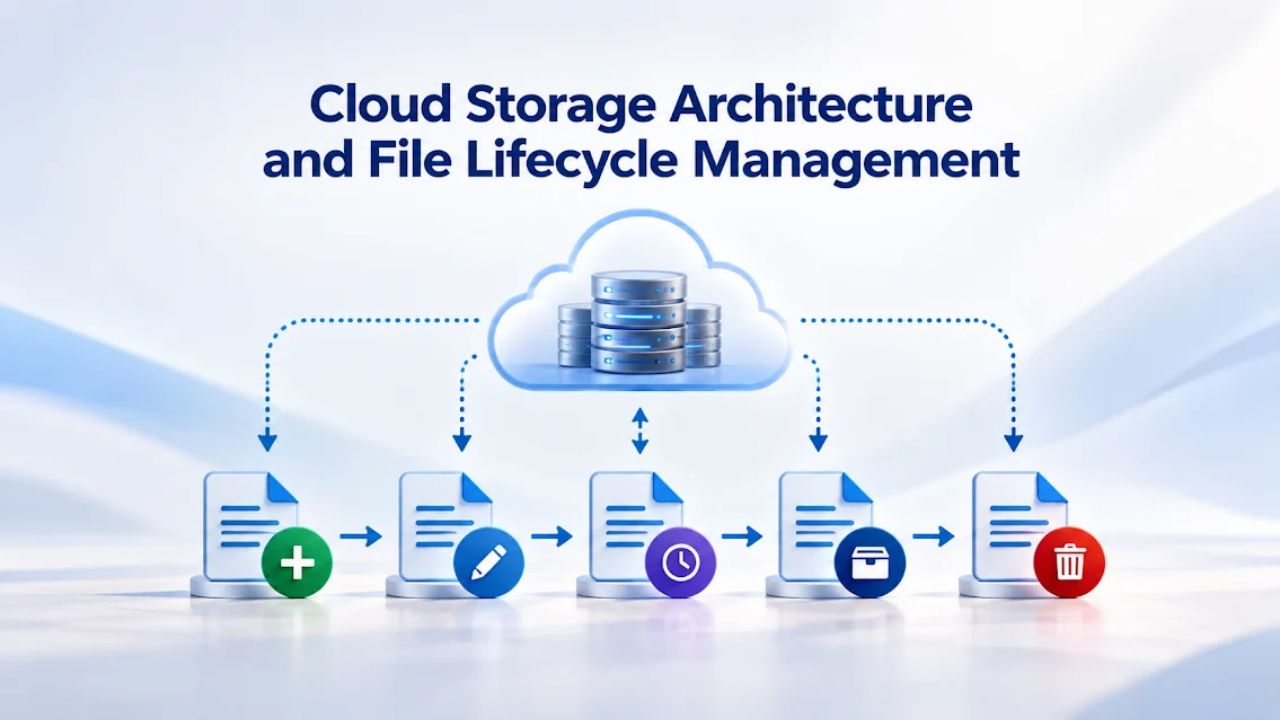
All Microsoft 365 Business plans provide comprehensive cloud storage through OneDrive for Business and SharePoint Online. Understanding the distinction between personal and organizational storage helps teams organize files effectively and plan for growth without unexpected capacity constraints.
Personal OneDrive and Organizational SharePoint Pool
Each user receives personal cloud storage through OneDrive, essentially a private cloud file store for individual work files, personal archives, and non-collaborative content. Your organization simultaneously receives shared SharePoint storage for team sites, collaborative projects, and shared departmental resources.
This separation encourages OneDrive for personal work and SharePoint for team documents. OneDrive excels for individual file management; SharePoint is built for group editing, version history, and multi-person access control.
File Recovery and Compliance Retention
Deleted files remain in the Recycle Bin for an extended period, giving users a recovery window if they accidentally delete important content. After that period, deletion becomes permanent. This lifecycle lets organizations recover from accidental deletions without maintaining indefinite backup copies.
For compliance-sensitive industries that require longer retention, Microsoft 365 provides retention policies that automatically preserve files according to regulatory requirements, even after users delete them.
Professional Email and Brand Impact
Establishing professional business communication through Microsoft 365 business email with your company domain fundamentally changes how customers, partners, and prospects perceive your organization. A professional email address (sarah@yourcompany.com) signals credibility, legitimacy, and business maturity far more effectively than a generic consumer email (sarah.smith@gmail.com).
Custom Domain Configuration and Setup Process
Setting up a custom domain begins with ownership, either registering a new domain through a registrar or connecting an existing domain you already own. Microsoft provides step-by-step guidance through the admin center.
You add DNS records (text entries in your domain registrar’s settings) to prove ownership and route email to Microsoft’s servers. Many modern domain registrars support automatic verification, completing verification in seconds; others require manual DNS record entry.
Brand Reinforcement and Professional Presence
Custom domain email creates consistent brand presence across all client communications, invoices, and correspondence. Marketing research consistently demonstrates that professional domain email improves customer confidence, reduces spam classification rates, and enhances perceived legitimacy.
For businesses competing on professionalism and trust, consulting firms, professional services, agencies, and B2B companies, custom domain email represents one of the highest-value investments available.
Support Channels and Technical Assistance Availability
Microsoft 365 Business plans include access to official Microsoft support through multiple channels: phone, chat, and email. Understanding support availability and limitations prevents surprises when urgent issues arise.
Technical Support and Availability
Technical support operates 24 hours per day, 7 days per week. Billing and subscription support is available during business hours (timezone and local language support may vary by region). Organizations can contact support directly through the Microsoft 365 admin center; the system indicates expected wait times before connecting with a support specialist.
Self-Service Resources and Community Support
Microsoft provides comprehensive self-service documentation through Microsoft Learn, YouTube tutorials, and community forums. Many routine questions- email setup, Teams basics, document collaboration- are answered faster through existing documentation than opening a support ticket and waiting for agent availability.
Microsoft maintains community forums where users help peers troubleshoot common issues. This combination of official support, extensive self-service resources, and peer community support enables organizations to resolve most issues quickly without formal support escalation.
When Third-Party Partners Add Value
Microsoft support focuses on product troubleshooting and technical issue resolution. Strategic planning, architecture design, complex multi-organization migrations, or custom workflow implementation often benefits from specialized Microsoft 365 partner services.
A partner with migration expertise can design migration sequencing, prevent common pitfalls, and ensure minimal service disruption during large-scale transitions. Partners often deliver faster results and better outcomes compared to relying exclusively on Microsoft support for complex projects.
Building Your Business Case: Real-World Deployment Scenarios
To understand how Microsoft 365 Business plans translate into organizational value, evaluate realistic deployment scenarios across different business types and sizes. Total cost of ownership extends beyond subscription to encompass setup, domain registration, training, and ongoing support.
| Business Scenario | Team Size | Typical Plan Mix | Annual Setup & Domain | Training | Migration Assistance |
|---|---|---|---|---|---|
| Tech Startup | 5 | 5 × Business Basic | Minimal to Moderate | Self-service | Minimal |
| Growing Agency | 20 | 8 × Business Basic, 12 × Business Standard | Moderate | Moderate | As needed |
| Professional Services Firm | 50 | 20 × Business Basic, 30 × Business Standard | Moderate to Substantial | Structured | Recommended |
| Small Manufacturing | 100 | 30 × Business Basic, 50 × Business Standard, 20 × Business Premium | Substantial | Comprehensive | Essential |
Assumptions: Setup costs reflect domain registration plus implementation support. Training estimates assume partial self-service plus structured departmental sessions. Migration assistance ranges based on complexity and existing infrastructure.
Preparing Your Organization: Deployment and Transition Planning
Successful Microsoft 365 deployment requires careful planning, phased rollout, and comprehensive team preparation. Organizations that rush implementation or underestimate transition complexity often face service disruptions, user frustration, and incomplete feature adoption.

Phased Rollout Strategy and Timeline
Small organizations can pilot in one to two weeks: register domain, create user accounts, configure email and Teams, test from multiple devices and locations, conduct team training, and go live. Larger implementations require sequenced rollout: pilot phase with early adopter groups, feedback incorporation, departmental deployment waves, and comprehensive testing before full organization go-live. This staged approach reduces risk: if problems emerge with a subset of users, you can mitigate them before they disrupt the organization.
Security Configuration and Threat Response Planning
Out-of-the-box Microsoft 365 includes essential security features, but default configurations aren’t optimized for every organization. Policy decisions around password complexity, device enrollment requirements, threat escalation procedures, and compliance retention periods require thoughtful design.
Organizations deploying the Business Premium tier particularly benefit from a security baseline design and professional configuration of Defender for Business and Intune policies aligned to your risk tolerance and regulatory environment. This initial investment substantially reduces risk for organizations handling sensitive data.
Ready to Implement Microsoft 365 and Optimize Your Cloud Deployment?
Transitioning your organization to Microsoft 365 Business Email involves more than creating accounts and configuring email. Strategic planning, careful sequencing, comprehensive testing, and team preparation determine whether your deployment becomes a productivity catalyst or a source of ongoing frustration and service complaints. Niya Digital manages the complete implementation lifecycle, from domain setup and security configuration through migration and team training, ensuring your organization achieves full value from Microsoft 365.
Frequently Asked Questions
What determines which Microsoft 365 tier is right for my business?
Your choice depends on application requirements, security obligations, and team size. If team members work primarily from browsers and don’t need offline desktop Office applications, Business Basic delivers full capability. If your team creates complex spreadsheets, presentations, or documents requiring advanced formatting and offline access, Business Standard’s desktop applications become essential.
If you handle sensitive data, operate in regulated industries, or use company devices for remote work, Business Premium’s endpoint protection and device management provide necessary risk mitigation. Evaluate your specific workflows, data sensitivity, and compliance environment to determine the optimal tier.
Can I mix different Microsoft 365 tiers for different employees?
Yes, absolutely. Microsoft 365 supports blended deployments where different employees receive different plan tiers based on their actual role and requirements.
Support staff might use Business Basic; accountants and designers might use Business Standard; leadership and technical staff might use Business Premium. This segmentation lets organizations provide the necessary capabilities while avoiding universal over-provisioning and optimizing overall investment.
What happens if our organization grows beyond 300 users?
Microsoft 365 Business plans are designed for organizations up to 300 users. As you approach this threshold, organizations migrate to Microsoft 365 Enterprise plans, which offer expanded functionality and higher user limits. This transition typically occurs gradually; plan the migration once you’re within 50 to 100 users of the ceiling.
Does our organization need annual or monthly billing?
Annual commitment typically offers better value than month-to-month subscriptions, though billing structures and options vary by region. Annual commitment with monthly payments splits the commitment: you commit to a year but pay monthly, saving you money compared with pure month-to-month arrangements.
If your team size fluctuates significantly or you’re in a pilot phase, month-to-month offers flexibility, though per-month rates may be higher. Stable organizations typically benefit from annual commitment economics.
How much does Microsoft 365 setup and migration typically require in resources?
Microsoft 365 migration services scope widely based on your current infrastructure and data complexity. A five-person startup transitioning from consumer email might require minimal setup assistance.
A fifty-person organization migrating from an existing email system could require substantial professional services, depending on mailbox volume, shared resources, calendar complexity, and timeline requirements. Niya Digital can assess your specific situation and provide detailed implementation scope and resource requirements.
What training does our team need for Microsoft 365?
Microsoft provides free self-service training through Microsoft Learn and YouTube. Most team members can learn email basics, Teams essentials, and document collaboration through self-guided resources or brief departmental walkthroughs.
Formal instructor-led training, group workshops, or one-on-one sessions are available as an additional investment. Many small businesses allocate structured time during the first week for hands-on demonstration and practice rather than investing in formal training programs.
Can I downgrade my plan if features prove unnecessary?
Yes. Microsoft 365 lets you change plans anytime without penalties or cancellation fees. If a user on Business Standard transitions to a role that doesn’t require desktop Office applications, downgrading to Business Basic immediately optimizes spending with a prorated billing adjustment.
This flexibility allows organizations to adjust tier allocation as work patterns change or roles evolve, ensuring optimal feature-to-investment alignment.
What email protection is included across all plans?
Exchange Online Protection, included in all Business plans, scans incoming email for phishing, malware, spam, and spoofed senders. Multifactor authentication adds second-factor verification to prevent unauthorized account access even if passwords are compromised.
These baseline defenses intercept the overwhelming majority of email-based attacks. Business Premium also adds Defender for Business endpoint and ransomware protection across company devices.
Does Business Premium security justify its additional features?
Defender for Business continuous endpoint monitoring, ransomware detection, and device management are essential for organizations that handle sensitive customer data, process payments, operate in regulated industries, or use company laptops for remote work.
For office-based teams using corporate desktop systems in trusted environments with minimal external data exposure, the Basic or Standard tier’s email protection may suffice. When you’re unsure, the additional tier provides meaningful risk mitigation compared to the consequences of a breach.
How does Niya Digital help with Microsoft 365 implementation?
Niya Digital assists with domain setup and configuration, email migration from existing systems, security baseline configuration, and ongoing support to ensure successful deployment and feature adoption.
Our expertise prevents common implementation mistakes, accelerates go-live timelines, and ensures your organization achieves full value from Microsoft 365 capabilities.
What happens if our organization needs more cloud storage?
All plans include substantial OneDrive per user and organizational SharePoint storage. Most small organizations rarely exceed these allocations with normal document and file usage.
If your organization archives large media files, maintains extensive historical records, or uses SharePoint for substantial document libraries, you can purchase additional storage through capacity add-ons. Your support team or Niya Digital can advise on expansion options if storage constraints emerge.
Is Microsoft 365 subject to data residency or compliance regulations?
Data residency requirements vary by jurisdiction and industry. Microsoft maintains regional data centers and complies with major regulatory frameworks.
Organizations subject to specific compliance obligations, such as healthcare, financial services, or international regulations, should verify that Microsoft’s certifications and geo-location options align with their requirements. Niya Digital can help assess your specific compliance environment and configure Microsoft 365 appropriately.
Can we customize Microsoft 365 workflows for our specific business processes?
Microsoft 365 includes automation capabilities through Power Automate, allowing teams to automate repetitive tasks without custom development.
Common examples include automatically saving email attachments to SharePoint, triggering Teams notifications based on file changes, or routing approval requests through custom workflows. Niya Digital can help design and implement automations aligned to your specific business processes.
What support options are available for complex technical needs?
Microsoft provides standard technical support 24/7 through multiple channels. For strategic planning, architecture design, or complex migrations requiring specialized expertise, Niya Digital’s professional services provide implementation support, best-practices guidance, and managed services. This partnership approach combines Microsoft’s official support with specialized partner expertise for comprehensive solutions.
How should we approach planning our Microsoft 365 deployment?
Start by evaluating your team’s actual workflows and application needs. Determine which employees require desktop Office applications versus browser-based access. Assess your security and compliance requirements based on data sensitivity and industry regulations.
Plan your migration timeline realistically; smaller teams might go live within weeks, while larger organizations need months of planning and execution. Engage your IT staff and key departments in the planning process. Consider engaging Niya Digital for implementation guidance and support to accelerate go-live and ensure successful adoption.
Glossary
- Custom domain: A branded domain name (e.g., yourbusiness.com) that you own and use for professional email addresses (yourname@yourbusiness.com) and other online services. Custom domains enhance brand recognition, improve email deliverability, and signal business legitimacy to customers and partners.
- Exchange Online: Microsoft’s cloud-based email and calendar service included with all Microsoft 365 Business plans. Exchange Online provides mailbox storage, email forwarding, shared mailboxes, and distribution lists for team communication.
- Multifactor authentication (MFA): A security verification method requiring two or more proof-of-identity steps to access an account, typically a password plus a code sent to your phone or generated by an authentication app. MFA significantly reduces the risk of account compromise, even if passwords are stolen or guessed.
- Microsoft Defender for Business: Endpoint security solution included in Business Premium that continuously monitors company devices for malware, ransomware, and suspicious activity. Defender automatically quarantines threats and alerts administrators to potential incidents.
- OneDrive: Microsoft’s cloud file storage service included with all Business plans. Each user receives personal OneDrive storage for documents, photos, and files accessible across devices and synchronized to the cloud.
- SharePoint Online: Team collaboration platform included with all Business plans for creating team sites, document libraries, project management, and shared workspaces. Organizations receive pooled SharePoint storage for collaborative content separate from individual OneDrive allocations.
- Ransomware: Malicious software that encrypts a victim’s files and demands payment for decryption keys. Business-grade endpoint protection like Defender for Business detects and blocks ransomware before encryption can spread, preventing data loss and extortion attempts.